
How do PDF Expert, PDFgear and the other Mac editors compare?
On the job of changing text that is already in a PDF, the eight products differ in three ways that matter: whether they edit existing text at all, which font the edit is drawn in, and what you pay. PDF Expert and PDFgear both edit existing text. PDF Expert works by paragraph, and Readdle’s help says an edit can change to another font when that font is not supported by the system, with installing the font as the fix; PDFgear’s guide says the original font and styles are kept. PDFgear is free with no trial watermark, in its own words, while PDF Expert has a seven-day trial and then costs US$4.99 a week, US$79.99 a year or US$139.99 once for the Mac.
Each pair below says what separates the two, taken from the table: how each one edits, which font it uses, what is free and where it runs. No pair has a winner: which one fits depends on the file and the job.
How to read the table
Every cell about another product comes from that vendor’s own page, read on October 12, 2026, and links its source. A gray cell is a question the pages read did not settle; it means “not verified”, never “no”.
- Edits existing text separates editors from annotators. Adding a text box over a word is not editing it.
- Font rule is the vendor’s own sentence about which font an edit is drawn in. The page on editors that keep the original font explains why the rules differ.
- Free tier and limits says what you can do before paying.
- Price model is the price as the vendor’s page or the Mac App Store printed it that day. Prices change; the one-time prices page covers the buy-once options in more depth.
- Platforms and Offline are the vendors’ statements, where they make one.
The last column is PDF Textfix, in the app’s own words.
Each pair, by what separates them
PDF Expert vs PDFgear
PDF Expert detects paragraphs and you click one to edit its text, while PDFgear has you type into the text and adjust font, size, color and alignment from its toolbar. On fonts, Readdle says an edit can switch to another font when the system does not support the original and suggests installing it; PDFgear’s guide says the original font and styles are kept. The free terms differ most. PDFgear says every function is free with no trial watermark, and PDF Expert from Readdle’s website runs seven days before it becomes a viewer.
PDF Expert vs UPDF
Both tie the font of an edit to the fonts on your Mac. Readdle’s fix for an edit that changes font is to install the font, and UPDF says it keeps the same font only when that font is available on your system. The free terms differ in kind. UPDF’s free version edits but adds a trial watermark when you save, while PDF Expert’s website trial is limited to seven days. UPDF runs on Windows, Mac, iOS and Android; PDF Expert is not available for Windows.
PDF Expert vs PDFelement
Wondershare and Readdle describe the same dependence on your system’s fonts. Wondershare says that if the original font is not supported in your system you can’t edit the text with it, and Readdle links a font change during editing to the same cause. PDFelement’s unregistered trial watermarks what you save, while PDF Expert’s trial ends after seven days. Wondershare’s perpetual plan names one version, PDFelement 13, and Readdle’s lifetime plan covers the Mac version only.
PDF Expert vs Nitro PDF Pro
Nitro’s listing describes editing with “full-page paragraph reflow”, and PDF Expert edits the paragraph you click; the Nitro pages read state no font rule. Nitro gives 14 days to try and then sells an annual subscription in the Mac App Store, while Readdle also sells a one-time licence for the Mac. Nitro lists Mac, Windows and iOS; PDF Expert is not available for Windows.
PDF Expert vs Foxit PDF Editor
Foxit’s Mac manual works on text objects, which you double-click to add or delete text or change its font formats; PDF Expert works on paragraphs. Foxit’s Mac app views and annotates for free and charges for the editor; PDF Expert’s trial runs seven days and then leaves a viewer. Foxit covers Windows, macOS and the web, PDF Expert the Mac, iPhone and iPad.
PDF Expert vs Acrobat
Adobe says that when a font is embedded but not installed, you can only change the text’s color or size. Readdle describes a font that changes while you edit and suggests installing it. Both trials last seven days, but Acrobat’s converts to a paid plan when it ends and PDF Expert’s leaves a viewer; Adobe says Acrobat Pro 2024 works offline, and the Readdle pages read do not say which PDF Expert features do.
PDFgear vs UPDF
PDFgear’s guide says the original font and styles are kept; UPDF’s says the same font is kept only when it is installed on your system. PDFgear says it adds no trial watermark, while UPDF’s free version adds one when you save, until you buy. UPDF runs on Windows, Mac, iOS and Android; PDFgear’s Mac app needs macOS 12 or later and does most editing locally.
PDFgear vs PDFelement
Both describe keeping the font, on different terms. PDFgear’s guide says the original font and styles are kept, and Wondershare says you can’t edit text in the original font unless your system supports it. PDFgear costs nothing; PDFelement’s trial watermarks saved files, and its plans run from a quarterly subscription to a perpetual licence of PDFelement 13. PDFelement’s plans include mobile and web access; PDFgear’s Mac app needs macOS 12 or later.
PDFgear vs Nitro PDF Pro
Nitro edits with paragraph reflow across the page, and PDFgear edits text in boxes with toolbar controls for font, size and color. PDFgear is free; Nitro PDF Pro has a 14-day trial and then an annual subscription in the Mac App Store. Nitro lists Mac, Windows and iOS, and PDFgear says AI features, online services and updates use the internet while most editing stays on the Mac.
PDFgear vs Foxit PDF Editor
Both let you change the font of text you edit, Foxit through its font formats after you double-click a text object and PDFgear through its toolbar. PDFgear’s editing is free; Foxit’s Mac app is free for viewing and annotating, and editing is part of the paid editor. Foxit adds Windows and the web; PDFgear’s Mac app needs macOS 12 or later.
PDFgear vs Acrobat
Adobe says Acrobat edits text in a font only when that font is installed, and PDFgear’s guide says the original font and styles are kept. PDFgear is free; Acrobat’s seven-day trial converts to a paid plan. Adobe says Acrobat Pro 2024 works offline, and PDFgear says most of its editing tools work locally on the Mac.
UPDF vs PDFelement
Both say the font must be on your computer to edit text in it, and both free versions watermark what you save. They differ in what one payment buys. In the Mac App Store UPDF listed a perpetual licence, while Wondershare’s own store sells perpetual access to one version, PDFelement 13, in a cross-platform plan or a Mac-only one. UPDF runs on Windows, Mac, iOS and Android, PDFelement on desktop, mobile and the web.
UPDF vs Nitro PDF Pro
UPDF says it keeps the font only when it is installed; the Nitro pages read do not say how it handles a missing font. UPDF lets you edit for free with a watermark on what you save, while Nitro gives 14 days and then charges yearly. UPDF covers Windows, Mac, iOS and Android, and Nitro Mac, Windows and iOS.
UPDF vs Foxit PDF Editor
UPDF says it needs the font installed to keep it, and Foxit’s Mac manual does not say. UPDF’s free version edits and watermarks what you save, while Foxit’s free Mac app stops at viewing and annotating. Foxit covers Windows, macOS and the web, and UPDF Windows, Mac, iOS and Android.
UPDF vs Acrobat
Adobe and UPDF give the same rule. The font must be installed to edit text in it, and Adobe adds that without it you can only change the text’s color or size. UPDF’s free version watermarks saved files, and Acrobat’s seven-day trial converts to a paid plan. For a single payment, UPDF listed a perpetual licence in the Mac App Store, and Adobe’s one-payment option, Acrobat Pro 2024, is a three-year term.
PDFelement vs Nitro PDF Pro
Wondershare says PDFelement can’t edit text in the original font unless your system supports it; Nitro describes paragraph reflow and states no font rule on the pages read. PDFelement’s trial watermarks saved files, and Nitro’s trial lasts 14 days. Nitro covers Mac, Windows and iOS, and PDFelement desktop, mobile and the web.
PDFelement vs Foxit PDF Editor
Wondershare says the original font must be on your system; Foxit’s Mac manual lets you change font formats without saying what happens to a font that is not installed. PDFelement’s trial watermarks saved files, and Foxit’s Mac app views and annotates for free. Foxit sells its editor per user per year, and Wondershare also sells a perpetual licence of PDFelement 13.
PDFelement vs Acrobat
Wondershare and Adobe both say the font must be on the computer to edit text in it. PDFelement’s trial adds a watermark when you save, and Acrobat’s converts to a paid plan after seven days. For one payment, Wondershare sells perpetual access to PDFelement 13, and Adobe sells Acrobat Pro 2024 as a three-year term.
Nitro PDF Pro vs Foxit PDF Editor
Both edit existing text, and the pages read for neither say what happens to a font that is not installed. Nitro has a 14-day trial and an annual subscription in the Mac App Store; Foxit’s Mac app views and annotates for free, and its editor is sold per user per year. Both run on Mac and Windows, with Nitro adding iOS and Foxit the web.
Nitro PDF Pro vs Acrobat
Adobe says the font must be installed to edit text in it; Nitro’s listing describes editing “with full-page paragraph reflow” and states no font rule. Both start with a trial, 14 days for Nitro and seven for Acrobat, followed by a yearly price. For a payment that does not renew, Adobe sells Acrobat Pro 2024, a three-year term licence.
Foxit PDF Editor vs Acrobat
Both edit existing text; Adobe says the font must be installed, and Foxit’s Mac manual does not say. Foxit’s free Mac app stops at viewing and annotating, and Acrobat’s trial converts to a paid plan after seven days. Foxit covers Windows, macOS and the web, and Adobe says Acrobat Pro 2024 is desktop-only and works offline.
How does each of them compare with Preview?
Preview comes with macOS, and Apple’s guide says you can’t edit the text of a PDF in it; its markup tools put text boxes, shapes and signatures on top, in the font you choose. That one fact settles every pair with Preview. Each of the other seven products changes existing text, and Preview does not.
Where they differ from Preview is what changing the words costs. PDFgear says all its functions are free. UPDF and PDFelement let you edit before you pay, with a watermark on what you save. PDF Expert and Acrobat give seven-day trials and Nitro a 14-day one. Foxit’s Mac app views and annotates for free, as Preview does, and charges for its editor. For reading, marking up and signing, Preview does the job at no cost.
How does PDF Textfix compare with each of them?
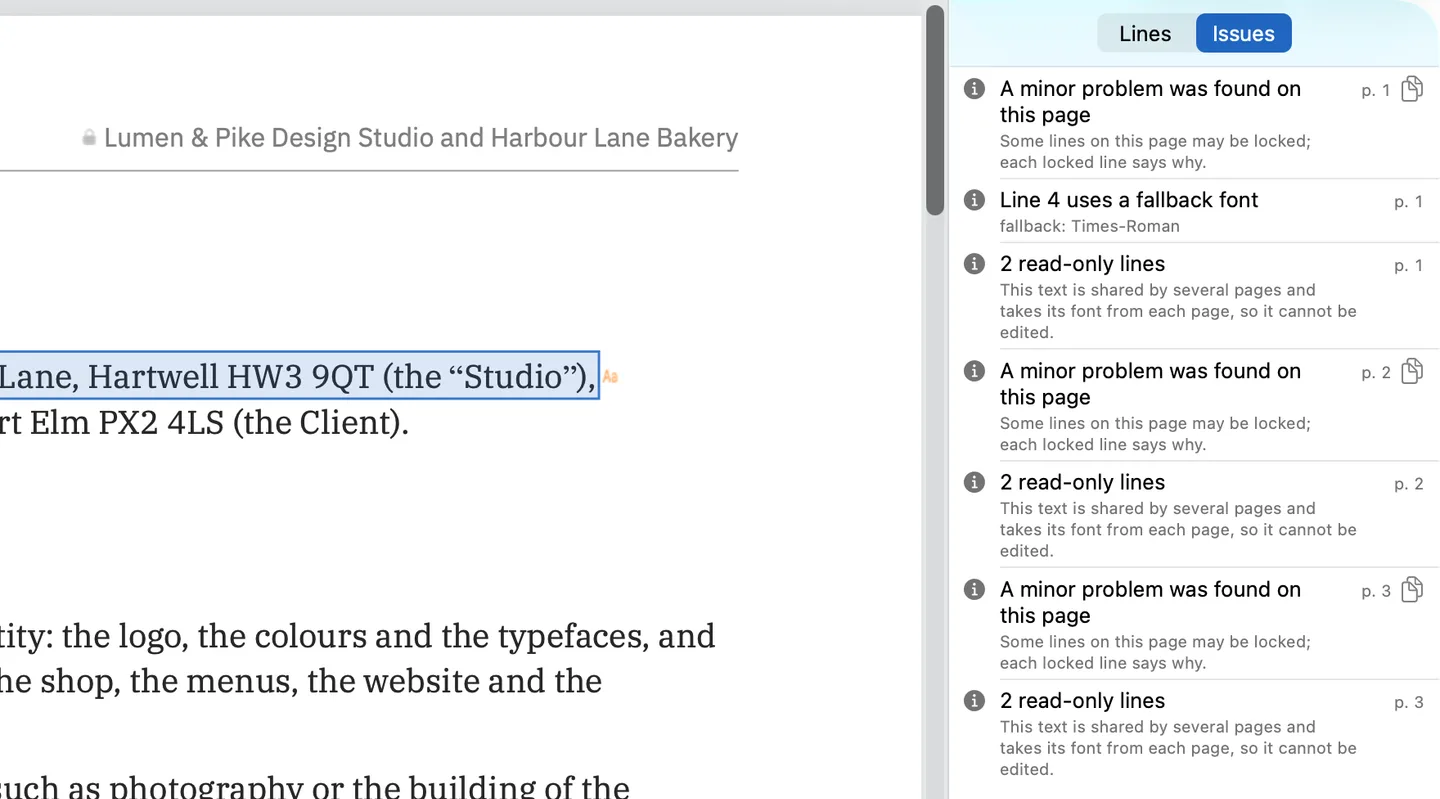
PDF Textfix has its own column in the table. It changes the text that is already on a page, one line at a time, with the font inside the document whether or not it is installed on your Mac, and it checks every edit before applying it: in the screenshot above, the Issues pane lists the lines it locks and why. It does not add text boxes, change fonts, edit scanned pages, fill forms or redact, which every suite above does in some form. Free to try. Your first 5 line edits save clean. After that, saved files carry a watermark until you buy once.
Each pair with PDF Textfix has a page of its own: PDF Expert, PDFgear, UPDF, PDFelement, Nitro PDF Pro, Foxit, Acrobat and Preview. If you are moving one job away from a suite, the alternatives hub covers that, and the comparisons hub lists everything else.
Questions people ask
Is PDF Expert or PDFgear better for editing text?
This page does not rank them. PDF Expert edits by paragraph, and Readdle says an edit can change to another font when the system does not support the original; PDFgear edits text with toolbar controls, keeps the original font according to its guide, and is free. Try both on a copy of your own file.
Is PDF Expert free?
Not to keep editing. Downloaded from Readdle’s website, the Mac app gives a seven-day trial; after it, Readdle says you can keep using it as a PDF viewer only, without its other functions, until you buy.
Which of these editors work without an internet connection?
Adobe says Acrobat Pro 2024 works offline, and PDFgear says most of its editing tools work locally on the Mac. The pages read for the others do not say. PDF Textfix edits with no connection. Its Mac App Store version goes online only to confirm a purchase, and its version from this website needs a connection once on each Mac to activate a licence, then checks it about once a week when online.
Which of them can I buy once?
PDF Expert, UPDF and PDFelement each list a one-time option, and Acrobat Pro 2024 is a three-year term paid once. Foxit sells a perpetual licence of Foxit PDF Editor 14; its pricing page does not say which systems it runs on. The page on one-time prices compares what each covers.
