
Nitro PDF Pro for Mac is a full PDF editor sold by subscription: its Mac App Store listing offers one in-app purchase, an annual subscription at US$139.99, after a 14-day free trial. It requires macOS 26 or later; PDF Textfix needs macOS 26 or later on a Mac with Apple silicon. Nitro’s own migration page moves PDFpen and PDFpenPro settings and licensing data into Nitro PDF Pro, and a TidBITS report of August 8, 2022 calls the Nitro apps “formerly PDFpenPro and PDFpen”; no Nitro page read for this comparison states the rename, so the table marks it not verified. Nitro’s one-time licence, Nitro PDF Classic, runs on Windows only and lasts three years. PDF Textfix is a one-time purchase for one job: correcting text already on a page, a line at a time, in the font inside the file.
What happened to PDFpen?
PDFpen and PDFpenPro were Mac PDF editors, and Nitro offers their users a way into Nitro PDF Pro. Its page “PDFpen to Nitro Migrator” says: “PDFpen and PDFpen Pro customers who purchased Nitro PDF Pro Essentials or Nitro PDF Pro can migrate their settings with one, easy app and start working in Nitro PDF Pro in minutes.” The Migration Assistant carries over library items, preferences, and licensing and registration data from PDFpen and PDFpenPro 11 and later, and Nitro’s own gonitro.com/pdfpen address leads to that page.
The rest of the story comes from one press source. A TidBITS report of August 8, 2022 describes “Nitro PDF Pro and Nitro PDF Pro Essentials (formerly PDFpenPro and PDFpen…)” and points to its report of July 12, 2021, “Nitro Acquires PDFpen from Smile”. Neither the rename nor the purchase is stated on the Nitro pages read on October 12, 2026, so the table marks that row “not verified”.
What Nitro’s pages do show is where the Mac app stood on October 12, 2026. The Mac App Store listing is “Nitro PDF Pro: Edit & Sign”, version 26.4, from Nitro Software, Inc. Its version history shows a move to calendar-based version numbers at 26.0 in February 2026, after 14.10.4. Its only in-app purchase is “Annual Subscription $139.99”, and it “Requires macOS 26.0 or later.”
Can you still buy Nitro PDF Pro for Mac once?
Not according to the pages read. Nitro’s pricing page offers Nitro PDF Standard and Nitro PDF Plus by subscription, and its FAQ says “All subscriptions are billed annually.” The one plan paid once is Nitro PDF Classic, described as “One-time payment for three years of use”, and the FAQ is explicit about where it runs: “Licensing: Three-year term, per-license pricing, Windows desktop only (not available for Mac or mobile).” So on a Mac, the choice is the subscription or another app. The comparison of PDF editors without a subscription lists the Mac editors that are still sold once.
PDF Textfix is bought once, as a US$29.99 in-app purchase in the Mac App Store or as a licence from this website; the licence has no expiry date. The licence is activated online once on each Mac, on 3 Macs at a time, and checked about once a week when the Mac is online. It is free to try. Your first 5 line edits save clean. After that, saved files carry a watermark until you buy once. The pricing page gives each region’s price, and every 1.x update is free.
At the price the Mac App Store listed on October 12, 2026, three years of the Nitro PDF Pro subscription come to US$419.97. That buys a great deal more than text correction, so the sum only matters if text correction is most of what you would use it for.
How does Nitro PDF Pro edit text?
As a full editor, with paragraphs that reflow. The listing’s feature list includes “Edit text and images with full-page paragraph reflow”, and the notes for version 26.0, released on February 11, 2026, introduced “a new Edit Text tool that automatically recognizes paragraphs for easier text editing.” Around that, Nitro PDF Pro creates and converts PDFs, runs OCR on scans, fills and creates forms, compares versions, redacts, signs, and adds AI tools for extracting data. It runs on Mac, Windows and iOS.
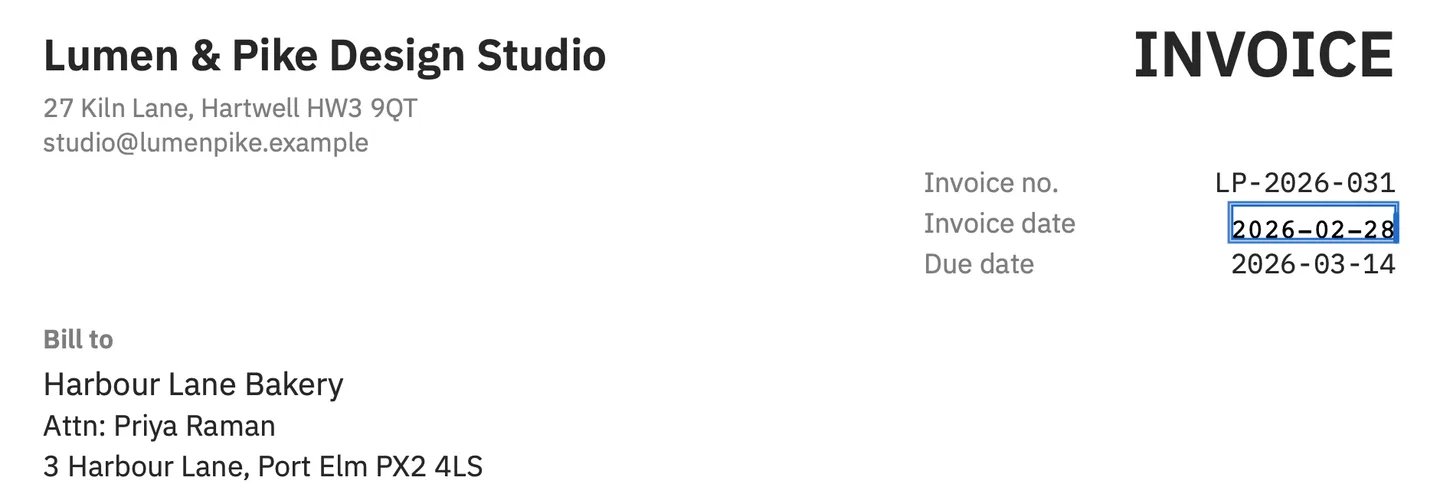
PDF Textfix does not reflow. It edits one line at a time and leaves every other line where it is. You select a line and press Return, or double-click it, type the correction, and press Return to apply; Escape cancels and Tab moves to the next line. The screenshot above shows a corrected date on the demo invoice: one line changed, the lines around it untouched. Reflow suits rewriting a paragraph; in a finished document it can move line breaks you meant to keep. The page on paragraphs and reflow explains why PDF Textfix leaves it out.
Does Nitro PDF Pro keep the original font?
The pages read for this comparison do not say what Nitro PDF Pro for Mac does when a document’s font is not installed on the Mac, and no Nitro help page on the subject turned up, so the table says “not verified” instead of guessing. Nitro PDF Pro was not tested for this page.
PDF Textfix’s behavior is documented and visible. It writes with the font stored in the PDF. For a character that font lacks, it looks in a fixed order: the same font’s own characters, another copy of the same face in the file, the same font installed on your Mac, and the closest standard font. While you type, a character from a fallback font shows orange, one from another copy of the line’s font is underlined, and one that no font can draw is red and is not applied. The editor bar names the font in use, such as “Font: Helvetica (embedded subset), 11 pt”. The file’s existing fonts are never modified.
What does PDF Textfix check before it applies an edit?
Before it applies an edit, PDF Textfix checks that every other character on the page stays where it was. If an edit would move or restyle something else, it is refused, and the bar says why; the file stays as it was. Text it cannot change safely is locked, and each locked line says why: fonts made of pictures, the hidden text layer of a scan, vertical text, right-to-left scripts, form fields and comments. Encrypted files and files whose permissions forbid changes open view only.
Save (⌘S) writes the whole file again, removes the replaced lines from the pages, and keeps no earlier version of them. Everything else is copied as it was, unless the file was damaged; the app tells you when it repaired one. The bar confirms “Saved and verified.” Before your first edit of a signed document, the app asks, and says its signatures will no longer verify once you save.
How do they treat secured and signed PDFs?
Nitro PDF Pro protects documents as well as editing them: its listing includes password protection, permission controls, redaction and signatures. Version 26.0 also changed how it treats files that already carry restrictions; its notes list “Security Improvement: Strengthened enforcement of editing restrictions in secured PDFs.”
PDF Textfix does not add protection, and it does not edit around it either. An encrypted file, or one whose permissions forbid changes, opens view only, and the banner says why. A signed document opens normally, but the first edit you commit brings up a sheet titled “Edit a signed document?” It says that saving writes the whole file again, so the signatures will no longer verify, and it shows the line before and after your edit in the document’s own font. Apply goes ahead; Cancel leaves the editor open with your text. The how-to on editing a signed PDF explains what happens to the signature and what to do instead when the signature matters.
Which one fits your Mac?
Both need macOS 26 or later, but PDF Textfix also needs a Mac with Apple silicon, while Nitro’s listing names no processor. On an Apple silicon Mac, the operating system does not decide it. Nitro PDF Pro fits a team or a person who uses PDFs all day: OCR, forms, comparison, redaction, signatures, Windows and iOS apps, and a yearly subscription that keeps them current. The Nitro PDF Pro alternative page is for the other case: you left PDFpen behind, you do not want a subscription, and what you mostly did with it was fix a word or a number in a finished PDF. PDF Textfix does that one job, in the file’s own font, bought once. On macOS 26, the how-to for editing PDF text on macOS Tahoe covers the steps, and the comparisons hub lists every other editor this site compares.
Questions people ask
Is PDFpen now Nitro PDF Pro?
A TidBITS report of August 8, 2022 says so, calling the Nitro apps “formerly PDFpenPro and PDFpen”. Nitro’s own pages read on October 12, 2026 do not state the rename, but its Migration Assistant moves PDFpen settings and licensing data into Nitro PDF Pro.
Is Nitro PDF Pro free?
It has a 14-day free trial. After that, the Mac App Store listing’s in-app purchase is an annual subscription at US$139.99.
Is Nitro PDF Classic available for Mac?
No. Nitro’s pricing FAQ says Classic is “Windows desktop only (not available for Mac or mobile)”, with a three-year term.
What macOS does Nitro PDF Pro need?
macOS 26 or later, per its Mac App Store listing. PDF Textfix also needs macOS 26 or later, on a Mac with Apple silicon.
