
PDF Textfix, a PDF text editor for Mac
Fix the text in a PDF.Everything else stays as it was.
Correct a date, a name or a typo in your own PDF, written in the fonts inside the document. Everything you do not edit is copied as it was, unless the file was damaged; the app tells you when it repaired one.
The free version edits without limit. Saved files carry a watermark on every page until you buy once. The samples in the Help menu never do.

Requires macOS 26 Tahoe or later on a Mac with Apple silicon. Not for Intel Macs. The pricing page has the one-time purchase.
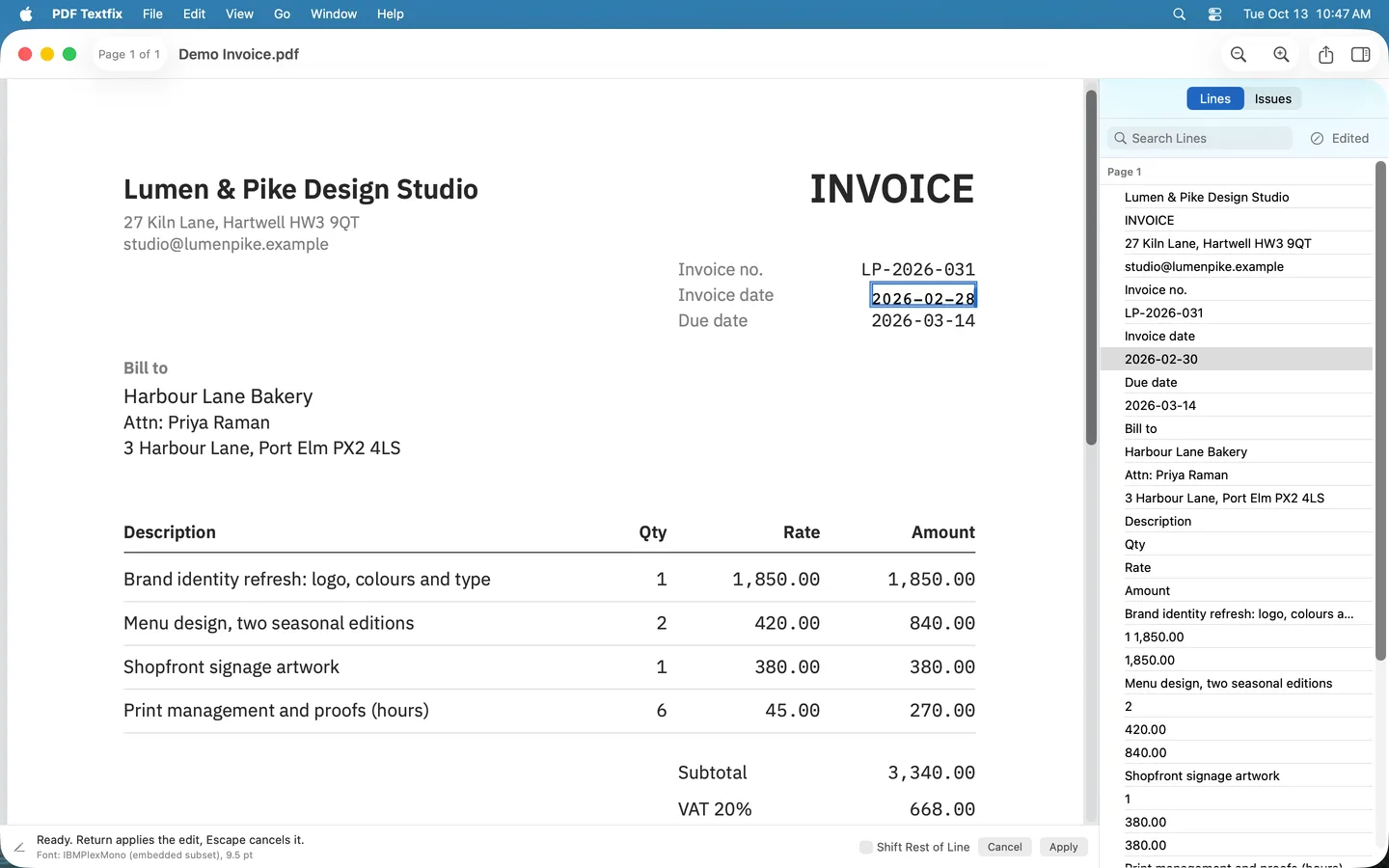
Why the page still looks right
Three things happen on every edit, and you can see each one in the app.
-
The same font
Your text is written in the line’s own font, the one inside the document, so you do not need it on your Mac. A character that font lacks comes from the nearest match, and the editor marks it.
-
Every edit checked
Before an edit is applied, the app checks that every other character on the page stays where it was. When a check fails, it refuses the edit, says why, and leaves the file as it was.
-
Save writes the file again
Save writes the whole file afresh. The lines you replaced are removed from the pages, not covered up, and the saved file keeps no earlier version of them.
In the app
-
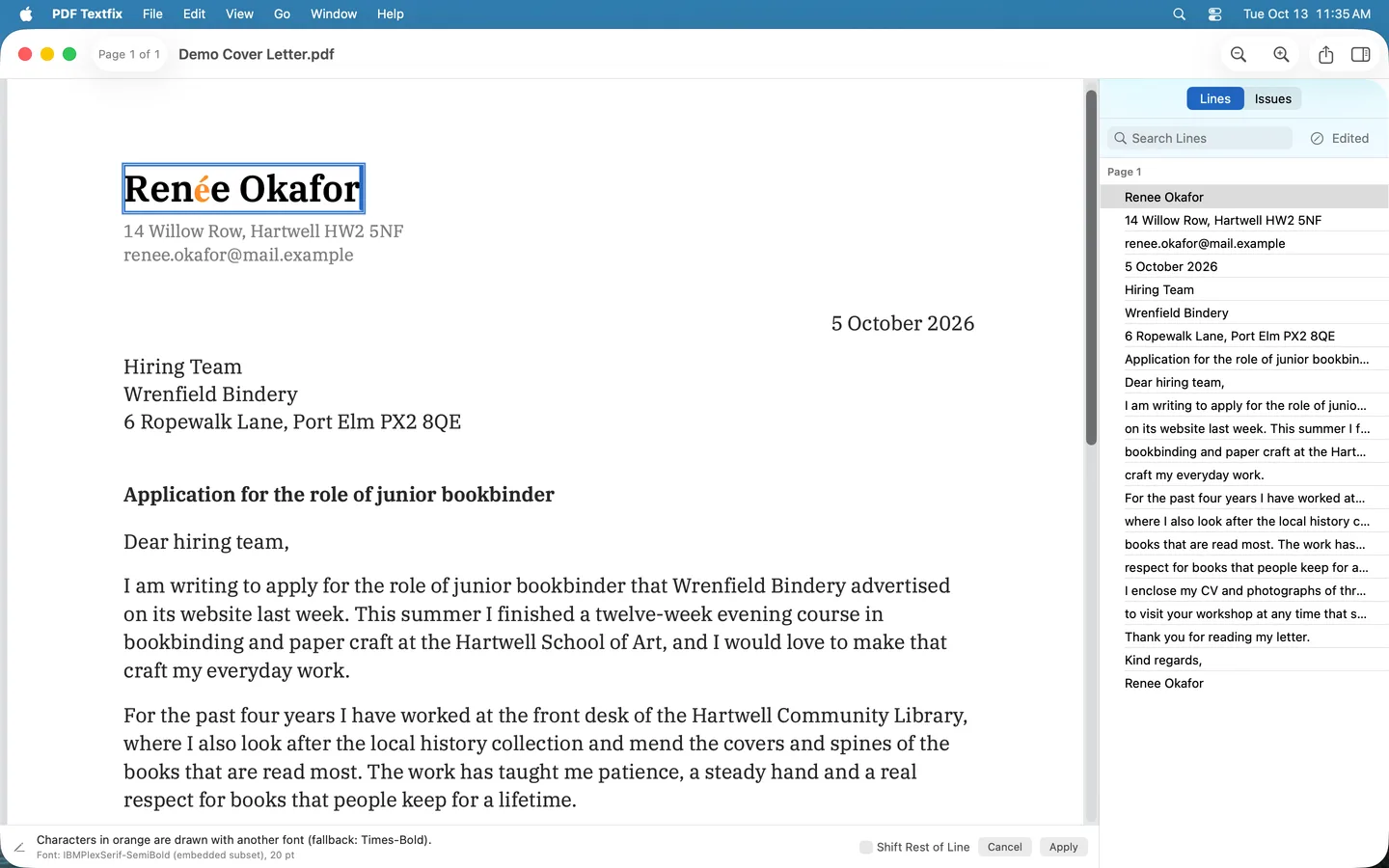
Uses the font inside the PDF.
Her cover letter’s font has no é, so a fallback font draws it, marked in orange; the bar under the page names that font.
-
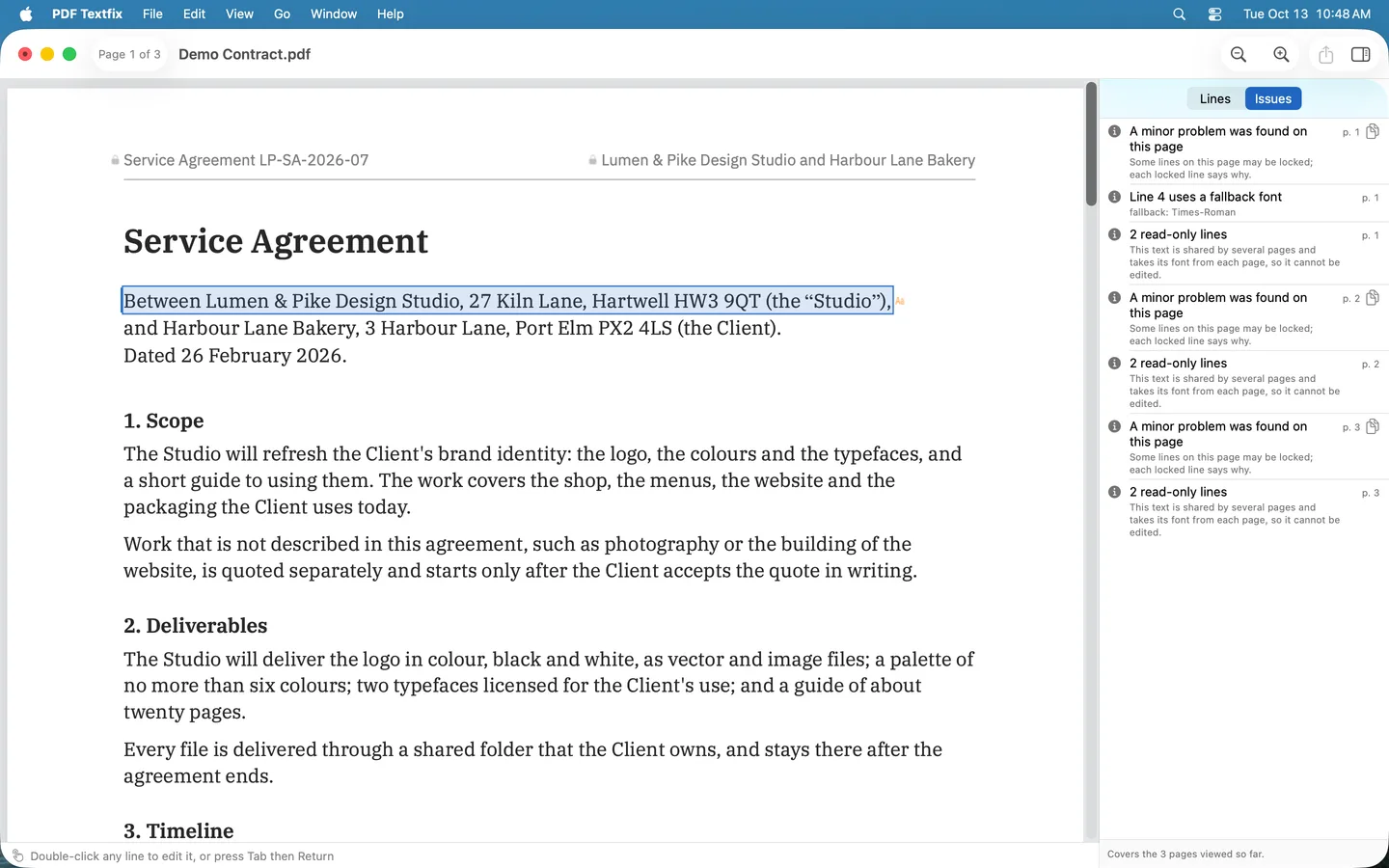
Every edit is checked.
The Issues pane lists a line partly drawn with a fallback font, and the running header’s lines, locked because one part of the file draws them on every page.
-
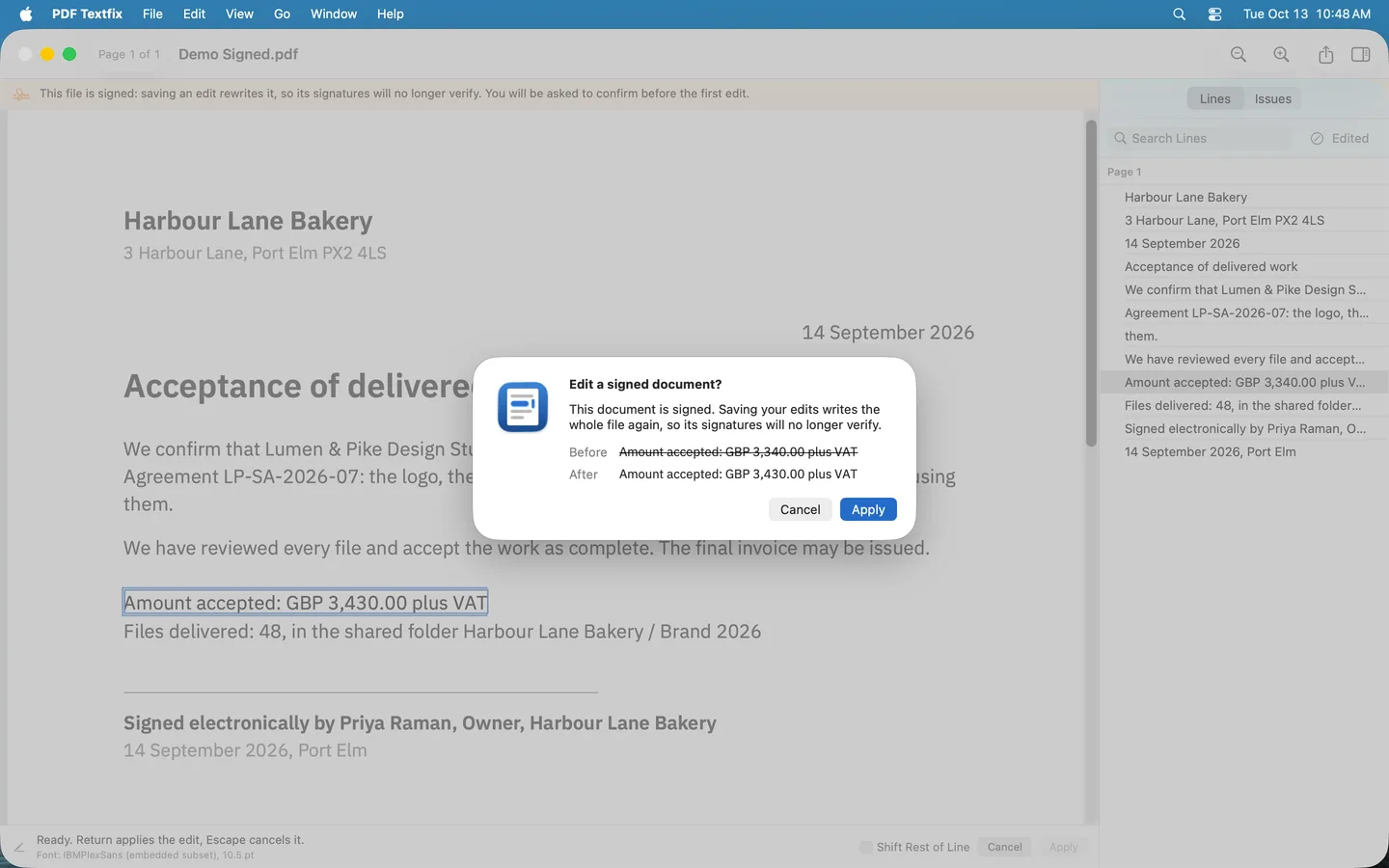
Signed PDFs, handled honestly.
Before the first edit of a signed document is applied, the app says that saving rewrites the file, so its signatures will no longer verify, and shows the line before and after.
What changes when you fix a line?
The line you edit, and nothing else on the page. The page on what saving does has the measurement on the demo invoice.

What it does, and what it does not do
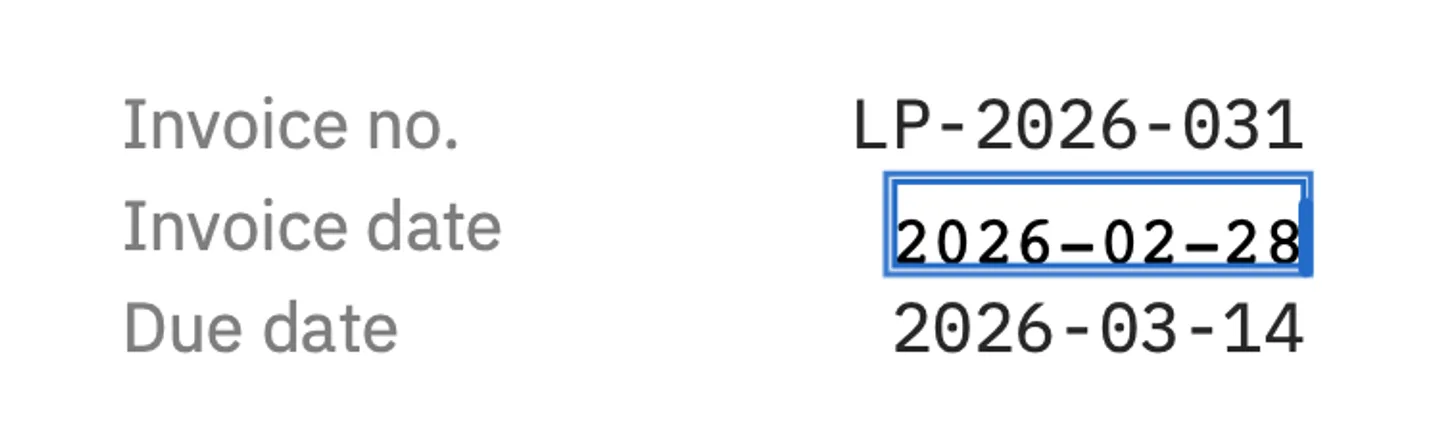
PDF Textfix corrects your own documents: a wrong date on an invoice you issued, a typo in your CV, a name in a letter you wrote.
What it does
- Changes the text of a line already in the PDF: double-click it, type, and press Return.
- Shows the line’s font and size while you type, and marks every character another font draws.
- Finds any line with Find or the Lines pane; the Issues pane lists locked lines and the fonts your edits used.
- Asks before your first edit of a signed document, since its signatures stop verifying once you save.
- Repairs a damaged file as it opens it, and says so in a banner.
What it does not do
- Add text boxes, move text from one line to the next, or reflow paragraphs.
- Change fonts or sizes.
- Edit scanned pages: the text of a scan is a picture.
- Edit form fields, comments, vertical or right-to-left text, or fonts made of pictures: those lines stay locked and say why.
- Redact: the same words can remain elsewhere in the file, such as in bookmarks or the file’s properties; the support page lists where.
Find what you came for
How-to guides, comparisons and explainers, each checked against its sources on the day it names.
-
How-to
Step by step, by the job you have: a date, a name, a typo, the font.
22 pages
-
Compare
Editors side by side on one job: changing the text already there.
24 pages
-
Alternatives
Leaving another app for the one job of changing text.
11 pages
-
Guides
How a PDF stores text and fonts, and why edits go wrong.
20 pages
-
Glossary
The terms you meet in Document Properties and error messages.
24 pages
-
Use cases
Invoices, contracts, CVs and letters, shown on demo documents.
4 pages
-
FAQ
Short answers, including the ones that are no.
7 pages
-
Where most people start
Private by construction
PDF Textfix has no account and does not record how you use it. Your files never leave your Mac.
The Mac App Store version goes online only when you buy or restore, to confirm the purchase with RevenueCat and, until you quit the app, a few times more to keep that confirmation current. The version from pdftextfix.com activates its licence online once per Mac and checks it about once a week.
The privacy policy has the details, for the app and for this site.
Mac App Store version. Goes online only to confirm a purchase.
Version from pdftextfix.com. Activates a licence once per Mac, then checks it about once a week. Updates only when you allow it.
Questions
More in the FAQ, and how to reach us on the support page.
Do I need the document’s font installed?
No. PDF Textfix writes your text with the font inside the document. When that font lacks a character you type, it looks in this order: another copy of the same font in the file, the same font installed on your Mac, then the closest standard font. While you edit, a character written with another copy of the font is underlined, and one drawn with another font is marked in orange.
The fonts already in the file are never changed. A character from another font goes into a font added for the new text only.
How does the free version work?
Editing is free, with no limit on documents, lines or days. Every file PDF Textfix saves with an edit carries a watermark on every page until you buy once. Once bought, PDF Textfix saves without the watermark and also removes it from files saved with it.
The sample documents in Help > Open Sample PDF are never watermarked, so you can try every feature on them first and see a saved file without the mark.
Made in Romania
PDF Textfix is made by Pocket Implementation S.R.L., a software studio in Bucharest, Romania. Write to support@pdftextfix.com with any question. New versions are announced in the release notes feed.