
A PDF usually grows when you edit it because the editor saves by appending: it leaves every existing byte in place and adds the changed parts, a new index and a new trailer to the end of the file. That is called an incremental update, and it has a side effect people rarely expect: the text you replaced is still in the file, in the earlier revision, and anyone who knows where to look can read it. An editor that writes the whole file again drops the old version instead. PDF Textfix saves that way. This article shows both on a measured example, explains what still stays in a file after a rewrite, and gives the checks you can run yourself with free tools.
The numbers come from the demo invoice, a synthetic document dated 2026-02-30, a day that does not exist, and the edit used throughout this site.
Incremental save. The new line is appended after the original; the old line is still in the file.
Full rewrite. The file is written again, and the replaced line is gone from the page.
Why does a PDF get bigger every time you edit it?
The PDF standard lets an app save a change without rewriting the file: “The contents of a PDF file can be updated incrementally without rewriting the entire file. When updating a PDF file incrementally, changes shall be appended to the end of the file, leaving its original contents intact.” The standard published by Adobe also says what that means over time: “Because updates are appended to PDF files, a file may have several copies of an object with the same object identifier”.
So every save adds new copies of the objects that changed, and the old copies stay. A page edited and saved ten times can carry ten versions of its drawing instructions. The glossary entry on incremental updates defines the term; the guide to large PDFs covers the other causes of size, such as uncompressed images and fully embedded fonts.
Appending is not a bug. It is fast on large files, and it is the only way to add something to a signed PDF without breaking the signature. Its costs are the growth and the old text.
What does a PDF look like inside?
Open a PDF in a text editor and most of it is unreadable, but its skeleton is plain text. A PDF is a set of numbered objects. The demo invoice’s catalog, object 1, points to its list of pages; its one page, object 4, names its drawing instructions in object 5:
4 0 obj
<< /Contents 5 0 R /Parent 3 0 R /Resources 6 0 R /Type /Page >>
endobj
Object 5 is a stream, compressed. Decompressed, it is a list of drawing operations, and the date is one of them:
/TT3 1 Tf (2026-02-30) TjThat reads: use font TT3 and draw these characters. At the end of the file, a cross-reference table gives the byte position of every object, and a trailer says where the catalog is, followed by startxref, the table’s position, and the %%EOF marker. A reader starts from the end of the file and works inward.
Is deleted text still in the PDF after you edit it?
It depends on how the editor saved.
When it appends, changing the date means writing a new copy of object 5 after the original %%EOF, with a small cross-reference section and a trailer that points back to the old one with /Prev:
5 0 obj
<< /Length 1157 /Filter /FlateDecode >>
stream
…
endstream
endobj
xref
5 1
0000063626 00000 n
trailer
<< /Size 20 /Root 1 0 R /Info 2 0 R /ID […] /Prev 63053 >>
startxref
64856
%%EOF
A reader finds the newest table first and shows the new date. The old object 5 is still in the file, untouched, a little further up. Cut the file after its first %%EOF and you hold the original document, which opens in any viewer with the old date on the page.
When it writes the file again, the editor produces a fresh file with only the objects the current document uses and one cross-reference table. The old object 5 is not copied, because no page uses it, and there is no earlier revision to recover, because the new file has none.
Either way, the words you replaced may also live in other parts of the file. The section “What stays in the file” below lists them, and the guide to hidden text in a PDF shows how to find them.
What did the measurement on the demo invoice show?
On 2026-10-12, a short script made the same edit both ways with qpdf 12.4.2, a free, open-source PDF tool, and read the results with pdftotext 26.08.0 from Poppler. It checked the demo invoice against its recorded SHA-256 digest (beginning 057672a6), appended an update that replaces “2026-02-30” with “2026-02-28”, and then wrote that file again with qpdf as one revision. The script, not PDF Textfix, made the edit, so the files differ only in how they were saved.
| Measured | Original | Appended update | Written again |
|---|---|---|---|
| Size | 63,626 bytes | 65,044 bytes (+1,418) | 63,320 bytes (−306) |
Revisions (%%EOF markers) |
1 | 2 | 1 |
| Objects in the file | 19 | 20 | 19 |
| Old date in the decompressed streams | 1 | 1 | 0 |
| New date in the decompressed streams | 0 | 1 | 1 |
| Old date found by searching the raw file | 0 | 0 | 0 |
What the rows show:
- The appended file grew by 1,418 bytes: one compressed copy of the page’s drawing instructions, plus its table and trailer. A page with images or long text grows by more, and the file grows again at every save.
- It holds both dates. Cut at its first
%%EOF, the appended file is the original, byte for byte, andpdftotextreads 2026-02-30 from the cut copy. - The rewritten file holds only the new date, in one revision. It came out 306 bytes smaller than the original: 143 because the edited stream was compressed more tightly (1157 bytes against 1300), and 163 because qpdf writes the file’s structure more compactly than the app that made it.
- A plain search of the raw bytes finds nothing in any of the three, because page content is compressed. A quick
grepproves nothing on its own; the checks below decompress first.
What does PDF Textfix write when you save?
PDF Textfix writes the file again. When you save an edit, Save writes the whole document afresh as one revision and drops every object nothing refers to any more: the drawing instructions your edit replaced, earlier revisions, and unused objects the file carried. Fonts, images and other stream data are copied unchanged; the one exception is the document’s XMP metadata, written uncompressed with the same content.
Before Save hands the file over, the written file is checked against the edited document PDF Textfix verified: the same objects with the same keys and values, the same stream bytes, the same pages in the same order, no object that nothing uses, and none of the replaced bytes anywhere in the file. Then the status bar says “Saved and verified.” If a rewrite cannot be produced or checked, for example because a damaged object outside your edit would have to be repaired, the edit is refused with the reason before you ever save. Save never falls back to appending.
Help > Saving and Privacy says the same inside the app:
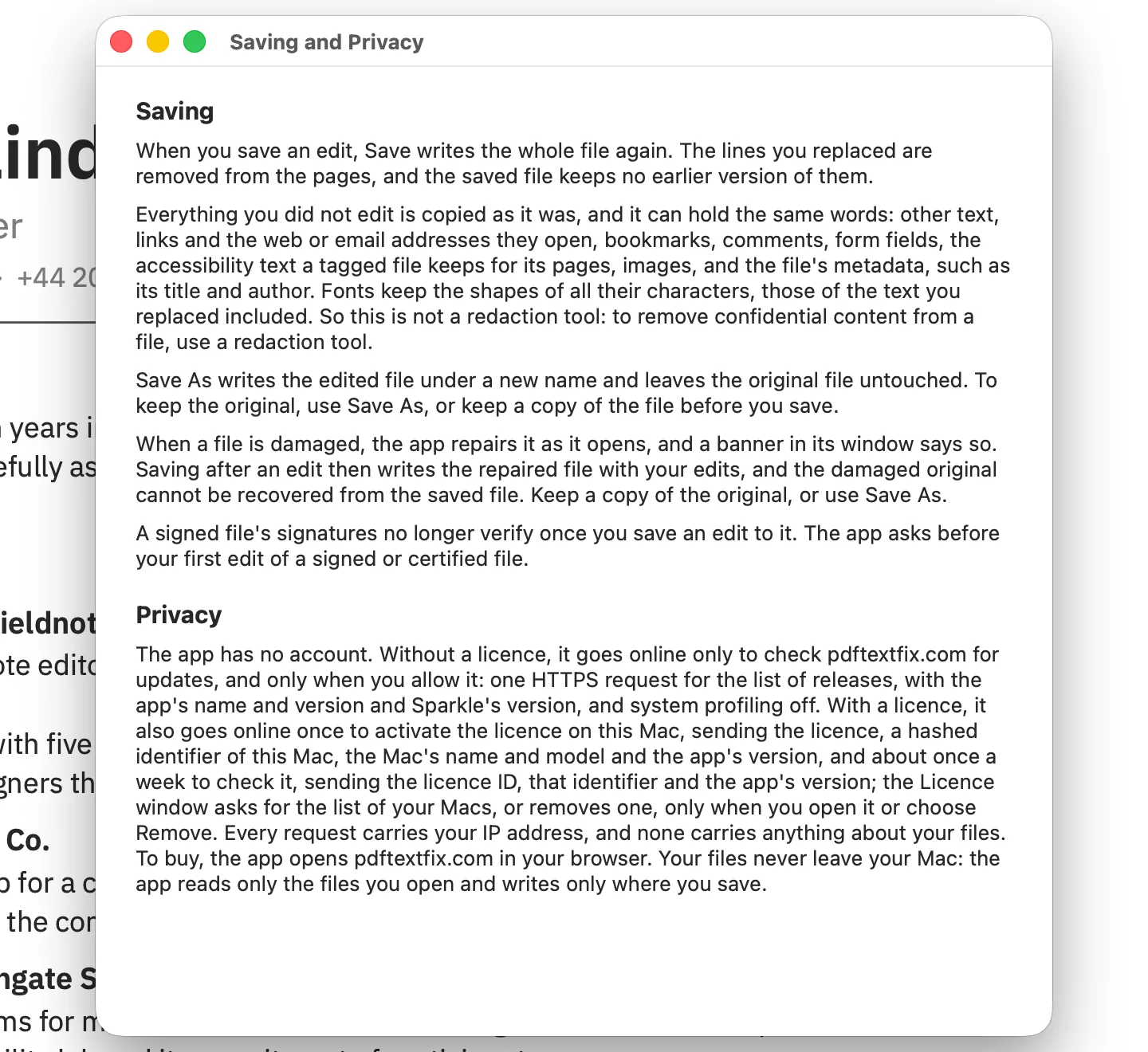
Three more facts follow. Saving with no edit writes the file back exactly as it was read, byte for byte. A file appended to earlier by another app keeps those earlier revisions until you edit and save it here. And because the saved file has no earlier section, the original cannot be recovered from it: use Save As (⇧⌘S) to write the edited copy under a new name, or keep a copy before you save.
Will the file size change after a PDF Textfix save?
Usually by little, and in a direction you can predict. The page’s drawing instructions are written once, compressed again, so a corrected date or name barely moves the total. When a character you typed was missing from the document’s font, the characters it needs are added in a new font object that only your inserted text uses; the file’s existing fonts are never modified, and the added font object is what makes the file grow. A file that had grown through appended saves in another app usually shrinks on its first edited save here, since its earlier revisions are not written. One case the release notes name can make a file much larger: the free version’s watermark on pages that share many fonts and images, described below.
What happens to a signed PDF when you save an edit?
A digital signature covers a range of the file’s bytes. The standard recommends that “This range should be the entire file, including the signature dictionary but excluding the signature value itself (the Contents entry).” A viewer recomputes a digest over that range, and “Differences in the digest values indicate that modifications have been made since the document was signed.” That is why signing tools append. The standard notes that a signed document saved by incremental update keeps the data its signature covers, and of documents signed more than once it says, “Since each signature results in an incremental save, later signatures have a greater length value.”
A rewrite changes those bytes, so after PDF Textfix saves an edit to a signed file, its signatures no longer verify. The app asks before your first edit of a signed or certified document, shows the line before and after, and says so in plain words:
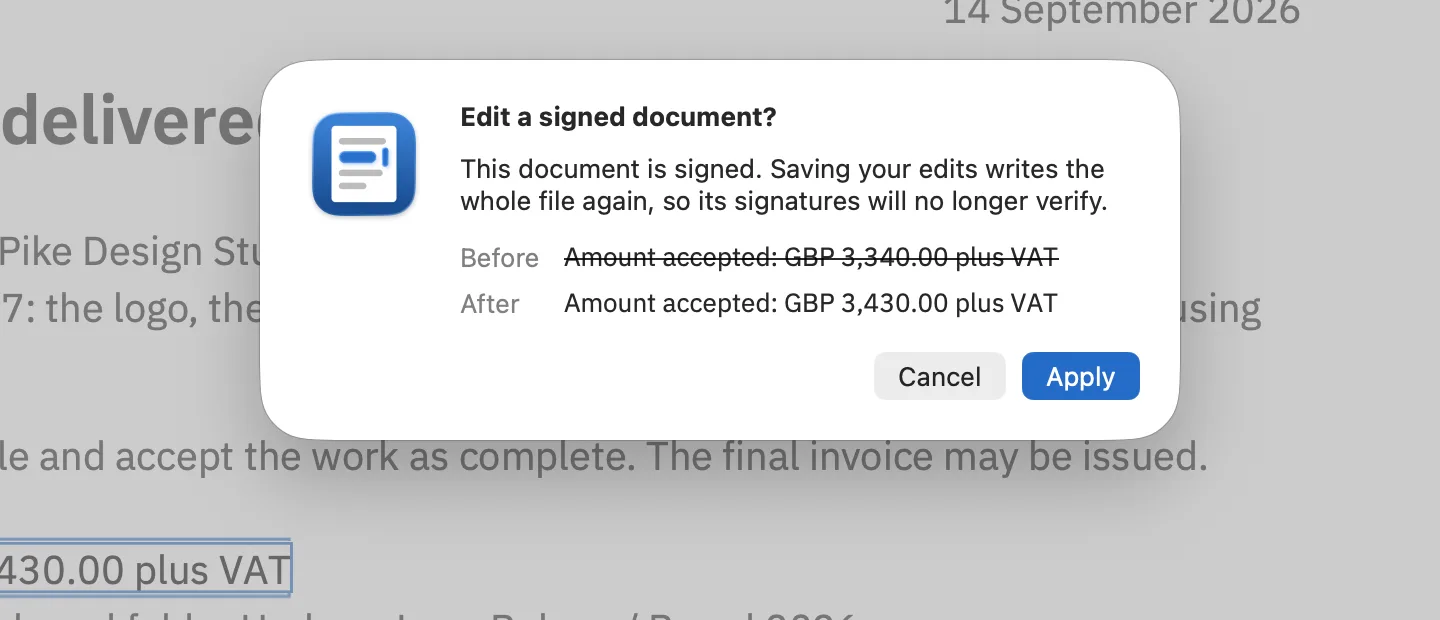
The guide to editing a signed PDF goes through the cases, from a document of your own signed before it was ready to someone else’s signed contract.
A damaged file is the other case where a save changes more than your line: PDF Textfix repairs it as it opens and says so in a banner, and saving an edit writes the repaired copy, from which the damaged original cannot be recovered.
What stays in the file after the line is gone?
PDF Textfix removes the replaced line from the page. It does not search the rest of the file for the same words, and a PDF can repeat them in many places outside the page:
- links, and the web or email addresses they open;
- bookmarks;
- comments and form fields;
- the document’s properties, such as its title, subject and keywords, and its XMP metadata;
- the accessibility text a tagged file keeps for its pages;
- images, which can show text as pictures;
- fonts, which keep the shapes of all their characters, those of the replaced text included.
Everything you did not edit is copied as it was, unless the file was damaged, in which case the app tells you it repaired it. That is the purpose of the tool, and it is why PDF Textfix is not a redaction tool. Even dedicated redaction has edges: Apple’s guide to Preview’s redaction notes, “If the PDF has a table of contents, entries in it that link to redacted text aren’t removed.” The guide to redaction versus editing explains the difference and when each is right.
How do you check a PDF yourself?
Two free tools do it: qpdf, and Poppler for reading text. Both install with Homebrew:
brew install qpdf popplerStep 1: How many revisions does the file hold?
Each appended update ends with its own end-of-file marker, so count them:
grep -a -c '%%EOF' saved.pdfA file written in one piece prints 1; a file with appended updates prints one more per revision. A file prepared for fast web display can print 2 with a single revision, because it carries an extra table near the start.
Step 2: Is the old text in the decompressed file?
qpdf can write a copy with every stream decompressed; its manual says that in this mode, “Unless specifically overridden, streams appear uncompressed”. Search the original first as a control: if the search finds nothing there, the words are stored in a form a plain search cannot match, and the check proves nothing.
qpdf --qdf --object-streams=disable original.pdf original-readable.pdf
grep -a -c '2026-02-30' original-readable.pdf

qpdf --qdf --object-streams=disable saved.pdf saved-readable.pdf
grep -a -c '2026-02-30' saved-readable.pdf
On the demo invoice the first search prints 1, and on the file written again the second prints 0. Search for a short fragment such as a number or one word: many documents store a line in pieces, so the invoice’s “Due date” is stored as [ (Due dat) 4 (e) ] TJ, and only a search for “Due dat” finds it.
Step 3: What did the earlier revisions say?
The decompressed copy holds only the newest revision: on the appended invoice, Step 2 prints 0 although the old date is still in the file. That is why Step 1 matters. List the byte position of each marker:
grep -a -b -o '%%EOF' saved.pdfFor the appended invoice that prints 63620:%%EOF and 65038:%%EOF. Add 6 to the first position, for the marker and its line break, and keep that many bytes:
head -c 63626 saved.pdf > earlier.pdf
pdftotext earlier.pdf - | grep '2026-02'
On the appended file that prints the old date, 2026-02-30. On a file PDF Textfix saved after an edit, Step 1 prints 1, so there is nothing earlier to cut out.
What if the file has already grown?
Writing it again drops the unused objects: qpdf saved.pdf rewritten.pdf took the appended invoice from 65,044 to 63,320 bytes without touching a pixel. For the other causes of size and the ways to shrink images, see the guide to large PDFs.
What does the free version add to a saved file?
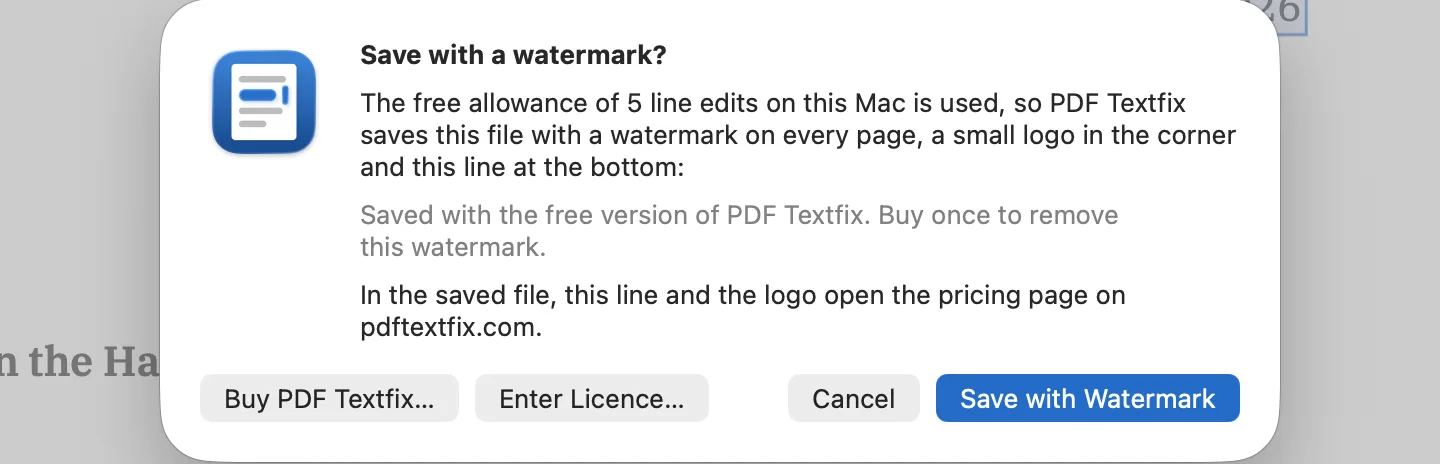
Free to try. Your first 5 line edits save clean. After that, saved files carry a watermark until you buy once. The watermark repeats a faint diagonal “PDF Textfix · free version” across every page and adds a small logo in the corner and a footer line; the footer and the logo open the pricing page, or PDF Textfix on the Mac App Store in the Mac App Store version. Before the first such save after the app opens, a sheet quotes the footer the file will carry. On a file whose pages share many fonts and images, the watermark can make the saved file much larger; it returns to its size once the unlocked app saves it without the watermark. The pricing page says how to buy once.
Questions people ask
Why does my PDF get bigger every time I save it?
Most often because the app appends each save as an incremental update, keeping every earlier version of what changed. Writing the file again drops what nothing uses any more.
Is the old text really gone after a PDF Textfix save?
From the page, yes. The saved file has one revision and holds none of the bytes your edit replaced. The same words can still sit in the places listed under “What stays in the file”.
Can I get the original back from a file PDF Textfix saved?
No. Use Save As to keep the original, or copy the file before you save.
Does PDF Textfix change a file I only opened?
No. Opening a file changes nothing, and saving with no edit writes it back byte for byte.
