
If you use Nitro PDF Pro, or used PDFpen, mostly to correct words in finished PDFs, and the annual subscription is why you are looking around, a one-time app that changes existing text on a Mac covers that part. PDF Textfix edits a line where it stands with the document’s own fonts, checks every edit before applying it, and costs a single payment. It does not sign, fill forms, recognize scans or reflow paragraphs, so those jobs stay with Nitro or another suite. To compare several Mac editors you can buy once, see the roundup of PDF editors without a subscription.
Why are people looking for a Nitro PDF Pro alternative on the Mac?
The Mac app is sold by the year. In the US Mac App Store, the only in-app purchase listed for Nitro PDF Pro is “Annual Subscription $139.99”, after a trial the listing describes in these words: “Try Nitro PDF Pro for Mac for free with a 14-day trial”.
The one-time license is for Windows. Nitro still sells a license paid once, Nitro PDF Classic, but its pricing page sets the terms: “Licensing: Three-year term, per-license pricing, Windows desktop only (not available for Mac or mobile).” On a Mac, a subscription is the route Nitro offers.
Many came from PDFpen. Nitro runs a migration assistant for them, and its page says: “PDFpen and PDFpen Pro customers who purchased Nitro PDF Pro Essentials or Nitro PDF Pro can migrate their settings with one, easy app and start working in Nitro PDF Pro in minutes.” TidBITS reported the change from PDFpen to Nitro’s product names in August 2022. If you bought PDFpen once, a Mac app you can buy once again may be what you are after.
What part of the job does PDF Textfix take over?
Correcting text that is already on a page: an amount, a date, a name, a typo. PDF Textfix runs on the same macOS 26 floor as Nitro’s current Mac app, on Apple silicon.
Open the PDF with File > Open (⌘O). Double-click a line, or press Tab to select one and Return to open the editor over it. Type the change and press Return. Nitro’s listing promises “full-page paragraph reflow”; PDF Textfix does the opposite on purpose. It never moves text from one line to another, and before applying an edit it checks that every other character on the page stays where it was, refusing the edit with the reason when one would not. A longer replacement can push the rest of its own line along with Shift Rest of Line (⌃⌘R).
The new characters are drawn with the font the document already carries, and a character that font lacks is borrowed in a fixed order and marked; the guide to keeping the same font explains the order.
You type é. The line’s own font has no é.
- Another copy of the same font in the file.
- The same font, installed on your Mac.
- The closest standard font.
Signed documents get particular care, which matters if your PDFs pass through Nitro’s QuickSign or another signing tool. Editing a signed file and saving it means its signatures no longer verify, and PDF Textfix says so with the change in front of you, before anything is written:
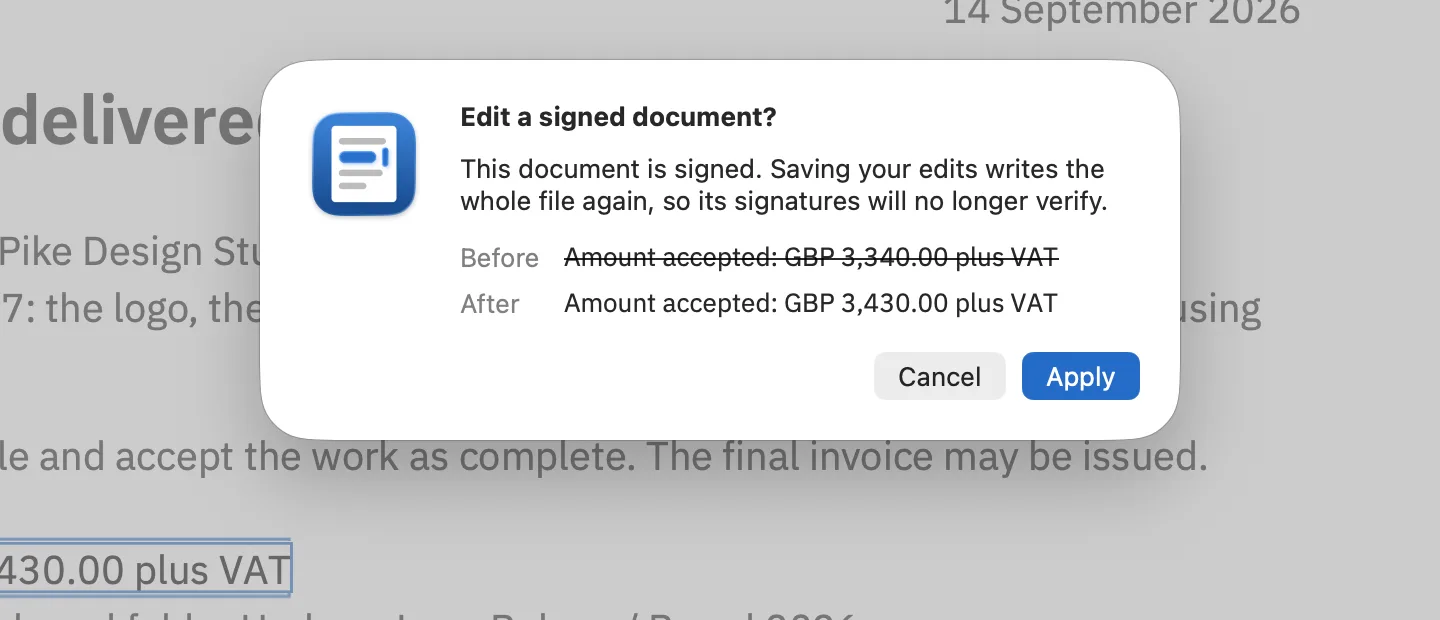
Save (⌘S) writes the file again, and the lines you replaced are removed from the pages.
What does Nitro PDF Pro cost next to a one-time purchase?
As printed on October 12, 2026:
| Topic | Nitro PDF Pro for Mac | PDF Textfix |
|---|---|---|
| Model | Annual subscription | One-time purchase |
| Price | Annual Subscription $139.99 (Mac App Store) | US$29.99 (Mac App Store) or US$29 (this website) |
| One-time option | Nitro PDF Classic, three years, Windows only | The purchase itself, with every 1.x update |
Regional prices for PDF Textfix are on the pricing page.
What happens to your existing files?
Nothing has to move. Your PDFs, including any you edited in PDFpen or Nitro, are ordinary files, and PDF Textfix opens them in place. There is no account, no import step and no cloud copy.
Nitro’s migration assistant moves PDFpen’s library items and preferences into Nitro PDF Pro. PDF Textfix has no library, stamps or custom tools, so there is nothing of that kind to bring along, and nothing to set up before the first edit.
Two things to know about files with a history. A file saved by an app that appends its changes to the end keeps earlier versions of its pages inside it; when PDF Textfix saves an edit, it writes the file without them. And a signed file loses its valid signature once you save a change, as the confirmation sheet says, so save the edited copy with Save As (⇧⌘S) and keep the signed original. The guide to editing a signed PDF goes through that case.
Scans you made searchable with Nitro’s OCR keep the recognized text in a hidden layer over a picture of the page; PDF Textfix locks those lines and says why. Forms you built in Nitro keep their fields, whose text is locked too.
Should you switch? Check these first
- Most of what you do in a PDF editor is correct words in documents that are otherwise final.
- You do not need to sign, fill or build forms in the same app.
- You do not rewrite whole paragraphs; line-by-line changes are enough.
- Your Mac has Apple silicon and macOS 26 or later.
- You would rather pay once than every year.
If every box is ticked, PDF Textfix can replace Nitro for that work; for anything in the list of what you would still need Nitro for, keep it alongside. The side-by-side facts list each point with its source, and the walkthrough of editing PDF text on a Mac shows the whole process.
Questions people ask
Is there a one-time-purchase alternative to Nitro PDF Pro for Mac?
For text corrections, yes: PDF Textfix is bought once, as an in-app purchase in the Mac App Store or as a licence from this website, with every 1.x update included and no subscription.
Is there a free Nitro PDF alternative?
The roundup of free PDF editors for Mac lists the free options and what each leaves out, from the vendors’ own pages. PDF Textfix is a paid app with a free version. Free to try. Your first 5 line edits save clean. After that, saved files carry a watermark until you buy once.
Is there an open-source alternative to Nitro PDF?
PDF Textfix is not one; it is not open-source software. Among open-source tools, LibreOffice Draw opens PDFs for editing, and the comparison with LibreOffice Draw says, with sources, what it does to the layout and the fonts.
Can it rewrite a whole paragraph?
No. It changes one line at a time and does not reflow text. The answer on paragraphs and reflow explains why and what to use instead.
