
To replace Foxit PDF Editor on a Mac for the text edits alone, you need an app that changes the words already on a page, keeps the document’s fonts and does not need a yearly plan. PDF Textfix does that one job: it edits existing text line by line with the fonts embedded in the file, checks each edit before applying it, and is a one-time purchase. Foxit’s forms, security tools, OCR and collaboration are outside its scope, and the page lists them rather than hiding them. The roundup of PDF editors without a subscription sets Foxit’s perpetual license next to the other one-time options.
Why do Mac users look for a Foxit alternative?
The price. Foxit’s pricing page puts it in one paragraph: “Foxit PDF Editor costs $129.99 per user per year, and Foxit PDF Editor+ costs $159.99 per user per year, with monthly billing available from $10.99.” It continues: “Foxit also sells a perpetual license, Foxit PDF Editor 14, for a one-time $209.99 per user.” In the Mac App Store the listing sells “PDF Editor: $109.99/year.” and “PDF Editor+: $139.99/year.” The free part of the app is for reading: “This easy-to-use PDF editor allows you to view and annotate PDFs for free.”
Edit Text is grayed out. Foxit’s knowledge base has an article for it. Most of the causes it lists depend on how the file is opened in Foxit, such as protected view or PDF/A view mode; one belongs to the file itself: “PDF document has security restrictions and changing the document is not allowed.” The side-by-side facts give every cause with its source, and the guide to why you can’t edit text in a PDF covers the causes in any editor.
Would PDF Textfix have the same problem?
Partly, and it is better to know which part before switching.
A file whose permissions forbid changes opens view only in PDF Textfix too, and so does an encrypted file. The app does not remove restrictions; a banner above the pages says why the file is view only, and the remedy is the same as in Foxit’s article: ask the sender for a copy without the restriction. The guide PDF locked for editing explains the permissions password and what you can do.
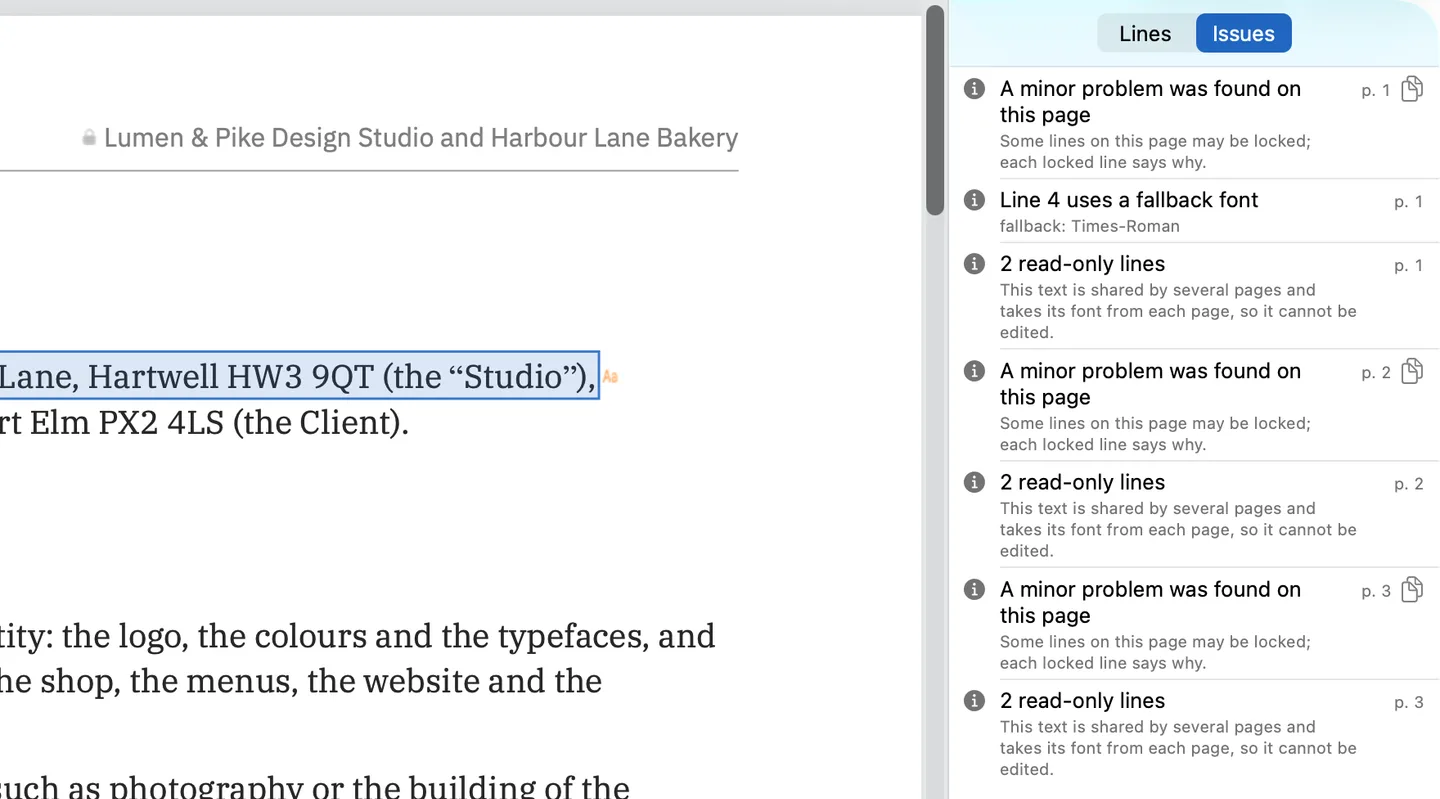
Beyond restrictions on the whole file, PDF Textfix gives a reason for each line it cannot edit. Some text is out of its reach: fonts made of pictures, the hidden text layer of a scan, vertical and right-to-left text, form fields and comments, and text one shared part of the file draws on several pages with each page’s font. Those lines are locked, a lock shows on the line, and the Issues pane (⌥⌘I) collects every reason in one list:
A PDF/A document is not refused for being PDF/A. A banner says the file is PDF/A, and any character added from another font is embedded in the file, so the edit does not depend on fonts outside it.
How does a text edit work in PDF Textfix?
Foxit’s Mac manual describes its way: “Double-click the text object you want to edit, and then you can add, delete text, or change font formats for the selected text.” PDF Textfix starts the same way, with a double-click, but limits what follows. You change the characters of one line; the font, the size and the position stay. Return applies the edit, Escape cancels it, and Tab applies it and moves to the next line.
The new characters are drawn with the font embedded in the PDF. A character it lacks is borrowed in a fixed order and marked, and the Issues pane records it (“Line 4 uses a fallback font”); the guide to keeping the same font explains the order.
You type é. The line’s own font has no é.
- Another copy of the same font in the file.
- The same font, installed on your Mac.
- The closest standard font.
Every edit is checked before it is applied, and refused with a reason if it would move or restyle any other character on the page. Save (⌘S) writes the whole file again; File > Save As (⇧⌘S) leaves the original as it was.
How does Foxit’s pricing compare with paying once?
As printed on October 12, 2026:
| Topic | Foxit PDF Editor | PDF Textfix |
|---|---|---|
| Yearly | US$129.99 per user (Editor), US$159.99 (Editor+); PDF Editor: $109.99/year in the Mac App Store | None |
| Paid once | Foxit PDF Editor 14, US$209.99 per user | US$29.99 in the Mac App Store; US$29 from this website |
PDF Textfix’s EU, Romanian and UK prices are on the pricing page.
How do you move your work from Foxit?
There is no export or import. The PDFs you edited with Foxit are files, and PDF Textfix opens them as they are, from Finder, from File > Open (⌘O) or by dragging them onto its icon. Foxit’s own cloud and shared-review features have no counterpart, so download any document that lives only there.
What you made in Foxit carries over like this:
- Comments and shared-review notes stay in the file, and PDF Textfix leaves them as they are: their text is locked, because viewers draw it again from the comment’s own value.
- Scans you made editable with Foxit’s OCR keep the recognized text in a hidden layer over a picture of the page; PDF Textfix locks those lines and says why.
- Forms you created keep their fields, and the text in a form field is locked.
- Files you protected in Foxit behave as protected files do: an open password is asked for before the pages show, and a file whose permissions forbid changes opens view only.
Is PDF Textfix enough for you?
Run through these:
- You use Foxit mainly to fix text in finished documents.
- You rarely or never create forms, redact, run OCR or review with others in Foxit.
- Your Mac runs macOS 26 or later on Apple silicon.
- You want to pay once.
If all four are true, the one-job app covers what you use; for anything in the list of what you would still need Foxit for, keep it alongside. The guide to editing PDF text on a Mac shows a first edit.
Questions people ask
Is there a free Foxit alternative?
For reading and annotating, free apps exist, and the roundup of free PDF editors for Mac lists what each one does with existing text, from the vendors’ own pages. For correcting text, PDF Textfix is a paid app with a free version. Free to try. Your first 5 line edits save clean. After that, saved files carry a watermark until you buy once.
Is there a cheaper alternative to Foxit for Mac?
For correcting existing text, PDF Textfix is a one-time US$29.99 in the Mac App Store or US$29 from this website. It does far less than Foxit, so compare it with the jobs you actually do.
Can it edit text in a password-protected PDF?
No. A file with an open password asks for it before its pages show, and encrypted files, like files whose permissions forbid changes, open view only: you can read them, not edit them.
