
Foxit PDF Editor runs on the Mac as one part of a cross-platform suite: Foxit says it “covers professional editing, conversion, OCR, forms, and document security on Windows, macOS, and web.” It is sold mostly by subscription, US$129.99 per user per year on Foxit’s pricing page, with a perpetual licence, Foxit PDF Editor 14, at US$209.99 paid once. PDF Textfix covers one job from that list, changing text that is already on a page, and costs less than either. If you need the suite, Foxit is the comparison to make with other suites. If you need a date, a name or a figure corrected in a finished PDF, in its own font, the rest of this page shows what each tool does with that one job.
What does Foxit PDF Editor cost on a Mac?
Foxit’s pricing page, read on October 12, 2026, answers in one sentence: “Foxit PDF Editor costs $129.99 per user per year, and Foxit PDF Editor+ costs $159.99 per user per year, with monthly billing available from $10.99.” The Editor+ plan adds the iOS and Android apps, an eSign allowance and AI-based redaction. The same page goes on: “Foxit also sells a perpetual license, Foxit PDF Editor 14, for a one-time $209.99 per user.” That sentence does not say which operating systems the perpetual licence covers, so check before buying it for a Mac.
In the Mac App Store, “Foxit PDF Editor: Convert&Sign” is a free download. Its listing says the app “allows you to view and annotate PDFs for free”, marks editing among the “advanced features based on subscription through in-app purchases”, and prices those subscriptions at US$109.99 a year for PDF Editor and US$139.99 a year for PDF Editor+, plus an AI assistant at US$49.99 a year.
PDF Textfix has one price and no plans: US$29.99 as an in-app purchase in the Mac App Store, or a licence from this website, bought once, with no account. It is free to try. Your first 5 line edits save clean. After that, saved files carry a watermark until you buy once. The pricing page has each region’s price, and the comparison of PDF editors without a subscription puts the one-time prices of several Mac editors together.
What do you get for the price?
With Foxit, a lot. The Mac App Store listing includes adding and editing text, images and shapes; search and replace; spell-check; converting to and from Office formats; portfolios; comments and stamps; passwords, certificates and redaction; signatures and DocuSign; page management, headers, footers and Bates numbering; form creation and filling; scanning and OCR; and an AI assistant with agent-based conversation. Foxit sells the same editor on Windows and the web, so a team can standardize on it.
With PDF Textfix, one thing: the text already on the page, changed a line at a time, in the font inside the file, with a check on every edit. It opens, saves, prints and shares. It does not add text boxes, change fonts or sizes, reflow paragraphs, edit scanned pages, fill forms or redact. The trade is scope against price: PDF Textfix does one job and checks every edit of that job before applying it.
How does each one change existing text?
Foxit’s Mac manual, version 2023.1.0, describes its object editor this way. “Double-click the text object you want to edit, and then you can add, delete text, or change font formats for the selected text.” A Format panel sets the font, size, color, spacing and alignment. Its Search & Replace panel goes further than PDF Textfix will: “Replace All: Replaces all instances of the search text in the document with the replacement text.”
PDF Textfix’s editor opens over one line, in that line’s font. Double-click the line or select it and press Return, type, and press Return to apply. To change a word wherever it appears, Edit > Find > Find Line… (⌘F) takes you to each line that holds it, and you replace each one; Find Next is ⌘G. There is no replace-all on purpose: every replacement is checked on its own page before it is applied, and a check that fails refuses that one edit with the reason. The page on find and replace explains the choice. When a longer edit would run into the text after it, the rest of the line moves to make room and the bar says so.
Does Foxit keep the original font?
The Mac manual read for this comparison does not say what happens when the font of the text is not installed on your Mac, so the table marks it “not verified”. Foxit PDF Editor was not tested for this page.
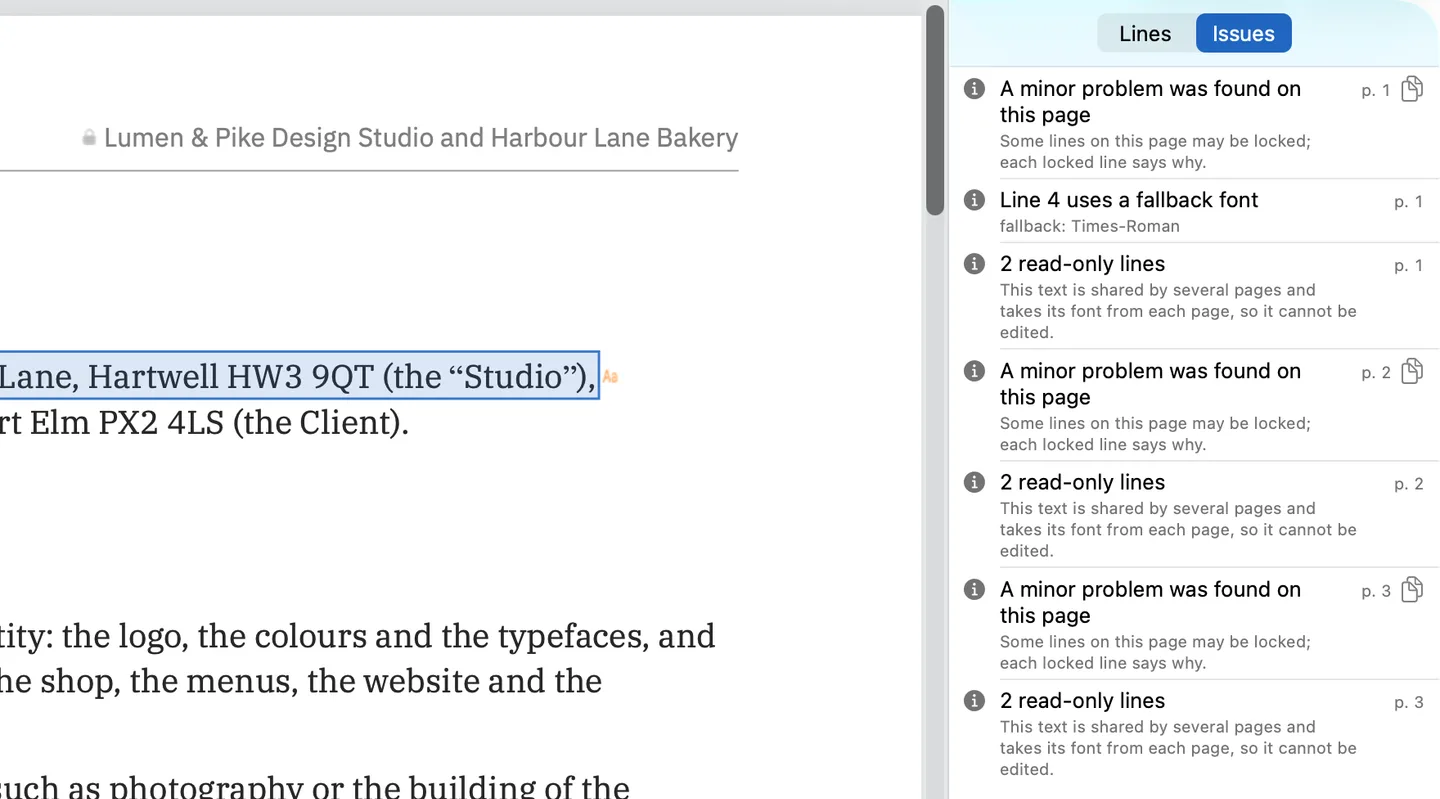
PDF Textfix does not depend on your installed fonts. It writes with the font stored in the PDF. A character that font lacks is taken, in order, from the same font, another copy of the same face in the file, the same font on your Mac, or the closest standard font, and it is marked while you type: orange for a fallback font, underlined for another copy of the line’s font, red when no font can draw it. The Issues pane (⌥⌘I), shown above on the demo contract, lists the fallback fonts your edits used along with the lines PDF Textfix locks.
Why is Edit Text grayed out?
Foxit’s knowledge base answers this in an article dated March 27, 2025. The reasons it lists are: no PDF is open; the file is open in protected view, a read-only mode for files from unsafe locations; the file is PDF/A and open in PDF/A view mode; or “PDF document has security restrictions and changing the document is not allowed.” For the first three, Foxit’s fix is to open a file or turn the view mode off. The article does not say which operating system it describes.
PDF Textfix handles the same situations in its own way. An encrypted file, or one whose permissions forbid changes, opens view only, and the window says why. A PDF/A file opens for editing, and Save keeps its PDF/A identification; a character the line’s font lacks always comes from a font PDF Textfix embeds. One caveat: past the free line edits, the watermark of the free version means the saved file no longer conforms to PDF/A. Inside an editable document, a line that cannot be changed is locked, and the line says why: a font made of pictures, the hidden text layer of a scan, vertical or right-to-left text, a form field or a comment. The guide why can’t I edit the text in a PDF? covers each cause, whatever the app, and PDF locked for editing covers permissions and passwords.
Which one should you choose?
Choose Foxit PDF Editor if you need the suite: conversion, OCR, forms, redaction, signatures, Windows and web access, administered for a team. Its Mac App Store listing asks for macOS 10.15 or later, so it also suits older Macs.
Choose PDF Textfix if the job is correcting text in finished documents and you would rather not pay a yearly fee for it. It needs macOS 26 or later on Apple silicon. Save (⌘S) writes the whole file again, without the replaced lines and with everything else copied as it was, unless the file was damaged; the app tells you when it repaired one. The Foxit alternative page covers keeping Foxit for the suite work and moving text fixes over.
Questions people ask
Does Foxit sell a perpetual licence?
Yes: Foxit PDF Editor 14, US$209.99 per user, paid once, per its pricing page on October 12, 2026.
Is Foxit PDF Editor cheaper in the Mac App Store?
On October 12, 2026, yes for the yearly plans: the Mac App Store listed PDF Editor at US$109.99 a year and PDF Editor+ at US$139.99 a year, against US$129.99 and US$159.99 per user per year on Foxit’s pricing page. The listing’s in-app purchases name no perpetual licence.
Does Foxit PDF Editor work on a Mac?
Yes. Foxit’s pricing page lists macOS with Windows and the web, and the Mac App Store listing asks for macOS 10.15 or later.
Is Foxit PDF Editor free on a Mac?
Its Mac App Store listing says the app lets you “view and annotate PDFs for free”; editing is one of the features it marks as needing a subscription, at US$109.99 a year or more.
Does Foxit have OCR?
Yes, according to Foxit’s pricing page. PDF Textfix does not edit scanned pages, and it locks the hidden text layer OCR leaves on a scan.
Can Foxit PDF Editor replace every match at once?
Yes. Foxit’s Search & Replace can replace every instance of a word in the document at once. PDF Textfix has no replace-all on purpose: Find Line (⌘F) takes you to each line that holds the word and Find Next (⌘G) to the next one, and every replacement is checked on its own page before it is applied, so a check that fails refuses that one edit with its reason and leaves the others alone. The page on find and replace explains the choice.
