
Yes, LibreOffice can edit a PDF for free on a Mac, and it does it in Draw, its drawing program. The Document Foundation’s FAQ explains that “LibreOffice recognizes foreign PDF files as graphical documents, therefore PDFs are opened in Draw.” The page becomes a drawing made of separate pieces: the FAQ says the text is no longer continuous, and that editing it “only makes sense if only single words or letters are to be exchanged” in most cases. A font that is not available is drawn with a substitution font. To get a PDF back, you export a new one. That is a capable free route for many jobs. It changes more than a correction needs when the font and the file must stay as they were.
How do you open a PDF in LibreOffice Draw on a Mac?
Install LibreOffice from libreoffice.org; its system requirements list macOS 11 or newer on an Intel or Apple silicon Mac. Then:
- Open LibreOffice and choose File > Open.
- Select the PDF and click Open.
A PDF made by another app opens in Draw. One made by LibreOffice itself and exported as a hybrid PDF, which carries the original document inside it, is a different case: the FAQ says it “can then be edited in Draw or better yet in Writer”. The rest of this page is about the first kind, the PDF you received or exported from somewhere else.
What does the text look like in Draw?
Not like text in a word processor. The FAQ puts it this way: “The texts are usually no longer continuous texts, as you are used to, for example, in Writer.” Text and images become single snippets that you select one at a time, listed as text frames in Draw’s Navigator. You can click into a snippet and change its words.
That approach suits some jobs and not others. Moving a block, deleting a logo, drawing a shape or adding a note anywhere on the page all work the way they do in any drawing program. A paragraph is another matter: when its lines arrive as separate pieces, a longer line does not push words onto the next one. The FAQ’s own advice is to keep edits to single words or letters.
What happens to the fonts?
When a font is not available, LibreOffice draws the text with another one. Its help on font replacement describes the fallback: “you can override the default substitution font that your operating system uses when it encounters an unavailable font in a document.” The replacement table lives under Tools > Options > LibreOffice > Fonts, which on a Mac is under LibreOffice > Preferences.
The pages read do not say whether Draw uses a font that is embedded in the PDF for the imported text, so the table above marks that row not verified. What is documented is the substitution for unavailable fonts, and the FAQ’s warning that processing PDFs from elsewhere may be limited. If the words you type come out in a different face, a substitution is the first thing to check, and the guide to PDF fonts explains embedded and subset fonts in more depth.
PDF Textfix starts from the embedded font. It writes your correction with the font inside the PDF, whether or not that font is installed on your Mac. When the embedded copy lacks a character you type, it looks for it in a fixed order: the same font, another copy of the same face in the document, the same font installed on your Mac, then the closest standard font. The character is marked in orange in the editor so you can see it, and the Issues pane (⌥⌘I) lists fonts the file does not embed.
How do you get the edited PDF out of Draw?
With File > Export As > Export as PDF. LibreOffice’s help describes the command as one that “Saves the current file to Portable Document Format (PDF) version 1.4.” The current file at that point is the Draw document built from your PDF, so the result is a new PDF written by LibreOffice from that drawing. The export dialog has options for images, links, security and digital signatures.
The new file is not the old file with one change. Anything the import changed, such as a substituted font or a shifted piece of text, goes into the export. A digital signature on the original does not carry over to a newly written file.
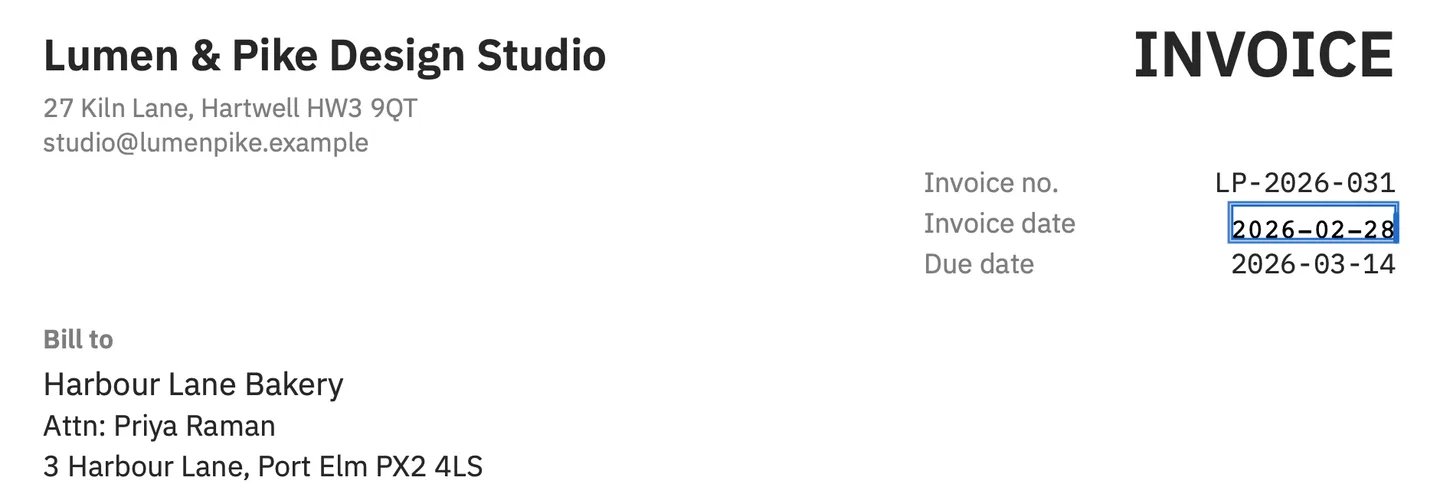
PDF Textfix saves the PDF you opened. Save (⌘S) writes the file again without the replaced text on the page, and everything you did not edit is copied as it was, unless the file was damaged; the app tells you when it repaired one. In the screenshot above, the demo invoice’s date is corrected in its own monospaced font with the lines around it unchanged. Save As (⇧⌘S) keeps the original if you want both versions.
Can you edit the PDF in LibreOffice Writer instead?
Only when the PDF carries its own source. LibreOffice’s PDF export has an option named Hybrid PDF (embed ODF file), and its help describes the result: “In PDF viewers it behaves like a normal .pdf file and it remains fully editable in LibreOffice.” Such a file holds two things, the PDF that viewers show and the LibreOffice document it was exported from. That is the case the Document Foundation’s FAQ means when it says a PDF exported from LibreOffice “can then be edited in Draw or better yet in Writer”.
If you make the PDF yourself in LibreOffice, the route looks like this:
- When you export, choose File > Export As > Export as PDF and, on the General tab, check Hybrid PDF (embed ODF file).
- To change the document later, open that PDF in LibreOffice and edit it in Writer, where text reflows and styles work as they did when you wrote it.
- Export it again as a hybrid PDF, so the next change can start from the source document again.
A PDF you received from someone else is a hybrid file only if its author exported it that way. For the ordinary kind, the source is somewhere else, or gone, and the choice is between Draw’s pieces and an edit of the PDF itself.
What does LibreOffice do well with PDFs?
It is free. The LibreOffice project offers “no-cost downloads of the LibreOffice suite of programs”, and LibreOffice is free and open source software. It runs on Intel and Apple silicon Macs back to macOS 11, so it works on Macs that cannot run macOS 26. It edits the whole page as a drawing, so you can move, delete and add objects, which a line editor cannot do, and its Navigator lists the text frames of a page, which helps when a word sits in a crowded layout. And for a hybrid file, Writer edits the source document itself, as described above.
What does it change along the way?
The font, when it is not available to LibreOffice. The structure of the text, which becomes separate pieces. And the file, which is written again by the export. None of that matters if you are reworking a page or making a draft. It matters when the PDF is a finished document that someone will compare with the version they already have.
When is PDF Textfix the better fit?
When one line is wrong and the rest must stay exactly as it was. On a Mac with macOS 26 or later on Apple silicon, open the PDF, double-click the line or select it and press Return, type the correction, press Return to apply, then Save. Before applying the edit, the app checks that every other character on the page stays where it was, and it refuses the edit with a reason when a check fails. It does not move objects, draw shapes, reflow paragraphs or edit scanned pages. The steps in editing a PDF without changing its format cover the method in detail, and the free PDF editors for Mac comparison sets LibreOffice next to the other free options. PDF Textfix is a one-time purchase; the pricing page lists the price for each region.
For more side-by-side pages, the comparisons hub lists every product compared on this site.
Questions people ask
Is LibreOffice free on a Mac?
Yes. LibreOffice is free of charge and free and open source software, and it runs on macOS 11 or newer, on Intel or Apple silicon.
Can LibreOffice Writer open a PDF?
A PDF made elsewhere opens in Draw, not Writer. A hybrid PDF exported from LibreOffice, which carries its source document, is better edited in Writer, according to the Document Foundation’s FAQ.
Why does my PDF look different in LibreOffice Draw?
Two common reasons: a font that is not available is drawn with a substitution font, and the text arrives as separate pieces instead of continuous lines. Check the font of the changed text first.
Does PDF Textfix run on Intel Macs?
No. It needs macOS 26 or later on a Mac with Apple silicon.
