
iLovePDF is a set of online PDF tools, and its editor can change existing text: “Select text to edit, move, or delete the existing content.” To use it, you upload the PDF; iLovePDF says processed files are “automatically and permanently deleted within two hours of being processed.” It also has desktop apps for Mac and Windows that process files on your computer, and a free plan for light use. PDF Textfix is a Mac app for one job, changing the text already on a page in the font inside the file, and it never uploads your file. The Mac App Store version goes online only to confirm a purchase; the version from this website goes online to activate a licence once on each Mac, to check it about once a week, and to check for updates when you allow it. Which fits depends mostly on where you want the file to be while you fix it, and on how the corrected line has to look.
What can iLovePDF’s editor do with text?
Its Edit PDF tool works in the browser. The page describes it as a way to “Edit PDF by adding text, shapes, comments and highlights”, and the editor itself says: “Use the toolbar to modify or add text, upload images, and annotate with ease.” For existing text, the hint reads “Select text to edit, move, or delete the existing content.” Around that editor iLovePDF has many other tools: merge, split, compress, convert to and from Office, sign, redact, compare, OCR, and AI summaries and translation.
The pages read do not say which font iLovePDF uses when you change existing text, so the table marks that row “not verified”; iLovePDF was not tested for this page.
What does PDF Textfix do instead?
It edits one line at a time, in place. Select a line and press Return, or double-click it; an editor opens over the line, in the line’s own font, and the bar under it names that font and size. Type the correction, press Return to apply or Escape to cancel. Tab applies and moves to the next line, and Edit > Find > Find Line… (⌘F) jumps to any line that holds a word. It does not add text boxes, shapes or comments, does not move text and does not reflow paragraphs. The how-to on fixing a typo in a PDF walks through a correction start to finish.
For a longer document, the Lines pane (⌥⌘L) lists the lines of the pages on screen with a search field, and its Edited filter shows only the lines you changed, so you can check every correction before you save. Each applied edit is one step of Undo (⌘Z), and File > Revert to Saved drops every edit since the last save. If the document is signed, PDF Textfix asks before your first edit is applied and says that its signatures will no longer verify once you save.
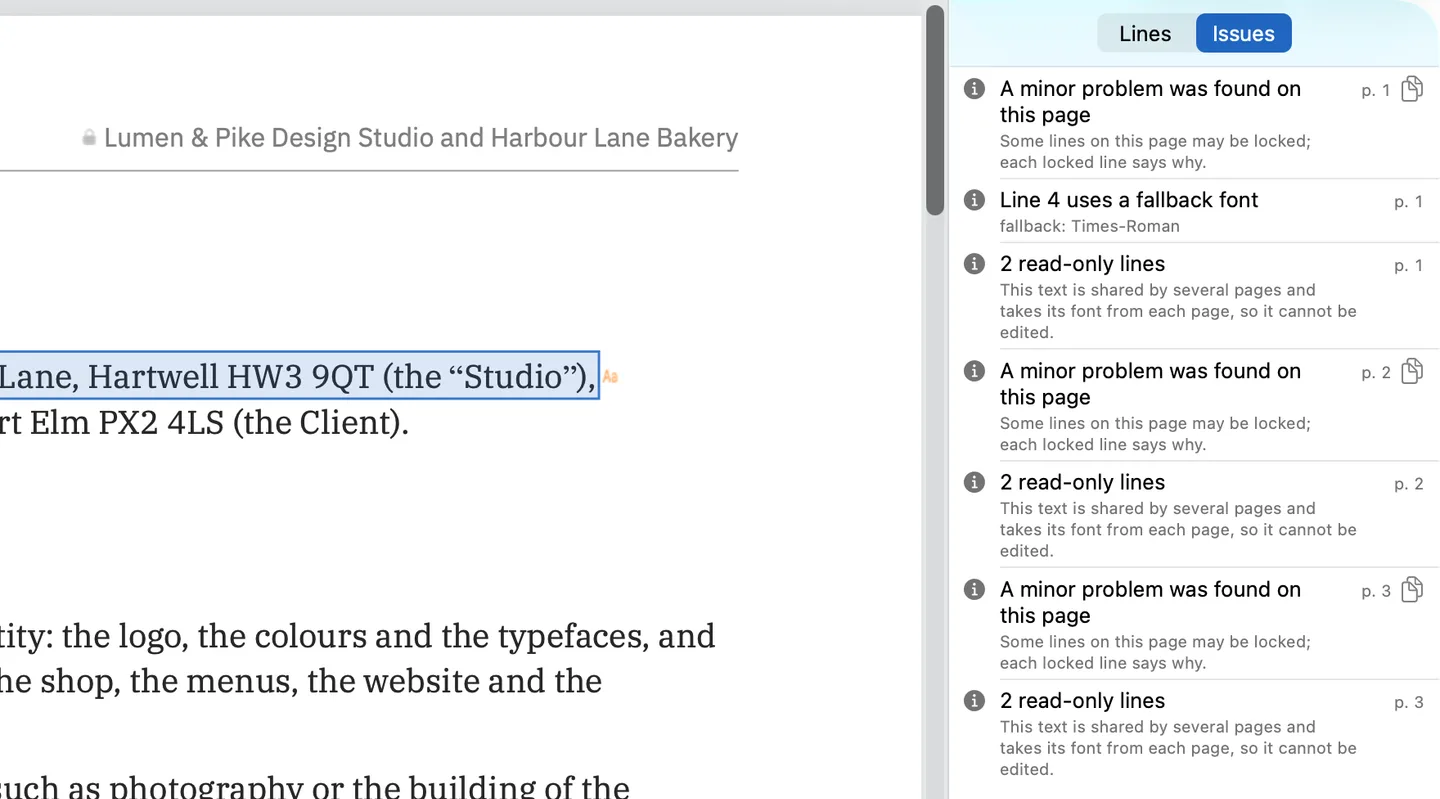
Two things happen before an edit is applied. First, the font: PDF Textfix writes with the font stored in the PDF. If you type a character that font lacks, it takes just that character from a fixed fallback order: a character already in the same font, another copy of the same face in the file, the same font on your Mac, then the closest standard font. The borrowed character is marked in orange or with an underline, and a character no font can draw is red and is not applied. Second, the check: every other character on the page must stay where it was, or the edit is refused and the bar says why. The Issues pane (⌥⌘I), in the screenshot above, lists what the app found: locked lines and the reason for each, fonts the file does not embed, and the fallback fonts your edits used.
What stays on your Mac?
With iLovePDF online, the file goes to its servers for the edit and comes back as a download. iLovePDF’s security page sets out its retention: “At iLovePDF, all files processed within our platform are automatically and permanently deleted within two hours of being processed.” It adds that you can delete files by hand from the download screen, and that “we retain signed documents for a maximum of 5 years in compliance with legal requirements.” Its privacy policy, last revised February 19, 2026, says the same two hours. Those are iLovePDF’s own terms; the guide is it safe to edit a PDF online? lists what to look for in any service’s terms before you upload a contract or an invoice.
iLovePDF also has a local option. Its desktop app is “Available for Mac and Windows”, and iLovePDF says it lets you “Enjoy the same features as the online service, while processing your files on your computer”. The desktop PDF reader is free; the desktop tools come with a subscription. The pages read do not say whether the desktop app changes existing text.
PDF Textfix never uploads your file. The app reads only the files you open and writes only where you save. The Mac App Store version has no account and goes online only to confirm a purchase. The version from this website has no account either. It checks pdftextfix.com for updates only when you allow it; with a licence, it also activates the licence online once on each Mac and checks it about once a week when online. The how-to on editing a PDF offline on a Mac covers working with no connection at all.
What do they cost?
iLovePDF’s free plan “gives you access to our core tools, perfect for light use. You can process a limited number of documents.” Premium offers unlimited processing and access across the web, mobile and desktop, billed monthly or yearly. On October 12, 2026 the website’s pricing page showed its prices in the reader’s local currency rather than US dollars, so that row of the table is “not verified”. In the US App Store, the iLovePDF app lists Premium as in-app purchases at US$5.49 a month and US$44.99 a year.
PDF Textfix is free to try. Your first 5 line edits save clean. After that, saved files carry a watermark until you buy once. The purchase is US$29.99 in the Mac App Store or a licence from this website, paid once, with no account. The pricing page lists each region’s price.
What does the iLovePDF desktop app add?
It brings the online tools to your computer. iLovePDF’s desktop page lists file format conversions to and from Office files and images, processing documents in bulk, converting to PDF/A for long-term archiving, password protection, and right-click conversions that run a tool on a PDF without opening the app. Its free PDF reader opens documents without an Internet connection. The desktop tools come with a subscription: the “Desktop Tools and Reader” card lists “All tools included”, “Unlimited document processing” and “Work on Web, Mobile and Desktop”, so the same Premium plan covers the website and the mobile apps too. The pages read do not say whether the desktop app changes existing text, so this page does not count on it.
PDF Textfix has no tool list to compare with that. It opens, edits, saves, prints and shares; it does not convert, compress, merge or protect files. What it does is the one job the iLovePDF desktop pages leave unclear: changing the text already on a page, on your Mac, in the file’s own font.
Which one fits the job?
iLovePDF fits a stream of mixed PDF tasks from any browser, phone or PC: merging, compressing, converting, signing, redacting, and quick edits where adding or moving text is part of the job.
PDF Textfix fits a finished PDF on your Mac with a wrong date, name or amount, corrected in the document’s own font, with no upload and no subscription. It needs macOS 26 or later on Apple silicon. Save (⌘S) writes the whole file again, without the replaced lines and with everything else copied as it was, unless the file was damaged; the app tells you when it repaired one. It is not a redaction tool; iLovePDF lists Redact PDF among its online tools. For the online tools side by side, see online PDF editors compared; for moving this one job off the web, see the iLovePDF alternative page.
Questions people ask
Can iLovePDF edit existing text in a PDF?
Yes. Its editor says “Select text to edit, move, or delete the existing content.” The pages read do not say which font it uses for the changed text.
How much is iLovePDF Premium?
In the US App Store on October 12, 2026, the iLovePDF app listed Premium at US$5.49 a month and US$44.99 a year. On the website the price is shown in your local currency.
How long does iLovePDF keep signed documents?
Up to five years. Its security page says “we retain signed documents for a maximum of 5 years in compliance with legal requirements”, while other processed files are deleted within two hours.
Does iLovePDF have a Mac app?
Yes, a desktop app for Mac and Windows, with a free PDF reader and a subscription for the desktop tools, plus mobile apps for iOS and Android.
Does iLovePDF have a limit on free use?
Yes: its pricing page says the free plan lets you “process a limited number of documents.” PDF Textfix is free to try. Your first 5 line edits save clean. After that, saved files carry a watermark until you buy once.
