
An iLovePDF alternative that works offline, for the job of changing text that is already in a PDF, is a Mac app that edits the file where it sits. PDF Textfix does that: you correct existing text a line at a time, with the fonts embedded in the document, every edit is checked before it is applied, nothing is uploaded, and you buy it once. It does not try to be a toolbox. Merging, splitting, compressing, converting and OCR are iLovePDF’s ground, and the list on this page names them. To compare the browser editors themselves, the comparison of online PDF editors puts iLovePDF next to Sejda, Smallpdf and PDFescape.
Why look for an offline iLovePDF alternative?
The online tools work on an uploaded copy. iLovePDF’s editor page says you can “Select text to edit, move, or delete the existing content,” and you do it in a browser on a file sent to its servers. Its security page states the retention: “At iLovePDF, all files processed within our platform are automatically and permanently deleted within two hours of being processed.” That is a clear policy; some people simply prefer that a contract, a lease or a CV never leaves their computer, whatever the policy.
Working offline means a subscription. iLovePDF answers the offline question itself with iLovePDF Desktop, which processes files on the computer and, in its words, offers “the same features as the online service”, the editor included. It is sold by subscription: “Stay with our Free PDF Reader or subscribe to iLovePDF Desktop”. The web service follows the same model: “The Free Plan gives you access to our core tools, perfect for light use. You can process a limited number of documents.” Beyond that, Premium is billed monthly or annually. For someone who corrects a few documents a year, a subscription for that is the question.
What does PDF Textfix do offline?
Everything it does with your files. Opening, editing, checking and saving happen on your Mac, and the app has no account. The Mac App Store version goes online only to confirm a purchase. The version from this website checks pdftextfix.com for updates only when you allow it; with a licence, it also goes online once on each Mac to activate it, and about once a week to check it. The app says what it does with your files in its own Help menu:
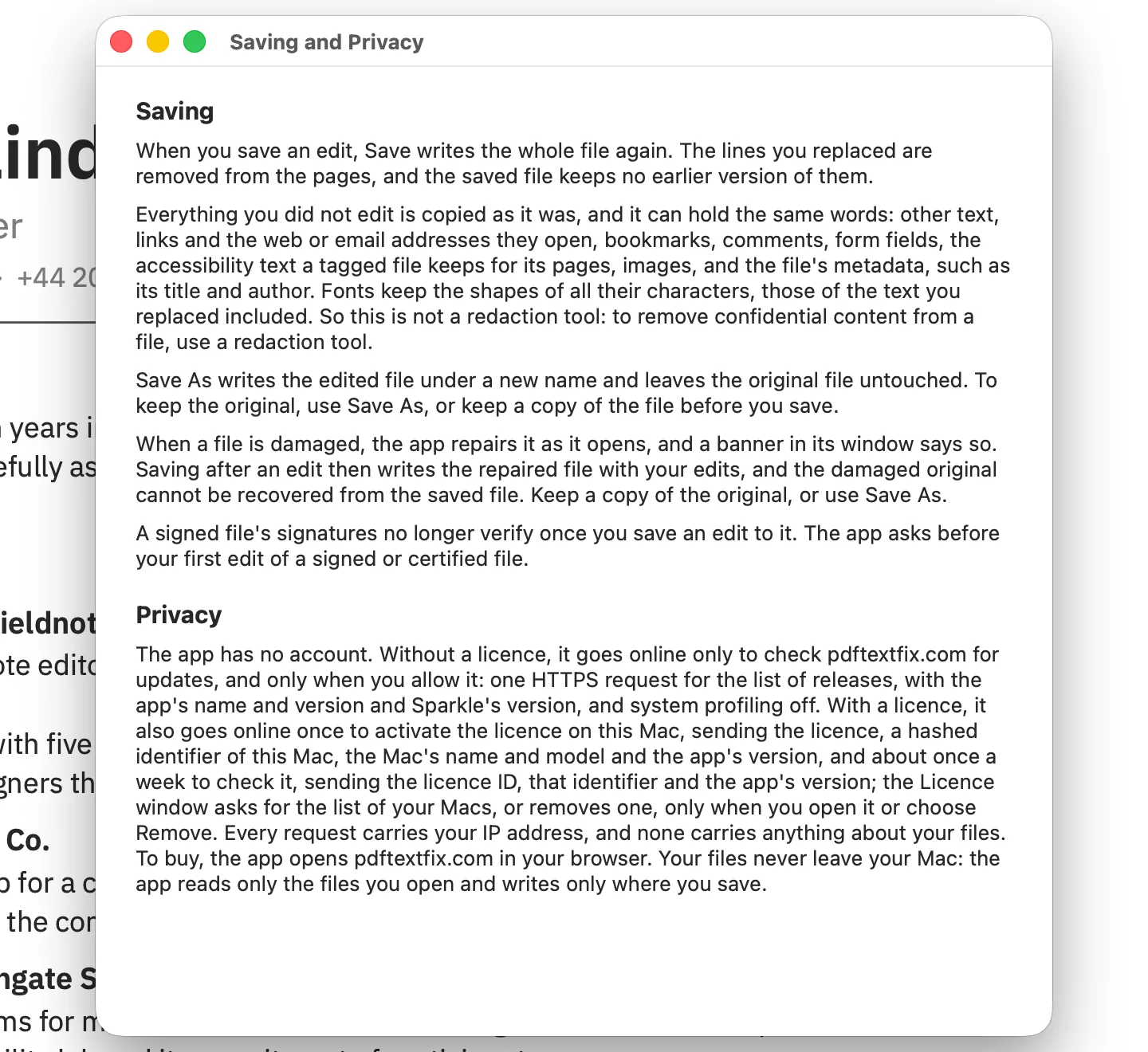
The edit: drop the PDF on the app or use File > Open (⌘O), double-click the line with the mistake, type, press Return. The walkthrough of editing PDF text on a Mac covers each step with screenshots.
The fonts: iLovePDF’s pages do not say which font an edited line uses when the document’s font lacks a character. PDF Textfix’s rule is fixed and visible: the correction is drawn with the font inside the PDF, and a character it lacks is borrowed in a set order and marked. The guide to keeping the same font explains the order.
You type é. The line’s own font has no é.
- Another copy of the same font in the file.
- The same font, installed on your Mac.
- The closest standard font.
The checks: before an edit is applied, the app makes sure every other character on the page keeps its place and look. If not, the edit is refused and the bar gives the reason. Saving (⌘S) writes a new file without the replaced text on the page, and the bar confirms “Saved and verified.”
How does iLovePDF Premium compare with paying once?
As printed on October 12, 2026:
| Topic | iLovePDF | PDF Textfix |
|---|---|---|
| Free | Core tools, a limited number of documents | Free to try. Your first 5 line edits save clean. After that, saved files carry a watermark until you buy once. |
| Paid | Premium, billed monthly or annually; iLovePDF Desktop by subscription | US$29.99 once in the Mac App Store, or US$29 once from this website |
| Where files go | Uploaded and deleted within two hours, or processed by the desktop app | Never leave your Mac |
iLovePDF shows its prices in the visitor’s own currency, so check the pricing page from where you are. PDF Textfix’s prices for the EU, Romania and the UK are on the pricing page, and the roundup of PDF editors without a subscription lists other one-time options.
Do you need to move anything from iLovePDF?
No. iLovePDF hands you back an ordinary PDF, and PDF Textfix opens any PDF on your Mac without importing it. There is nothing to export from an account, because PDF Textfix has none. If you keep files in a cloud folder that syncs to your Mac, PDF Textfix opens them from there like any other file.
If you use iLovePDF Desktop, your files are already on the Mac, so the two apps can work on the same folder: PDF Textfix for line corrections, iLovePDF for merging, splitting and converting. Two things to know when they share files:
- Scans you ran through iLovePDF’s OCR keep the recognized text in a hidden layer over a picture of the page; PDF Textfix locks those lines and says why.
- Files you compressed or repaired open like any other PDF. When PDF Textfix saves an edit, it writes the whole file again and leaves out parts nothing uses any more, so a saved file can come out a different size.
Use File > Save As (⇧⌘S) to keep an untouched original; Save replaces the file, and nothing is saved automatically.
Does PDF Textfix fit how you work?
Likely yes when:
- the task is fixing words already in a PDF, not reshaping the document;
- you want the file to stay on your Mac;
- you use a Mac with Apple silicon on macOS 26 or later;
- you prefer to pay once.
For anything in the list of what you would still need iLovePDF for, keep it alongside. Every fact is in the side-by-side comparison, and the guide to editing a PDF offline on a Mac covers the offline options more broadly.
Questions people ask
Is there an iLovePDF alternative that works locally?
Yes. iLovePDF’s own Desktop app processes files on your computer, by subscription. PDF Textfix is another for the one job of changing text: opening, editing and saving all happen on your Mac, and it is bought once.
Is there an open-source alternative to iLovePDF?
PDF Textfix is not open-source software. For the toolbox side of iLovePDF, open-source command-line programs such as qpdf and mutool work on PDFs locally; the comparison with command-line tools sets out what they can and cannot do to the text.
Does it need an internet connection at all?
Not to edit: every edit and every save happens on your Mac. The version from this website needs a connection once on each Mac to activate a licence, then checks the licence about once a week when online, and checks for updates only when you allow it; the Mac App Store version goes online only to confirm a purchase.
