
A PDFescape alternative for real text edits on a Mac is an app that changes the words already printed in the PDF, rather than covering them and typing on top. PDF Textfix does that: it edits the existing text of any PDF one line at a time with the document’s own embedded fonts, checks every edit before applying it, works offline, and is bought once. It is not a form designer or an annotation tool, and it has no browser version, so PDFescape stays useful for those. To compare PDFescape with the other browser editors instead, see the comparison of online PDF editors.
Why look for a PDFescape alternative on a Mac?
Its online editors add text rather than change it. The free editor’s feature list reads “Add text, shapes, whiteout & more to PDF files.” PDFescape Online, the browser application that comes with a PDFescape plan, has a help article on text that is specific: “You can only modify text added with PDFescape. To edit text made with another program, please use PDFescape Desktop.” A typo in a PDF exported from Word or an accounting app is text made with another program.
The desktop editor is for Windows. PDFescape Desktop is the version that edits original text: it “makes it easy to change the existing text & images in your PDF, change fonts or colors”. It comes with the paid plans, “for advanced PDF editing functionality on your Windows® PC.” PDFescape’s answer for Mac users names the condition and the limit: “With a PDFescape plan, you also gain access to the PDFescape Online version. This is our new browser-based application, providing most of the functionality available in PDFescape Desktop.” It then adds: “PDFescape Desktop is a Windows application. We currently do not have a downloadable macOS product.”
It runs in a browser. “Completely online, PDFescape requires no more than a modern internet browser and an active internet connection.” The free plan holds files of up to 10 MB and keeps 10 stored files and 7 days of history. That suits filling a form; it is less suited to a document you would rather not upload.
Covering the old text versus replacing it
When an editor cannot change the original words, covering them is the technique it offers: a white box over the mistake and the correction typed on top. PDFescape’s free editor lists whiteout among its tools, in the sentence quoted above. On screen the result can look right. But the original words are still in the file underneath: a search can find them, they can be selected and copied, they reappear if the box is moved, and the new words sit on a separate layer, often in another font. The guide to whiting out text in a PDF explains when covering is the right tool and when it is not, and redaction versus editing covers removing content properly.
PDF Textfix replaces the characters themselves. Open the PDF (⌘O), double-click the line, type, and press Return:
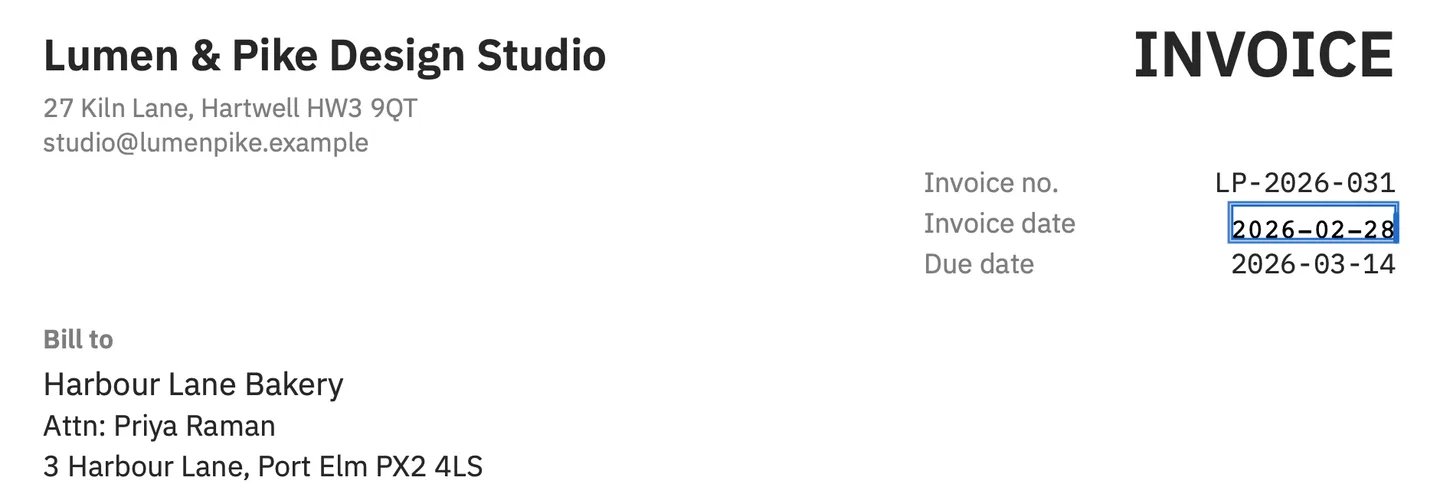
The new text is written into the page with the font the document embeds, in place of the old, and when you save (⌘S) the file is written again with the replaced text gone from the page. Nothing is drawn on top, so selecting, copying or searching the line finds the new words. Removing words from the page is not redaction, though: the same words can remain elsewhere in the file, such as in bookmarks, comments or its metadata, and the app says so in Help > Saving and Privacy.
What happens when the font is missing a letter?
PDFs usually embed only the characters they use, so a correction can need a letter the file never had. PDF Textfix keeps the line in the document’s font and fetches only the missing character, trying in turn another copy of the same font inside the PDF, the same font installed on the Mac, and the closest standard font. A character from elsewhere is marked in orange while you type, so you decide whether the result is acceptable before applying it.
You type é. The line’s own font has no é.
- Another copy of the same font in the file.
- The same font, installed on your Mac.
- The closest standard font.
Each edit is also checked against the rest of the page: if any other character would move or change, the edit is refused with the reason. Some lines cannot be edited at all, such as form fields, comments and the text layer of a scan, and each says why.
How do PDFescape’s plans compare with paying once?
As printed on October 12, 2026:
| Topic | PDFescape | PDF Textfix |
|---|---|---|
| Paid | Two plans with PDFescape Desktop for Windows and PDFescape Online: $2.99/month billed yearly or $5.99/month billed monthly; $5.99/month billed yearly or $8.99/month billed monthly | US$29.99 once in the Mac App Store, or US$29 once from this website |
| Existing text on a Mac | PDFescape Online, with a plan: text added with PDFescape only | Any editable line |
The PDF Textfix prices in euros and pounds are on the pricing page. The roundup of PDF editors without a subscription compares the one-time licenses on the Mac.
Is there anything to carry over from PDFescape?
Download any PDFs you keep in PDFescape’s online storage; after that they are ordinary files, and PDF Textfix opens them from wherever they are on your Mac. Text you added in PDFescape stays in the file; if it was added as an annotation, it is locked in PDF Textfix, as comments are. Where you covered a mistake with whiteout, the original words are still underneath, so open the file you started from and correct the line itself. Use File > Save As (⇧⌘S) to keep an original, because Save replaces the file and nothing is saved automatically.
Should you switch? A checklist
PDF Textfix suits you if:
- you need to change words that came with the PDF, not just add new ones;
- you work on a Mac with Apple silicon and macOS 26 or later;
- you would rather not upload the document;
- a one-time price works better for you than a monthly one.
For anything in the list of what you would still need PDFescape for, keep it alongside. The side-by-side facts give the source for each point, and the guide to editing PDF text on a Mac shows the full process.
Questions people ask
Is there a free PDFescape alternative online?
PDF Textfix is not one: it is a Mac app with no browser version. For free editors that run in a browser, the comparison of online PDF editors sets out what each one lets you change, in the vendors’ own words.
Is there a free PDFescape alternative for Mac?
For changing the words already in a PDF on a Mac, PDF Textfix is one option. Free to try. Your first 5 line edits save clean. After that, saved files carry a watermark until you buy once. The roundup of free PDF editors for Mac lists the others, with what each leaves out.
