
PDFescape’s free online editor works on top of a page. Its feature list says it can “Add text, shapes, whiteout & more to PDF files”, so the usual free fix for a wrong word is to cover it with a white box and type the right word over it. Changing the text that is already there is a different feature: PDFescape lists “Edit existing text & images” under the Premium features of PDFescape Desktop, which runs on Windows. PDF Textfix is a Mac app that does only that second job. It replaces the words of a line inside the page, in the font the document already uses, and when you save, the replaced words are gone from the page instead of hidden under a box.
What does PDFescape’s free editor do?
PDFescape calls itself a free online PDF reader, editor, form filler and form designer. You upload a file to the website and work on it in the browser. The free tools include adding text, shapes, images and whiteout, annotating with highlights and sticky notes, filling and designing forms, and moving, inserting or deleting pages. The free plan has limits printed on the Premium page: files up to 10 Mb, 10 stored files, and 7 days of recent file history. Avanquest says the free service puts no logo or watermark on your file.
For a form to fill or a page to annotate, that is a lot of tool for no money. The question this page answers is narrower. What happens when the thing you need to change is a word that is already printed on the page?
Can PDFescape edit existing text?
Its own pages answer in two ways. The feature list puts “Edit existing text & images” in the Premium Desktop column, and the plan comparison marks that row for Premium and Ultimate but not for Free. The home page’s FAQ, on the other hand, describes using the online Text tool this way: “Click on the document where you want to insert or delete existing text and wait for your cursor to appear.”
The pages do not say whether the online tool changes the text the page draws or adds new text over it, and they do not say which font the result uses. This comparison did not test it, because a test means uploading a document to the service. The table above marks those questions as the vendor’s words or as not verified, and leaves it there.
What is clear from the vendor’s pages is where the editing of existing text lives: in the desktop app, which the home page lists for “Windows 11, 10, 8, & 7”. There is no PDFescape Desktop for the Mac on the pages read, so on a Mac the online editor is the PDFescape you can use.
Is whiteout the same as deleting the text?
No, and the difference matters more than it looks. Whiteout, in any editor, means drawing a white shape over the page. Unless the editor also removes what is underneath, the words are still part of the page: a search inside the PDF can find them, and selecting the area can copy them out. If someone moves or deletes the white box, the old text shows again. The guide to whiting out, covering or deleting text shows how to check what a cover leaves behind.
PDF Textfix does not cover anything. When you change a line, it rewrites the part of the page that draws that line. Save (⌘S) then writes the whole file again, and the words you replaced are removed from the page. The saved file keeps no earlier version of them. Everything you did not edit is copied as it was, unless the file was damaged; the app tells you when it repaired one. The status bar confirms each save with “Saved and verified.”
Removing words from the page is still not redaction. The same words can remain in a bookmark, a link, the file’s properties or a comment, and PDF Textfix leaves those alone. PDFescape lists redaction among its Ultimate desktop features, and the plan comparison on its Premium page marks it for Ultimate only. For confidential content, use a redaction tool; Help > Saving and Privacy in PDF Textfix lists what a saved file can still hold.
What happens to the font?
This is where a cover and a replacement look most different. Text typed over a whiteout box is new text in a font the editor picks, and the PDFescape pages read do not say which font that is or whether the document’s own font is kept. The row is marked not verified.
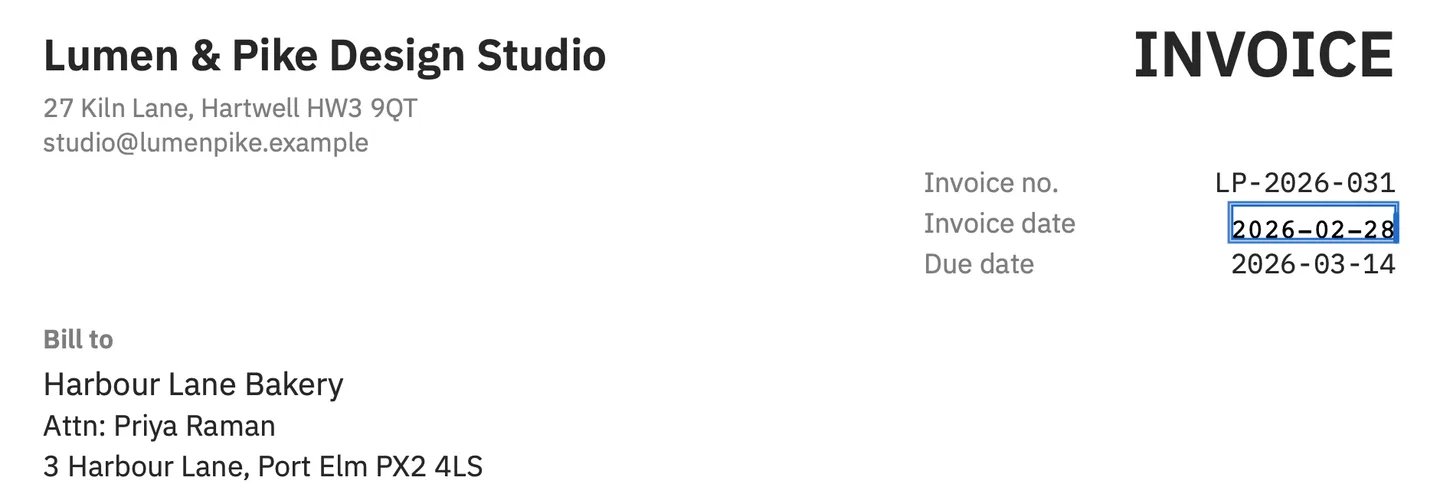
PDF Textfix writes your correction with the font embedded in the PDF, which often holds only the characters the document uses. In the screenshot above, the demo invoice’s date is corrected in its own monospaced font, and the rest of the line does not move. When you type a character the embedded font lacks, the app looks for it in a fixed order: the same font, another copy of the same face in the document, the same font installed on your Mac, then the closest standard font. A character drawn by a fallback font turns orange while you type, so you see it before you apply the edit.
Before applying any edit, PDF Textfix checks that every other character on the page stays where it was. If a check fails, the edit is refused with the reason and the file stays as it was. Some lines are locked and say why, such as text in a form field, a comment or the hidden text layer of a scan.
How can you tell whether an edit covered the text or replaced it?
Check the saved file, not the screen. Whatever editor you used, download or save the result, then open it in another viewer, such as Preview on a Mac:
- Press ⌘F and search for the old words. If the search finds them, they are still in the page, whatever the page shows.
- Drag across the corrected spot, copy, and paste into a plain text note. If the pasted text holds the old words, they are still there under the new ones.
- Look at the spot at high zoom. A white box can show its edge against a tinted background or a line of a table.
This test needs no upload and works on any PDF. It is also how to check a file PDF Textfix saved: on the line you edited, the search finds only the new words, unless the same old words appear elsewhere on the page. The guide to whiting out, covering or deleting text compares the methods in more detail.
Which one runs where?
PDFescape Online needs a browser and an internet connection, and your file goes to its servers. PDFescape Desktop is a Windows program. PDF Textfix runs on macOS 26 or later on a Mac with Apple silicon, and opens the file from your disk. The Mac App Store version goes online only to confirm a purchase. The version from this website checks for updates only if you allow it, activates a licence online once on each Mac, and checks the licence about once a week when online. Nothing you edit leaves your Mac.
What does each one cost?
PDFescape Online is free, with the limits above and no watermark. The Premium and Ultimate plans show a “Get Pricing!” button instead of a price on the pages read on October 12, 2026, so this page prints none. Avanquest offers Premium, including the desktop app, as a free 7-day trial.
PDF Textfix is a one-time purchase with no subscription and no account; the pricing page lists the price for each region. The sample documents in the Help menu are there to try the editor on before you use it on your own files.
Which one should you use?
Use PDFescape when you are on a computer that is not a Mac, when you need to fill or build a form, or when a white box over a word is enough, for example on a printout. Its free plan does a wide range of jobs.
Use PDF Textfix when the PDF is your own finished document and one line in it is wrong: a date, a name, an amount, a typo. It changes the words themselves, keeps the document’s font, and does not leave the old words under a box. The PDFescape alternative page covers moving that one job to a Mac, and the comparison of online PDF editors puts PDFescape next to the other web tools.
Questions people ask
Is PDFescape free?
The online editor is. Avanquest’s Premium page says: “No logo, watermark, or other tag is added to your file.” The free plan limits files to 10 Mb and stores up to 10 of them. Premium and Ultimate cost money; their price was not printed on the pages read.
Does PDFescape work on a Mac?
The online editor works in a browser on any computer, including a Mac. PDFescape Desktop, where existing-text editing is listed, is for Windows.
Does whiteout remove the text underneath?
Not by itself. A whiteout box is drawn on top, and unless the editor also removes what is underneath, the words stay in the page, where a search can find them. PDFescape’s pages do not say which its whiteout does, and this page did not test it; the check above shows how to find out on your own saved file.
Does PDF Textfix work in a browser?
No. It is a Mac app for macOS 26 or later on Apple silicon, and it works on files on your Mac without uploading them.
