
If what you need from Smallpdf is to change the text already in your PDFs, and you would rather not upload them or pay for Pro to do it, PDF Textfix is a Mac app that does that job offline. It corrects existing text one line at a time with the fonts inside the file, checks each edit before applying it, and is bought once; even its free version edits existing text. It is not a toolbox: conversion, compression, signing and team features stay with Smallpdf or another service. If you would rather stay in a browser, the comparison of online PDF editors sets Smallpdf next to Sejda, iLovePDF and PDFescape.
Why do people look for a Smallpdf alternative?
Changing existing text is a Pro feature. Smallpdf says it plainly on its editor page: “Direct PDF text editing requires a Pro subscription, which you can try with a 7-day free trial.” The free account covers other things: “With a free account, you can add text, images, highlights, and drawings to your PDFs, as well as organize your documents.” So a free user who needs to fix a misspelled name can type new text over the page but not change the word that is there.
The work happens on an uploaded copy. Smallpdf is an online service, and its privacy notice describes what happens to files: “If you access our services via a User Account, we delete User Files within one hour unless you save them to your file storage.” There is no current Mac app to keep files local; the Smallpdf macOS App page reads “Not supported as of October 1, 2021”. For someone who would rather keep a contract, a lease or a CV off any server, that settles it.
Pro is a subscription. The pricing page fills in its prices for each visitor. Read from outside the United States with yearly billing selected, Pro showed “USD 9.00 /month”, “Billed as USD 108.00/year”, so check the page from where you are. A canceled trial “will be automatically downgraded to the free plan when the 7-day period expires.”
What does PDF Textfix do instead?
It edits the PDF on your Mac. Nothing is uploaded, there is no account, and the version from the Mac App Store goes online only to confirm a purchase. The version from this website goes online once on each Mac to activate a licence, about once a week to check it, and to check for updates only when you allow it.
The edit itself is short, and the free version does it too, which is the part Smallpdf keeps for Pro. Open the file (⌘O, or drop it on the app’s icon in the Dock), select the line and press Return, type the correction, press Return again. PDF Textfix writes with the font embedded in the PDF; a character that font lacks is borrowed in a fixed order and marked, so the rest of the line never switches typeface. The guide to keeping the same font explains the order.
You type é. The line’s own font has no é.
- Another copy of the same font in the file.
- The same font, installed on your Mac.
- The closest standard font.
Before an edit is applied, PDF Textfix checks that no other character on the page would move or change. If one would, it refuses the edit and says why, and the file stays as it was. Saving (⌘S) writes the file again without the text you replaced on the page, and the bar confirms “Saved and verified.”
How does the free version work, and how does Smallpdf Pro compare?
The free version of PDF Textfix edits existing text from the first launch, with no trial clock and no account. Free to try. Your first 5 line edits save clean. After that, saved files carry a watermark until you buy once. When the allowance is used, the app asks before it writes anything:
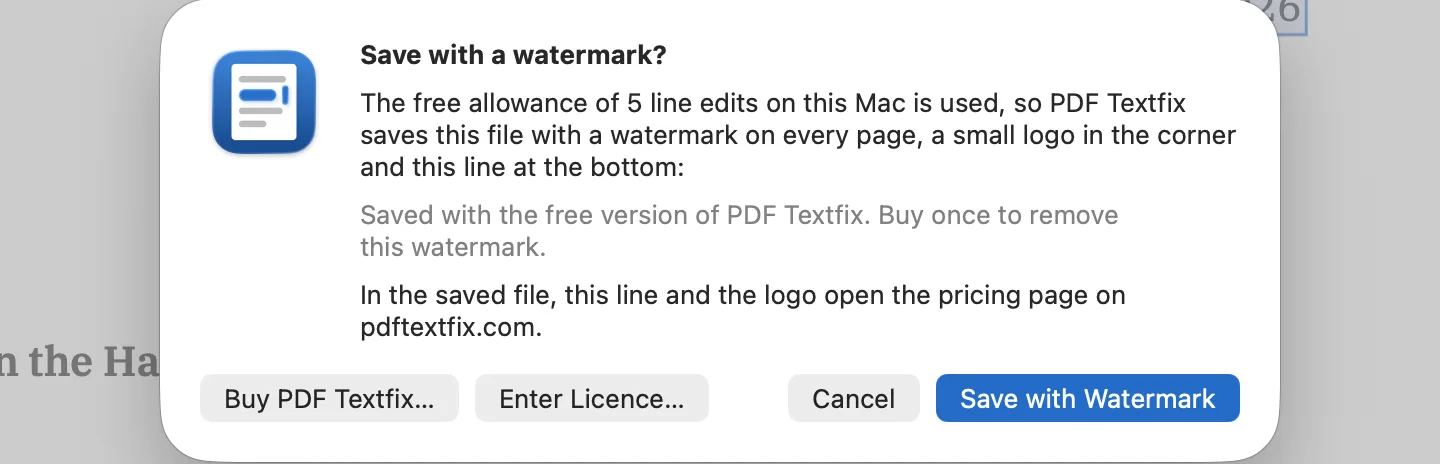
The sample documents in Help > Open Sample PDF never count. After you buy, open a file the free version watermarked and save it: the app removes its own watermark. File > Remove Watermark does the same.
As printed on October 12, 2026:
| Topic | Smallpdf | PDF Textfix |
|---|---|---|
| Editing existing text | Pro, USD 9.00 /month billed as USD 108.00/year (as shown outside the US), after a 7-day free trial | In the free version too, within the allowance above |
| Model | Subscription, yearly or monthly | One-time: US$29.99 in the Mac App Store, US$29 from this website |
| Where the file is edited | Uploaded; deleted within one hour unless saved to your storage (with a user account) | On your Mac; nothing is uploaded |
Regional prices for PDF Textfix are on the pricing page; the roundup of PDF editors without a subscription covers other one-time options.
Is there anything to move from Smallpdf?
Only your files, and only if they live in Smallpdf’s storage: download them to your Mac first. A downloaded PDF opens in PDF Textfix like any other. There are no projects, settings or account history to transfer.
A few kinds of file behave differently:
- Documents signed through Smallpdf’s e-signing. Editing a signed file and saving it means its signatures no longer verify, and PDF Textfix says so on a sheet before the first edit is applied. Keep the signed original with File > Save As (⇧⌘S) for the edited copy.
- Scans you ran through Smallpdf’s OCR. The recognized text sits in a hidden layer over a picture of the page; PDF Textfix locks those lines and says why.
- Text you added with the free account. If it was added as an annotation, it stays as it is, with its text locked, as comments are.
Keep the original with File > Save As (⇧⌘S) whenever you might need it, because Save replaces the file and the app has no autosave. For working without a connection in general, the guide to editing a PDF offline on a Mac covers the options.
Is the switch right for you?
It is if:
- you mostly fix text already in your PDFs: a date, a name, a figure;
- you would rather not upload documents;
- you use a Mac with Apple silicon and macOS 26 or later;
- you prefer a single payment to a subscription.
For anything in the list of what you would still need Smallpdf for, keep it alongside. The side-by-side facts cite each point, and the guide to editing PDF text on a Mac shows the whole process.
Questions people ask
Is there a free Smallpdf alternative for editing text?
Free online editors differ in whether they change existing text; the comparison of online PDF editors quotes what each one’s free plan allows. PDF Textfix edits existing text in its free version, within the allowance described above, and works on your Mac rather than on an upload.
Does the watermark appear on every page?
After the free line edits are used, yes: saved files carry it on every page, as faint diagonal text, a small logo in the corner and a line at the bottom saying the file was saved with the free version. The line and the logo open the pricing page, or PDF Textfix on the Mac App Store in the Mac App Store version. Once you buy, saving such a file again in PDF Textfix removes the watermark.
