
Yes, Smallpdf can change existing text, but only on its paid plan. Its edit page says: “Direct PDF text editing requires a Pro subscription, which you can try with a 7-day free trial.” A free account can add new text, images, highlights and drawings, and organize pages. Smallpdf works in the browser, so the file is uploaded; its privacy notice says signed-in users’ files are deleted within one hour unless saved. PDF Textfix is a Mac app that changes existing text from the first edit of its free version, in the font inside the file, and uploads nothing. It is free to try. Your first 5 line edits save clean. After that, saved files carry a watermark until you buy once.
Can Smallpdf edit existing text for free?
No. The free account covers additions: “With a free account, you can add text, images, highlights, and drawings to your PDFs, as well as organize your documents.” Changing the words that are already there is a Pro feature, and the edit page repeats it in its answer about modifying text: “direct text editing is a feature available with a Pro subscription, which includes a 7-day free trial.”
The trial is easy to leave. Smallpdf’s pricing page says: “If you cancel the free trial, your account will be automatically downgraded to the free plan when the 7-day period expires.” Its plans are Free, Pro and Team, billed yearly or monthly. On the website, the prices load in the browser by country, and this page could not read a US price there on October 12, 2026, so that row of the table is “not verified”. In the US App Store, Smallpdf’s iPhone and iPad app lists its plans as in-app purchases from US$7.99 to US$14.99 a month and from US$49.99 to US$119.99 a year; the listing does not say which plan each price buys.
PDF Textfix changes existing text in the free version, from the first edit. It is free to try. Your first 5 line edits save clean. After that, saved files carry a watermark until you buy once. That is enough to correct a date and a name and send the file. The purchase is US$29.99 in the Mac App Store, or a licence from this website, with no subscription and no account. The pricing page has each region’s price.
How does editing text work in each?
In Smallpdf, you upload the PDF, open the “Edit Text” tab, select the text and type, per its own description. Around that sit many other tools: compress, merge, convert, sign, OCR and more. The pages read do not say which font Smallpdf writes with when you change existing text, so the table marks that row “not verified”; Smallpdf was not tested for this page.
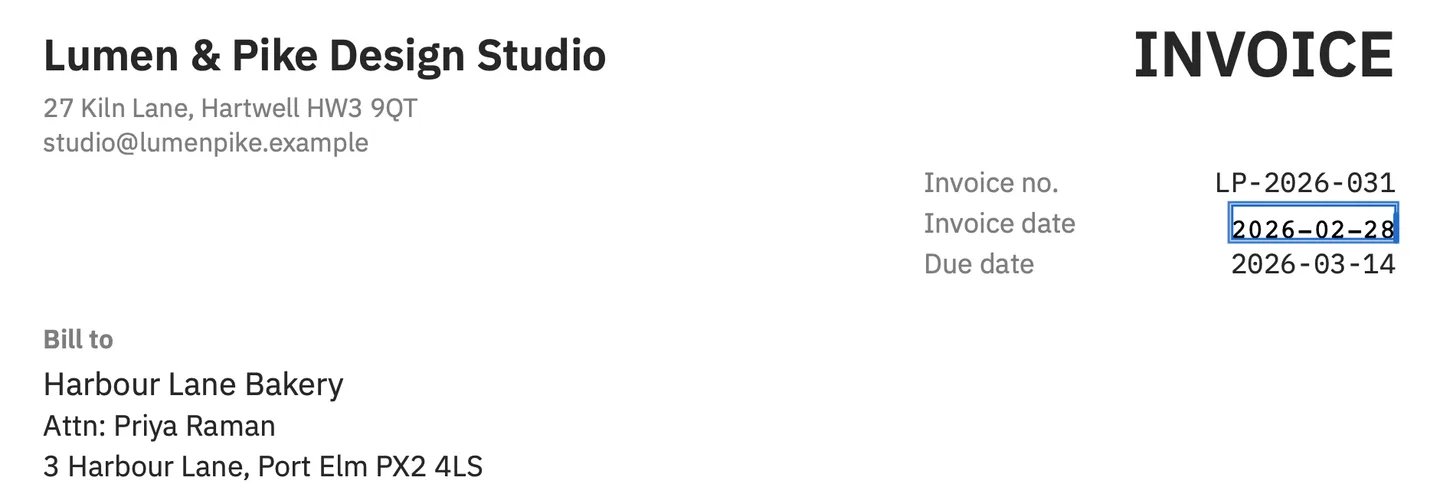
In PDF Textfix, you open the PDF on your Mac, select a line and press Return, or double-click it. An editor opens over the line in the line’s own font, and the bar under it names that font and its size. Type the change and press Return to apply it, or Escape to cancel; Tab applies and moves to the next line. The screenshot above shows the result on the demo invoice: the invoice date corrected in its own monospaced font, the lines around it untouched.
Before applying the edit, PDF Textfix checks that every other character on the page stays where it was. When a longer edit would run into the text after it, the rest of the line moves to make room and the bar says so; Keep Following Text in Place puts it back. A failed check refuses the edit and says why. If you type a character the line’s font lacks, PDF Textfix looks for it in a fixed order: a character already in the same font, another copy of the same face in the file, the same font on your Mac, then the closest standard font. It marks the borrowed character in orange or with an underline while you type, so you see every substitution before you apply it. The how-to on changing text in a PDF compares the four ways to do it.
Where does the file go, and for how long?
Smallpdf runs on its servers, so the PDF is uploaded to be edited. Its privacy notice, last updated July 29, 2025, sets out what happens to it. For signed-in users: “If you access our services via a User Account, we delete User Files within one hour unless you save them to your file storage.” Without an account: “we will generally aim to delete User Files within a reasonable period of time after the last time they were opened”, and that period starts again each time the file is reopened. Those are Smallpdf’s own terms; whether they fit a given document is for you to decide, and the guide is it safe to edit a PDF online? lists what to check.
PDF Textfix does not upload. The Mac App Store version goes online only to confirm a purchase. The version from this website checks pdftextfix.com for updates only when you allow it; with a licence, it also goes online once on each Mac to activate it, and about once a week to check it. Neither has an account. The app reads only the files you open and writes only where you save.
Does Smallpdf have a Mac app?
Not a current one. Smallpdf’s macOS app page still describes “All the PDF tools you already love—completely offline”, and beside its download button it says: “Not supported as of October 1, 2021”. Its current desktop app is for Windows: “Get offline access to all the PDF tools you love for Windows.” On a Mac, Smallpdf is used in the browser.
PDF Textfix is a native Mac app for macOS 26 or later on Apple silicon, with the Mac’s own keyboard shortcuts, dark mode, Undo and Redo for every edit, and File > Revert to Saved.
What does the Smallpdf free plan limit?
Downloads, mostly. Smallpdf’s pricing page gives the free plan “30+ document management tools” with “Limited document downloads”, and its plan table marks tools such as Word, Excel and PowerPoint conversion, PDF OCR and merging with “Daily download limit” on the free plan. Pro lists “Unlimited document downloads” and “Edit Text, OCR, and more…”. The page does not say how many downloads a day the free plan allows, so this page gives no number.
So on the free plan you can add text to a PDF, and download a limited number of results; changing the existing text needs Pro or its trial. PDF Textfix has no download or task limit: it opens, edits and saves any number of files on your Mac.
Which one should you use?
Smallpdf suits a mix of quick jobs on any computer with a browser: compressing, merging, converting, signing, and, with Pro, editing text. Its OCR turns scans into editable text, which PDF Textfix does not do; the guide to editing text in a scanned PDF explains why.
PDF Textfix suits one job on a Mac: a finished PDF of your own with a wrong word, date or number, fixed in the document’s own font without uploading the file or starting a subscription. Its Save writes the whole file again, without the replaced lines and with everything else copied as it was, unless the file was damaged; the app tells you when it repaired one. For other options, online PDF editors compared sets Smallpdf beside Sejda, iLovePDF and PDFescape, free PDF editors for Mac covers what free versions leave out, and the Smallpdf alternative page covers moving text fixes offline.
Questions people ask
How much does Smallpdf cost?
On its website the price depends on your country. In the US App Store on October 12, 2026, its iPhone and iPad app listed plans from US$7.99 to US$14.99 a month and from US$49.99 to US$119.99 a year. Changing existing text needs Pro, which has a 7-day free trial.
Does Smallpdf delete uploaded files?
Its privacy notice says signed-in users’ files are deleted within one hour unless saved to its file storage, and that files of users without an account are deleted within a reasonable period after they were last opened.
Does Smallpdf work offline?
On Windows, its desktop app offers offline tools. On a Mac, Smallpdf runs in the browser and needs a connection, since its macOS app is no longer supported. PDF Textfix edits without one; the version from this website needs one once on each Mac to activate a licence.
How does Smallpdf compare with iLovePDF?
The comparison of online PDF editors sets Smallpdf beside iLovePDF, Sejda and PDFescape, and the iLovePDF comparison puts iLovePDF next to PDF Textfix on the same points as this page.
Can Smallpdf edit the text of a scanned PDF?
Smallpdf says its OCR tool converts a scan to editable text, which its editor can then change. That text is recognized from the picture, so read it line by line before you rely on it. PDF Textfix does not edit scanned pages, and it keeps the hidden text layer that OCR adds read-only; editing text in a scanned PDF covers the other routes.
Is there a Smallpdf app for Mac?
Not one that is supported: its macOS app page says the app is not supported as of October 1, 2021. Its current desktop app is for Windows, with offline tools, so on a Mac Smallpdf runs in the browser.
