
PDF Expert, from Readdle, is a full PDF editor for the Mac, iPhone and iPad: it edits text, images and links, annotates, signs, converts and recognizes scanned text. PDF Textfix does one of those jobs. It changes text that is already on a page, a line at a time, in the font inside the document, and checks each edit before applying it. The difference that matters most for a text correction is the font: Readdle’s help says PDF Expert’s Mac app “supports Apple standard fonts only”, while PDF Textfix writes with the font the file carries. On price, PDF Expert’s lifetime plan is US$139.99 for the Mac only; PDF Textfix is US$29.99 once in the Mac App Store. The rest of this page goes through each difference and says when each app is the better buy.
Can PDF Expert edit the existing text in a PDF?
Yes. In Edit mode you click a block of text and type. Readdle’s help describes it plainly: “Click a paragraph to edit the text in it. PDF Expert uses an intelligent mechanism to detect paragraphs.” To change only one line, you hold Option and click it. You can also add new text blocks, choose a font, size, alignment and color in the sidebar, and drag blocks to another place on the page. That makes PDF Expert a general text editor for PDFs: you can rewrite a paragraph, restyle it, or put words where there were none.
PDF Textfix has no paragraph mode and no text boxes. You open a line, double-click it or select it and press Return, type the correction and press Return again. Escape cancels. Tab applies the edit and moves to the next line, where Return opens the editor again, so a run of fixes stays on the keyboard. Edit > Find > Find Line… (⌘F) goes straight to any line that holds a word, and the Lines pane (⌥⌘L) lists every line of the pages on screen. The trade is deliberate: a line edit cannot move the words around it, so the check described below can prove that nothing else on the page changed.
Does PDF Expert keep the original font when you edit?
Readdle’s troubleshooting page for the Mac answers in one sentence: “Our app supports Apple standard fonts only - thus, if the font used in the file is not on the list, it’s most probably because it’s a custom font.” Its fix is to find the font’s name, download the font, and add it with Font Book. A second help page describes the symptom: “If the fonts do not display correctly, look garbled, or change to another font while editing, this might be because the font is not supported by the system and thus by our app.”
So with PDF Expert, keeping the look of a line depends on the fonts installed on your Mac. Many PDFs are made with fonts you do not have: a company typeface, a font from a design app, a font bundled with the software that wrote an invoice. Installing them is possible when you can find them and are allowed to install them, and some of them you cannot.
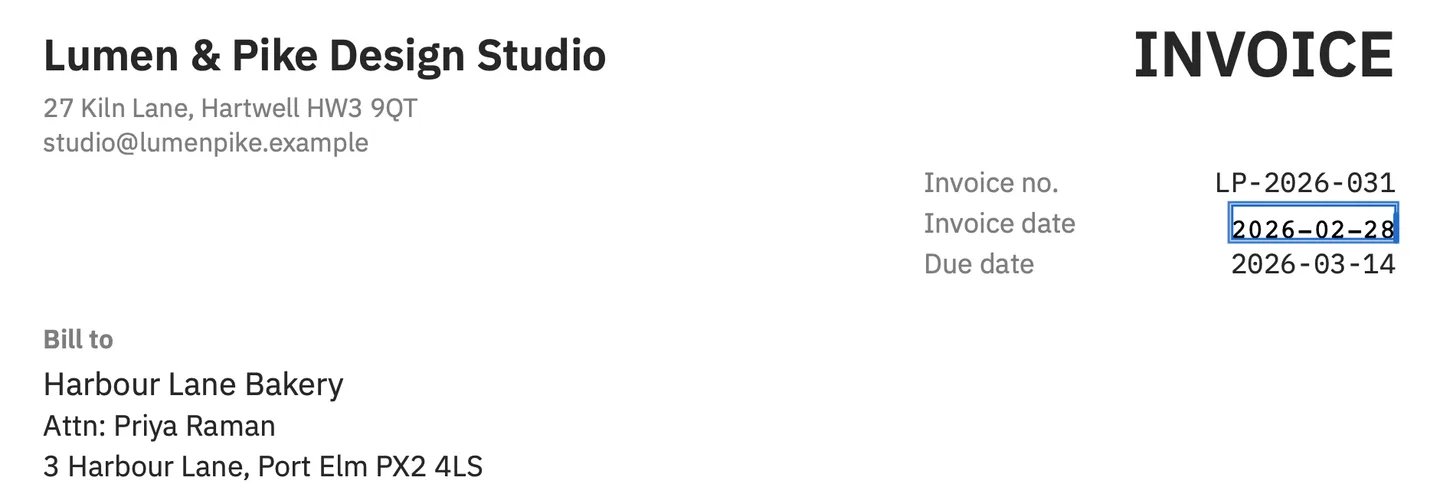
PDF Textfix starts from the other end. The font is usually already in the file, as an embedded subset holding the characters the document uses, and PDF Textfix writes your correction with it. The invoice in the screenshot above shows the result: the date corrected in the invoice’s own monospaced font. When you type a character the subset lacks, the app looks for it in a fixed order: a character already in the same font, another copy of the same face in the document, the same font installed on your Mac, then the closest standard font. It marks each borrowed character while you type: orange when it comes from a fallback font, underlined when it comes from another copy of the line’s font, and red when no font can draw it, with the reason and, where one exists, a suggested replacement (⌃⌘U). The editor bar names the line’s font and size, such as “Font: Helvetica (embedded subset), 11 pt”. The fonts already in the file are never modified; glyphs a fallback adds go into a new font that only the inserted text uses.
The guide on why editing a PDF changes the font explains why subsets cause this, and the comparison of editors that keep the original font puts several Mac editors side by side on this one question.
What happens to the rest of the page?
Before PDF Textfix applies an edit, it checks that every other character on the page stays where it was. When a longer word would run into the text after it on the same line, PDF Textfix moves the rest of that line to make room and says so in the bar; Keep Following Text in Place puts it back, and Shift Rest of Line (⌃⌘R) moves it by hand. When a check fails, the edit is refused, the bar says why, and the file stays as it was. Some lines are locked, and each says why: fonts made of pictures, the hidden text layer of a scan, vertical and right-to-left text, form fields and comments. The Issues pane (⌥⌘I) gathers the locked lines, the fonts the file does not embed and the fallback fonts your edits used.
Saving (⌘S) writes the whole file again. The lines you replaced are removed from the pages, and the saved file keeps no earlier version of them. Everything you did not edit is copied as it was, unless the file was damaged; the app tells you when it repaired one. The status bar then says “Saved and verified.” The write-up on what saving does to your PDF measures this on the demo invoice. The PDF Expert pages read for this comparison do not describe how it writes a file, so that row of the table is marked “not verified” rather than guessed.
Neither app treats a text edit as redaction. Readdle’s help says: “To permanently remove sensitive information, use the Redact tool instead of the text Editing tool.” PDF Textfix has no redaction tool at all; its Help > Saving and Privacy lists where the same words can remain in a file after an edit.
What does PDF Expert cost?
On Readdle’s pricing page on October 12, 2026, PDF Expert came three ways. Weekly: US$4.99 a week. Yearly: US$79.99 billed annually. Both of those include the iPhone, iPad and Mac versions. Lifetime: US$139.99 as a one-time payment, for the Mac version only. The lifetime plan adds one line of terms: “Get continuous support and bug fixes. Additional new features may come at an extra cost.” In the Mac App Store, PDF Expert is listed as a paid app at US$139.99, and Readdle’s help says a copy bought there includes Premium from the start.
PDF Textfix is bought once as well: US$29.99 as an in-app purchase in the Mac App Store, or a licence from this website, with no subscription and no account. It is free to try. Your first 5 line edits save clean. After that, saved files carry a watermark until you buy once. The sample documents in the Help menu never count. Once you buy, the app saves without the watermark and also takes it out of files saved with it: open such a file and save it. The pricing page lists the price for each region, and the comparison of PDF editors without a subscription sets the one-time prices of several editors next to each other.
When is PDF Expert the right buy?
Choose PDF Expert when the PDF is a working document rather than a finished one. If you annotate contracts with a pencil on an iPad, fill and sign forms, convert files to Word, run OCR on scans, rewrite whole paragraphs, or want the same documents on your iPhone, it covers far more ground than any one-job tool. The yearly plan includes all three devices. If the fonts in your files are standard macOS fonts, the font limit in Readdle’s help does not touch them.
When is the one-job tool the right buy?
Choose PDF Textfix when the document is finished and one line in it is wrong: a date, a name, a figure, a misspelled word. That covers invoices from accounting software, a CV exported from a design app, a letter whose font you do not own. It writes the correction in the font inside the file, shows you every character it had to borrow from another font, refuses an edit that would move anything else on the page, and tells you why. It needs macOS 26 or later on Apple silicon; PDF Expert’s Mac App Store listing asks for macOS 12, so it also runs on older Macs.
The two can live side by side. If you already own PDF Expert for annotation, you can keep it and use a narrower tool for the corrections where the font matters; the alternative page for PDF Expert walks through that split. To see the difference on your own document, open it in both: the 5 free line edits are enough to compare the saved files before you pay for anything.
Questions people ask
Does PDF Expert have a free version?
Readdle’s help says that from its website “you can either download the app for free to explore advanced PDF features before purchasing” or buy right away. The pages read do not say what the free download can save. In the Mac App Store it is a paid app at US$139.99.
Is PDF Expert available for Windows?
No. Readdle’s help says: “PDF Expert is not available for Windows for now.” PDF Textfix is a Mac app only as well, for macOS 26 or later on Apple silicon.
Does PDF Expert have OCR?
Yes. “Recognize text (OCR)” is in every plan on its pricing page, and its help says to run OCR before editing a scanned page. PDF Textfix does not edit scanned pages; the guide to editing text in a scanned PDF explains why.
Why does my text change font in PDF Expert?
Readdle’s help says this happens when the font “is not supported by the system and thus by our app”, and suggests installing the font with Font Book. PDF Textfix writes with the font embedded in the file instead, and marks any character that font lacks.
Is the PDF Expert lifetime plan a one-time purchase?
Yes, at US$139.99 for the Mac version only, on its pricing page on October 12, 2026. Readdle adds that “Additional new features may come at an extra cost.”
