
Firefox, Chrome and Skim cannot change the text already in a PDF; they add notes, highlights and, in the two browsers, drawings and new text on top of it. Mozilla’s article says that “Editing a PDF allows you to add notes, highlights and other markings directly on the document.” Google’s Chrome help says you can “open, search, and edit PDFs in Chrome”, and the list that follows is highlighting, drawing, adding text, filling forms and taking notes. Skim calls itself “a PDF reader and note-taker”. To change a wrong date or name inside the page on a Mac, you need an editor that rewrites the line itself.
What can Firefox do with a PDF?
Firefox opens PDFs in its own built-in viewer, and Mozilla’s help article lists a good set of tools. You can fill out form fields: “Using Firefox’s built-in PDF viewer, you can fill out fields such as text, check boxes and radio buttons.” You can add text by choosing a color and text size and then clicking where it should go, draw freehand, highlight a passage, add a comment, insert an image and give it alt text, and sign with a typed, drawn or pictured signature. Mozilla adds that signatures made this way are simple annotations, not legally binding e-signatures. The page tools reorder, copy, delete and export pages, and you can merge another PDF into the open one.
When you are done, “Downloading the file saves a copy of the document with your annotations.” Every one of those tools adds something to the page. The article does not describe a tool that selects an existing line and changes its characters, and the text tool places new text where you click.
What can Chrome do with a PDF?
Google’s help article lists what the Chrome PDF viewer does on a computer: highlight, annotate or draw on a document; add text to a document; fill out and sign paperwork; take personal notes. Add text works like Firefox’s: select it, choose your font, style and color from the sidebar, and click where the text should go. A drawn signature uses the Pen.
Chrome adds one thing the others do not mention. Google’s help says that “scanned PDFs of physical documents are automatically converted to be searchable and selectable using Optical Character Recognition (OCR)”, on your device, so you can search, copy and highlight text in a scan. That makes the text findable. It does not make it editable.
To keep your work, Download asks whether you want the file “With your changes or Without your changes”. As in Firefox, your changes are additions on top of the page.
What can Skim do with a PDF?
Skim is a Mac app built for reading and annotating PDFs, scientific papers in particular. Its home page lists adding and editing notes, highlighting with one-swipe modes, snapshots, a reading bar, presentations, and LaTeX and SyncTeX support. Skim’s notes are its own: its FAQ explains that they are kept in the file’s extended attributes rather than in the PDF data, because “in many cases it is nice not to change the PDF itself.” Exporting with embedded notes writes them into a copy. Skim reads the page and leaves it as it is, which is the point of the app.
Why can’t a browser change the text that is already there?
Because the text in a PDF is not stored as editable paragraphs. A page holds drawing instructions: put these characters, from this font, at these positions. Adding a new text box on top is easy for a viewer. Changing the characters of an existing line means rewriting those instructions, often with a font that is embedded in the file as a subset of its characters, and then checking that nothing else on the page moved. The guide to why you can’t edit text in a PDF explains the causes in more detail.
Filling a form can look like an exception, and it is not one. When Firefox or Chrome lets you type into a form field, you are changing the value the field holds, which the form’s author set up to be filled in, not the text the page itself draws.
So the browser workaround for a wrong word is to cover it and type over it. Mozilla describes what you download as “a copy of the document with your annotations”: the new text is an annotation added to the document, and neither help article describes a tool that removes the word under it. Unless something also removes it, the old word stays in the page, where search and copy can still find it.
Can you sign a PDF in Firefox or Chrome?
You can put a signature on the page. Firefox offers a typed, drawn or pictured signature, and Chrome’s help lists signing paperwork among the viewer’s tools. Mozilla is direct about what that is: “Signatures added using the Firefox PDF viewer are not legally binding e-signatures.” Its article adds that they are simple annotations that do not provide authentication or verification. For a contract that needs a verifiable signature, use a signing service or an app that applies a digital signature.
Editing text and signing also interact. A digital signature covers the bytes of the file as it was signed. PDF Textfix’s Save writes the whole file again, so after an edit a signed file’s signatures no longer verify; the app asks for confirmation before the first edit of a signed file, and its banner says what viewers will show.
Why did my Skim notes disappear?
Most likely because the file traveled without them. Skim’s FAQ explains that it stores notes and highlights in extended attributes, “So the notes are not stored in the PDF data itself.” Copying in the Finder or with cp keeps them. Email does not: the FAQ says email “loses the EAs and therefore the notes”, and so can any other copy that does not keep extended attributes. To send a PDF with its notes, export it from Skim’s File menu as a PDF with embedded notes, which writes them into a copy other viewers can show, or save them separately as a .skim file.
Which one should you use for what?
- Filling in a form or signing it. Firefox or Chrome, whichever you already use.
- Marking up a document for someone. Any of the three; Skim if you read many papers and want notes kept apart from the file.
- Searching a scan. Chrome, which recognizes the text of scanned pages.
- Sending a marked-up PDF to someone. Firefox or Chrome, since the file you download carries your annotations. From Skim, export a copy with embedded notes first.
- Signing something that must be verified. None of them; their signatures are annotations, as the section above explains.
- Changing a word that is already on the page. None of them. On a Mac, Preview cannot either; the guide to editing PDF text in Preview shows what Preview can do instead.
How do you change the line itself on a Mac?
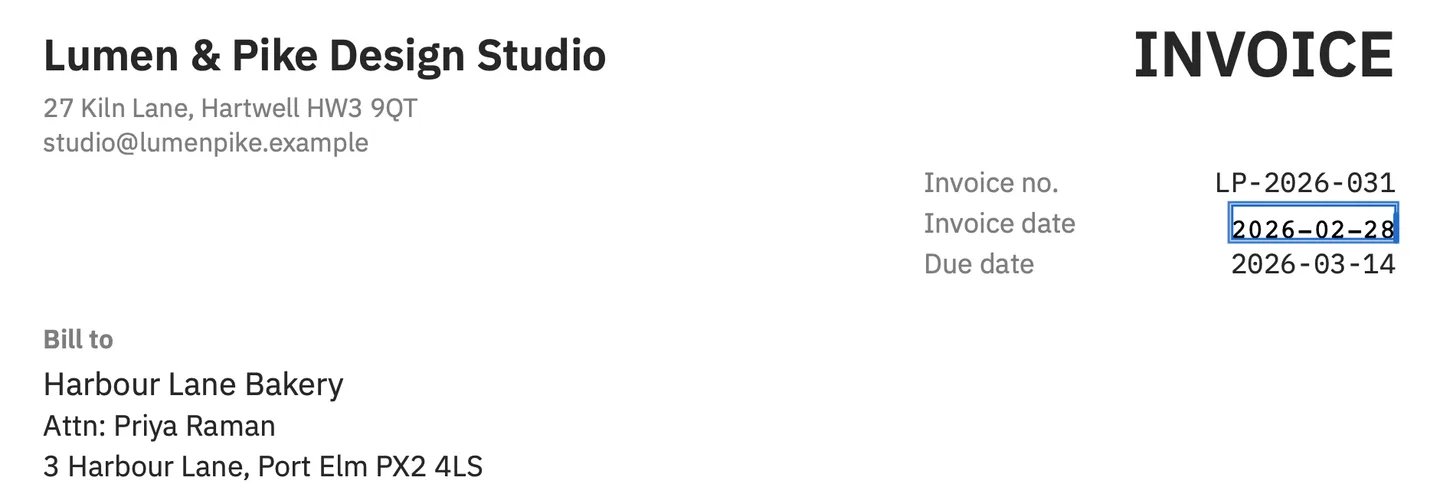
PDF Textfix does that one job. It runs on macOS 26 or later on Apple silicon. You find the line with ⌘F or the Lines pane (⌥⌘L), double-click it, type the correction and press Return, then save; the guide to editing text in a PDF on a Mac has every step. In the screenshot above, the demo invoice’s date is corrected this way in its own monospaced font. Before applying an edit, the app checks that every other character on the page stays where it was, and refuses the edit with the reason when a check fails. When the embedded font lacks a character you type, it borrows one in a fixed order and marks it in orange. Save writes the file again, and the words you replaced are gone from the page instead of covered. Everything you did not edit is copied as it was, unless the file was damaged; the app tells you when it repaired one.
It does not fill forms, add text boxes, draw, sign, or edit scanned pages, so it sits next to your browser rather than replacing it. It is a one-time purchase, with no subscription. The free PDF editors for Mac page compares the free options, and the pricing page lists the one-time price.
Questions people ask
Can Firefox edit the text of a PDF?
It can add new text, drawings, highlights, comments, images and signatures, and fill forms. Mozilla’s article describes no tool that changes the text a page already has.
Can I remove text from a PDF in Firefox?
Not the page’s own text. You can delete annotations you added, and delete whole pages with the page tools. Covering text with something on top leaves the words in the file.
How do I add text to a PDF in Chrome?
Open the PDF in Chrome, select Add text, choose a font, style and color in the sidebar, and click where the text should go. Then download it with your changes.
Is Skim a PDF editor?
Skim describes itself as a PDF reader and note-taker. It adds notes and highlights and keeps them separate from the PDF unless you export a copy with the notes embedded.
