
When you import a PDF into Canva, your CV’s fonts may change. Canva’s help page on importing PDFs says it directly: “Unsupported fonts may be replaced with similar fonts.” If a font changed, the page explains that “The original font isn’t supported in Canva and was replaced with a similar font,” and the fix it gives is to select the text and pick a different font. Layouts can move too; Canva says some “may shift slightly after import”. For redesigning a CV, that is a fair trade, because you are going to change the look anyway. For correcting one line of a finished CV, the substitution is the problem, and an editor that writes with the font inside the PDF avoids it.
What happens when you import a PDF into Canva?
Canva turns the PDF into a Canva design. In its words, “You can import a PDF to Canva to update text, replace images, adjust layouts, or convert it into a new design format.” You upload the file from the home page or the editor, and it opens in the Canva editor. Text and images may become separate elements you can select, move and restyle. Canva says it keeps the document as close as possible to the original while making supported content editable, and the important word there is supported.
Once imported, a text box behaves like any Canva text. You select it and use the editor toolbar to change the font, size, spacing or alignment. When you are done, you choose Share, then Download, and pick a file type: PDF Standard or PDF Print, PNG or JPG. The download is a new file made from the design.
Why do the fonts change after a Canva import?
Canva’s own answer is that the original font isn’t supported in Canva. A CV exported from a word processor or a design app often carries its fonts inside the PDF, sometimes as a subset holding just the characters the CV uses. The help page does not list which fonts Canva supports. Where a font is not supported, a similar one takes its place, and the letters come out with a different shape, width or spacing. On a CV, where the name and the headings were set with care, that difference tends to show.
You can bring your own font, with conditions. Canva’s help on brand fonts lists who can upload fonts: Canva Pro, Teams, Business, Education and Nonprofits. It adds that “Your fonts should be licensed for embedding. Otherwise, they may not upload.” So to keep the original look you need a plan that allows uploads, the font file itself, and a licence that lets you use it that way.
The guide on why editing a PDF changes the font goes through the same problem in other editors; it is not specific to Canva.
How can you see which fonts your CV embeds?
Before importing, it helps to know what the CV carries. Whether Canva keeps a font depends on whether it supports that font, and the help page does not publish the list, so it is worth knowing the CV’s font names before the import and checking them after it.
On a Mac, pdffonts, a free command-line tool from the Poppler project, lists every font of a PDF with two columns that matter here: emb, whether the font is embedded, and sub, whether it is a subset. Run on the demo CV on October 12, 2026, it listed two fonts, AAAAAB+IBMPlexSans-SmBld and AAAAAC+IBMPlexSans, both embedded subsets. The six capital letters and the plus sign in front of each name mark a subset, a copy that holds only the characters the CV uses. IBM Plex is not one of the fonts macOS installs.
That tells you two things. A design tool that does not support IBM Plex may set the text in something similar, as Canva’s help warns. And an editor that types new characters needs those characters in the subset, or a fallback for the ones that are missing. The guide to finding the fonts in a PDF covers the other ways to see the list and what each column means. In PDF Textfix, the editor bar names the font of the line you edit and says whether the file embeds it.
Will my CV’s layout survive the import?
Mostly, and Canva tells you where it may not. Besides the font note, the help page says “Some layouts may shift slightly after import and may need minor adjustments.” Two-column CVs, skill bars, icons next to contact details and tight line spacing are the parts worth checking after an import. A scanned CV does not become editable at all: Canva says “Scanned PDFS are imported as a single flattened image, so their text and design elements can’t be edited.”
Canva also gives limits for imports: up to 500 pages, up to 300 MB, and up to 1,400 elements and images per PDF. A CV is far below all three.
When is Canva the right tool?
When you want a different document. Canva is a design tool, and an imported PDF is a starting point for a new design: a new layout, new colors, a photo, a different template, a version for a job portal that wants another format. Canva can also download the design as a PNG or JPG when a site asks for an image instead of a PDF. If the CV was made in Canva in the first place, open the original design there and change it; that keeps the fonts you chose, and you download a fresh PDF.
PDF Textfix does none of this. It does not add text boxes, change fonts or sizes, move text from one line to the next, or edit images.
When is a correction the better job?
When the CV is finished and something in it is wrong: a phone number that changed, a date, a misspelled company name, a typo in the summary. Here the goal is the same file with different characters in one line. Importing the whole CV into a design tool to change those characters means checking every font and every column again afterward.
PDF Textfix edits the PDF itself, on a Mac: you double-click the line, type the correction, press Return and save. The CV use case walks through it on the demo CV, and the guide to editing text in a PDF on a Mac has every step.
How does PDF Textfix keep the CV’s font?
It writes the new characters with the font the PDF embeds for that line, installed on your Mac or not. The editor bar shows it while you type, such as “Font: Helvetica (embedded subset), 11 pt”. When you type a character the embedded subset does not contain, the app looks for it in a fixed order: a character already in the same font, another copy of the same face in the document, the same font installed on your Mac, then the closest standard font. While you type, a line in some embedded fonts is drawn in the closest installed font; once you apply the edit, the page shows the line in its own font.
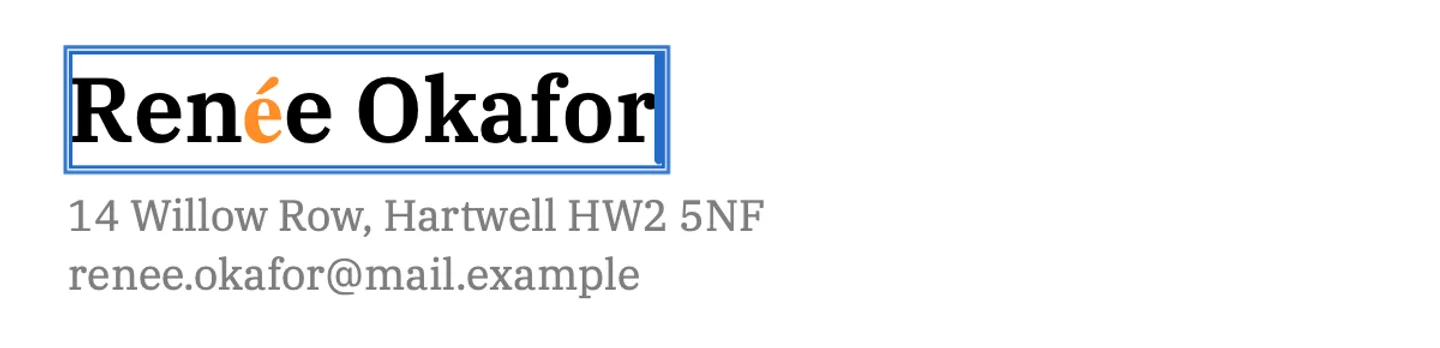
You see every borrowed character before you apply the edit. In the screenshot above, the writer’s name in the heading of the demo cover letter becomes “Renée Okafor”; the cover letter’s embedded font has every letter but the “é”, which comes from a fallback font and is shown in orange. A character no font can draw is red, with the reason. The Issues pane (⌥⌘I) lists the fallback fonts your edits used, which helps on a long document.
Before applying an edit, PDF Textfix checks that every other character on the page stays where it was. The rest of the line moves only when the new text would run into it, and the bar says so; Keep Following Text in Place puts it back. If a check fails, the edit is refused with the reason, and the file stays as it was. Save writes the whole file again without the replaced text on the page; everything you did not edit is copied as it was, unless the file was damaged, and the app tells you when it repaired one.
PDF Textfix is a one-time purchase; the pricing page lists the price for each region. For the other common route, converting the CV to a text document, see editing a PDF in Google Docs.
Questions people ask
Can Canva edit the text of a PDF?
Yes, after an import. Text becomes editable elements in a Canva design, and you change it with the editor toolbar. Canva notes that unsupported fonts may be replaced with similar ones.
Why does Canva change my fonts?
Canva’s help says the original font is not supported in Canva and was replaced with a similar font. You can pick another font, or upload your own on a plan that allows font uploads.
Can Canva edit a scanned PDF?
No. Canva says scanned PDFs import as a single flattened image whose text can’t be edited. PDF Textfix does not edit scanned pages either.
Does PDF Textfix let me change the font of my CV?
No. It keeps the line’s font and size. To change fonts or the layout, use a design tool or the CV’s original file.
