
On a Mac, three tools identify the fonts a PDF uses. Acrobat lists them under File > Document Properties > Fonts. The free pdffonts command from the Poppler project prints every font with its type and whether it is embedded. And when you are about to change a line, PDF Textfix names that line’s font in the bar under the pages. Apple’s guide to Preview lists no font view. A font name in a PDF is a label inside the document rather than a font you can download. pdffonts prints it exactly as the file stores it, where a prefix of six capital letters and a plus sign, such as AAAAAC+, marks a subset that holds only the characters the document needed. PDF Textfix shows the name without that prefix and says that the font is an embedded subset.
Does Preview show which fonts a PDF uses?
Not according to Apple. Its guide to Preview’s Inspector, the window behind the info button in the toolbar, says: “You can view information about a document or image, such as file size, the author name, and the image resolution, in the Inspector window.” It lists the Inspector’s tools for general information, keywords, encryption, cropping and annotations. None of them is described as a font list, and the guide for macOS Tahoe does not mention fonts at all. For fonts, use one of the tools below.
How do I see a PDF’s fonts in Acrobat?
Adobe’s help gives the menu path: “Select Menu > Document Properties > Fonts (Windows) or File > Document Properties > Fonts (macOS).” Then “Select the Fonts tab and check the list of fonts used in the document.”
How do I list a PDF’s fonts in Terminal?
Install Poppler with Homebrew, then run pdffonts on the file. It reads the PDF on your Mac and uploads nothing.
brew install poppler
pdffonts "Demo Cover Letter.pdf"
On the demo cover letter, one of the six demo documents of PDF Textfix, pdffonts 26.08.0 printed this on October 13, 2026:
name                                 type              encoding         emb sub uni object ID
------------------------------------ ----------------- ---------------- --- --- --- ---------
AAAAAB+IBMPlexSerif-SemiBold         TrueType          MacRoman         yes yes no       8  0
AAAAAC+IBMPlexSerif-Regular          TrueType          MacRoman         yes yes no       9  0
What do the pdffonts columns mean?
The Poppler manual defines each column. Read them left to right:
- name is “the font name, exactly as given in the PDF file (potentially including a subset prefix)”. The PDF standard says a subset’s name starts with a tag of six capital letters and a plus sign, and that “the choice of letters is arbitrary”. So
AAAAAC+IBMPlexSerif-Regularis a subset of IBM Plex Serif Regular. The letters identify nothing beyond that. - type is the kind of font program: TrueType, Type 1, Type 1C (the compact format also called CFF), Type 3, or one of the CID types, which are 16-bit fonts made for large character sets. A CID font usually pairs with the encoding
Identity-H. A Type 3 font draws each letter with ordinary drawing instructions instead of a font program, which matters if you want to edit the text. - encoding maps the codes in the page to letters.
MacRomanandWinAnsiare the classic one-byte tables;Identity-Hpasses 16-bit codes straight to a CID font. - emb says whether the font program is inside the file. A “no” here means each viewer draws that text with a font of its own choosing, which is why a font that is not embedded can look different on another Mac.
- sub says whether only part of the font was embedded. The embedded subset font entry explains why almost every PDF does this.
- uni says whether the font has a ToUnicode map, the table that turns codes back into characters for search and copy. Poppler adds that a missing map does not necessarily mean the text cannot be converted.
- object ID is the font’s object number inside the file.
The demo cover letter shows the usual case: one subset per weight, each with its own prefix. Both say “no” under uni, yet Poppler’s pdftotext reads the letter’s text correctly, because the Mac Roman encoding already tells a reader which letter each code stands for. Real files can also list one weight twice, under two prefixes: the maker split the typeface into two subsets, often with different encodings, such as one for the Mac Roman letters and one for letters outside that table.
What does PDF Textfix show about a line’s font?
PDF Textfix answers the question for the line you are changing. Select a line, press Return, and the bar under the pages names the line’s font, says whether it is embedded and whether it is a subset, and gives its size. On the demo invoice it reads “Font: IBMPlexMono (embedded subset), 9.5 pt”. The name is shown without the six-letter prefix.

The Issues pane (View > Issues, ⌥⌘I) adds what matters for an edit across the pages you have viewed: fonts the file does not embed, fonts whose licence limits edits, and lines whose edit used a fallback font, with the fallback named.
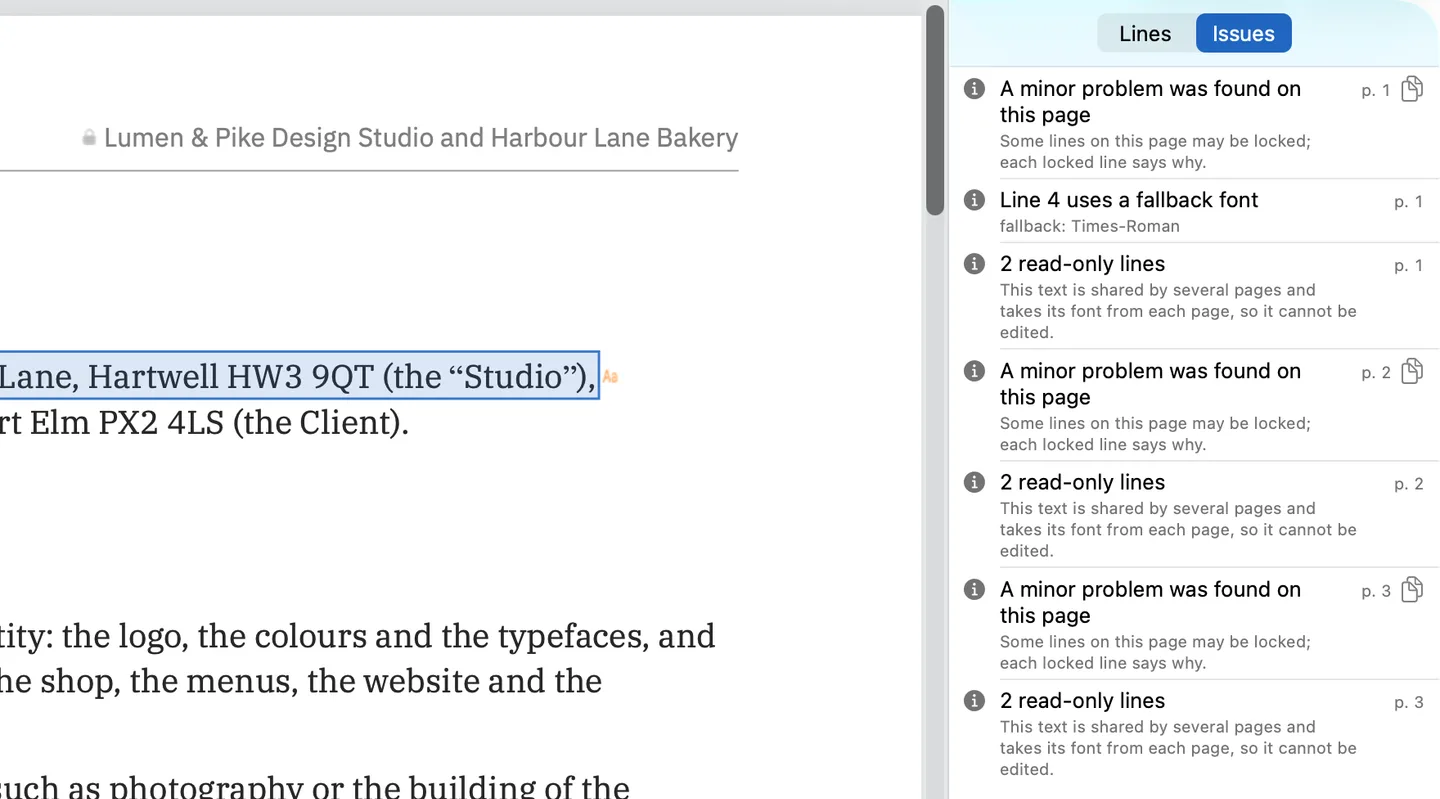
It is not a full inventory like pdffonts; it shows what affects your edit.
How do I identify the font of one piece of text?
pdffonts and Acrobat’s Fonts tab list every font in the file, but not which line uses which. To identify the font of one line, open the PDF in PDF Textfix, select the line and press Return: the bar under the pages names that line’s font, as in the screenshot above, with its size and whether it is embedded. Press Escape to close the editor without changing anything.
If you cannot select the text at all, the page may hold a picture of text, such as a scan, and then the file stores no font name for it. Image-based font finders guess from the letter shapes, which helps only in that case, and what they return is a lookalike, not a name stored in the file. For any PDF that holds real text, the name is already inside it, and the tools on this page read it on your Mac without uploading anything.
Can I download the font a PDF uses?
Not from the PDF. A subset holds only the characters the document used, so it would lack most of the alphabet, and the font’s licence decides where it may be used. Treat the name as a search term: the family name after the plus sign, such as IBM Plex Serif, tells you what to look for in Font Book (to see whether it is installed) or at the foundry that publishes it.
You may not need it at all. PDF Textfix types with the font embedded in the document, so a font that is only in the file still works for the characters it holds; editing a PDF in the same font shows what happens when you type one it lacks. The guide to PDF fonts covers the background.
Questions
How can I tell if a font is embedded in a PDF?
Run pdffonts and read the “emb” column, or open the Fonts tab of Acrobat’s Document Properties. “yes” means the font program travels inside the file.
What does the plus sign in a PDF font name mean?
It ends a subset tag. The six capital letters before it are arbitrary; they only keep different subsets in the same file apart. The real font name follows the plus sign.
Why does the same font appear twice in the list?
The file holds two subsets of one typeface, often with different encodings, such as one for the Mac Roman letters and one for the rest. Each subset has its own object and its own prefix. Two weights, such as the SemiBold and the Regular of the demo cover letter, are two fonts, not one font twice.
Does the font have to be installed on my Mac before I edit the text?
Not with PDF Textfix: it writes with the font embedded in the document and marks any character it had to draw with another font.
