
To change a number, a phone number or an address in your own PDF on a Mac, open the file in PDF Textfix, find the line with Find (⌘F), double-click it, type the new figures and press Return. Digits are usually stored in the same font as the letters around them, so they come out in the document’s own typeface. Three things need care: symbols such as € that the font may lack, addresses that run over several lines, and totals, which no PDF recalculates for you.
This covers your own documents: your letterhead, your price list, an invoice you issued and need to correct before you send it. Bank statements, receipts and documents other people issued are not yours to change.
Step 1: Which line holds the number?
Choose Edit > Find > Find Line… (⌘F) and type the figure as it is printed, with its spaces, commas and dots: “1,850.00” will not match “1850”. Find searches the lines of the whole document; ⌘G and ⇧⌘G step through the matches.
Contact details often share a line. In the demo CV, a synthetic document, the email address, the phone number and the town sit on one line: theodora.lind@mail.example · +44 20 7946 0958 · Hartwell. Changing the phone number edits that whole line, and the town after it has to move if the new number is longer (Step 4).
Step 2: Will the new digits match the font?
Usually, yes. A PDF often embeds only a subset of each font, the characters the document used, and a document full of figures uses most of the ten digits. The demo invoice sets its figures in IBM Plex Mono, embedded as a subset, and when its impossible date 2026-02-30 is corrected to 2026-02-28, the new digits are drawn in that font.
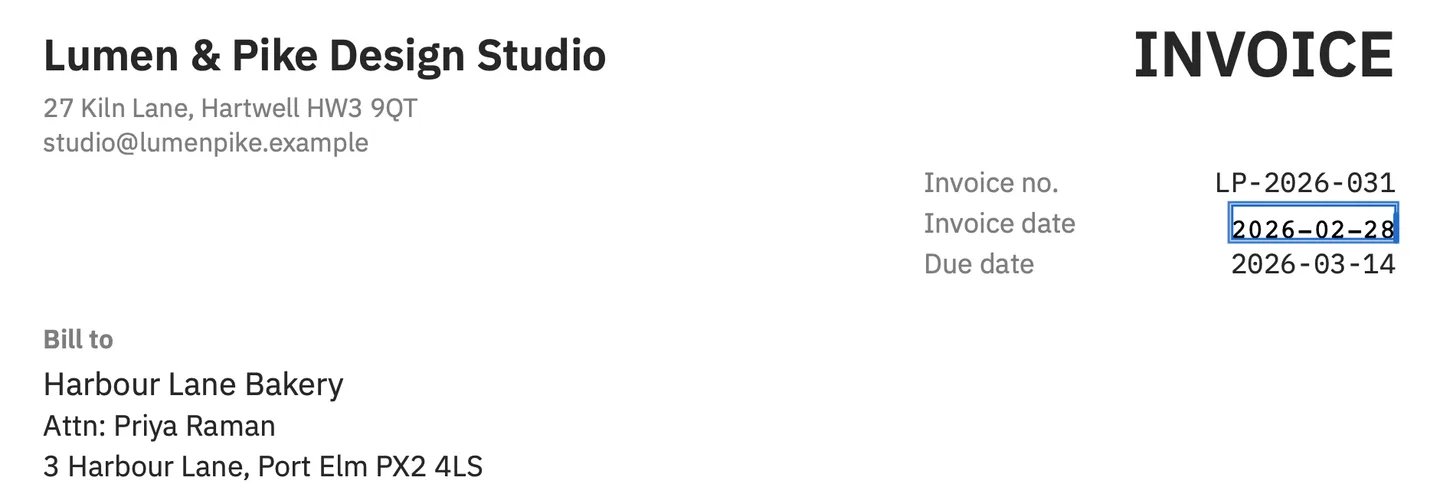

A digit the document never used can be missing from its subset. PDF Textfix then looks for it in another copy of the same font in the file, the same font installed on your Mac, and the closest standard font, and tints it orange while you edit, so you can see which character came from elsewhere.
Step 3: What about €, £ and other symbols?
Symbols go missing more often than digits, because a document uses fewer of them. The euro sign is a known case. The PDF standard records that Apple’s later use of code 333 for the euro “has not been reflected in PDF’s MacRomanEncoding, which shall continue to map code 333 to currency.” The demo invoice, priced in pounds, uses fonts with that encoding, and a € typed into it comes from a fallback font, marked in orange.
Zoom in after typing a currency sign, a fraction or a trademark sign and compare it with the figures beside it. If no font can draw it, the character turns red and the edit cannot be applied with it.
Step 4: What if the new number is longer or shorter?
By default, the text after the number on the same line stays where it is. When a longer number would run into it, PDF Textfix moves that text along by the difference on its own and shows a Keep Following Text in Place button, which puts it back. The Shift Rest of Line checkbox in the bar (⌃⌘R) turns the move on or off by hand.
Watch right-aligned columns. An edit keeps the start of the number where it was, so a figure that gains a digit grows to the right and no longer lines up with the figures above it. In a monospaced font, a number with the same count of digits keeps its width exactly. When 9 becomes 10 next to another column, one of two things happens:
- If the wider figure would read as part of the text after it, the edit is refused and the file stays as it was: “The edited text runs into the text after it on this line, such as the next column, and would read as part of it.” When that text belongs to another line, moving the rest of the line cannot make room, and the bar says so.
- If it only comes close to or touches other text, the bar warns: “The edited text comes very close to, or runs into, the text after it or the edge of the page.” Zoom in, then press Return again to apply it, or shorten the edit.
Step 5: How do I change an address that spans several lines?
One line at a time. Each line of an address is a separate line of the PDF, and each keeps its position: a new street goes on the street’s line, a new ZIP or postal code on the line that holds it. PDF Textfix does not move text from one line to the next and does not reflow, so an address that needs an extra line cannot get one, because it does not add text either. Can PDF Textfix rewrite a paragraph or reflow text? explains why.
When the new address has fewer lines, empty the line you no longer need: select its text in the editor, delete it and press Return. Its text is removed from the page, and the lines below stay where they are, so a gap remains.
Step 6: What about an email address or a website that is a link?
The visible text and the link are two different things. When a link covers the line, the bar says: “A link or a note covers this line; it stays where it is, and a link still opens the address it opened before.” After you correct an email address, the text shows the new one, but clicking it can still open a message to the old one. Fix or remove the link in an app that edits links, or tell the reader to type the address.
Step 7: Do totals update when I change a figure?
No. A PDF stores the printed result, not the arithmetic. On the demo invoice, the four amounts add up to the subtotal of 3,340.00, VAT at 20 percent is 668.00, and the total due is 4,008.00. Change one quantity and you have four more lines to correct: the amount, the subtotal, the VAT and the total. Work the figures out first, then edit each line, then read the page again from the top.
Step 8: How do I save and check?
Press ⌘S; the bar says “Saved and verified.” Save As (⇧⌘S) keeps the original next to the corrected file. The old figure can still appear outside the page: in the file name, in the document’s properties, in a bookmark, or in the address of a link. The invoice use case walks through a whole invoice correction, and how to change a date in your own PDF covers dates, which follow the same steps.
Free to try. Your first 5 line edits save clean. After that, saved files carry a watermark until you buy once.
Questions about changing numbers in a PDF
Can I change the page numbers of a PDF?
Page numbers printed on the page are lines like any other, so each page’s number is one edit. The page labels a viewer shows next to its thumbnails are stored elsewhere in the file and are not text on the page.
Can I edit numbers in a PDF for free?
Not with Preview, which comes with every Mac: it can add text on top of the page, but it cannot change the figures already there. Can you edit PDF text in Preview? shows what it does instead. PDF Textfix changes them in place, and you can try it before you pay: Step 8 says what the free version saves, and the pricing page has the price.
Can I change the numbers in a scanned document?
No. A scanned page is a picture of the figures, not text, and the Lines pane says “This page is a scanned image”.
Does the file keep the old number anywhere?
Not on the page. Save writes the file again without the line you replaced and keeps no earlier version of it. Copies outside the page, such as bookmarks and the document’s properties, stay as they were.
