
If you issued the invoice and the PDF has a wrong date, number or address, you can correct that line in the PDF itself: open it in PDF Textfix, find the line, type the correction and save. The new characters come out in the invoice’s own font, and everything you do not edit is copied as it was, unless the file was damaged; PDF Textfix tells you when it repaired one. Two things are yours to do: recompute any total the change touches, and check whether your accounting rules want a corrected copy or a separate correction document. This page is about invoices you issued. An invoice, a receipt or a statement that someone else issued is theirs to correct, not yours.
Which invoice mistakes can you fix in the PDF?
Each one is a line on the page, so each one is a line edit:
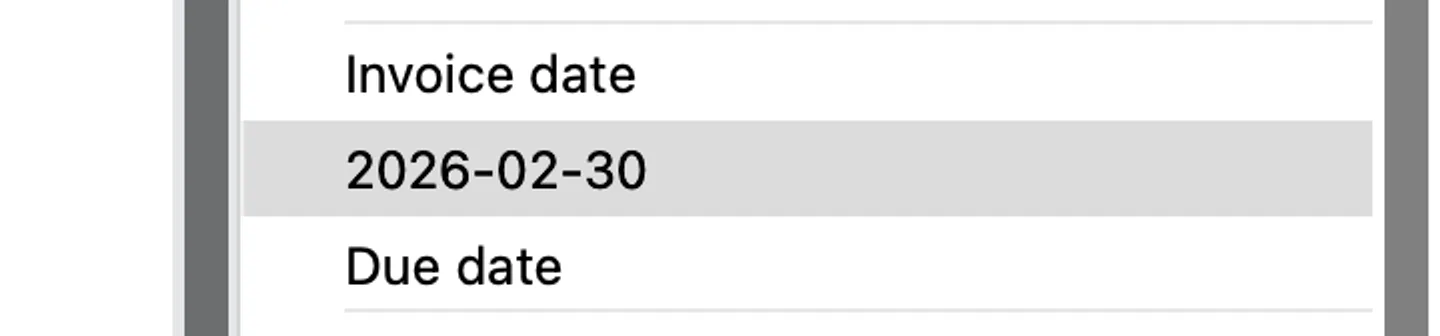
- The date. The demo invoice made for PDF Textfix is dated
2026-02-30, a day that does not exist. - The invoice number, when a typo broke your own series. EU invoicing rules ask for “a sequential number, based on one or more series, which uniquely identifies the invoice”. A typo in it is a correction; a different number is a different invoice.
- The customer’s name or address, one line at a time.
- A line item: a description, a quantity, a rate, and every figure that follows from them.
What you cannot do in the PDF is add a line item that was left out. PDF Textfix changes text that is already on the page and adds none, so a missing item means a new invoice from your invoicing app.
How do you change the date on an invoice PDF?
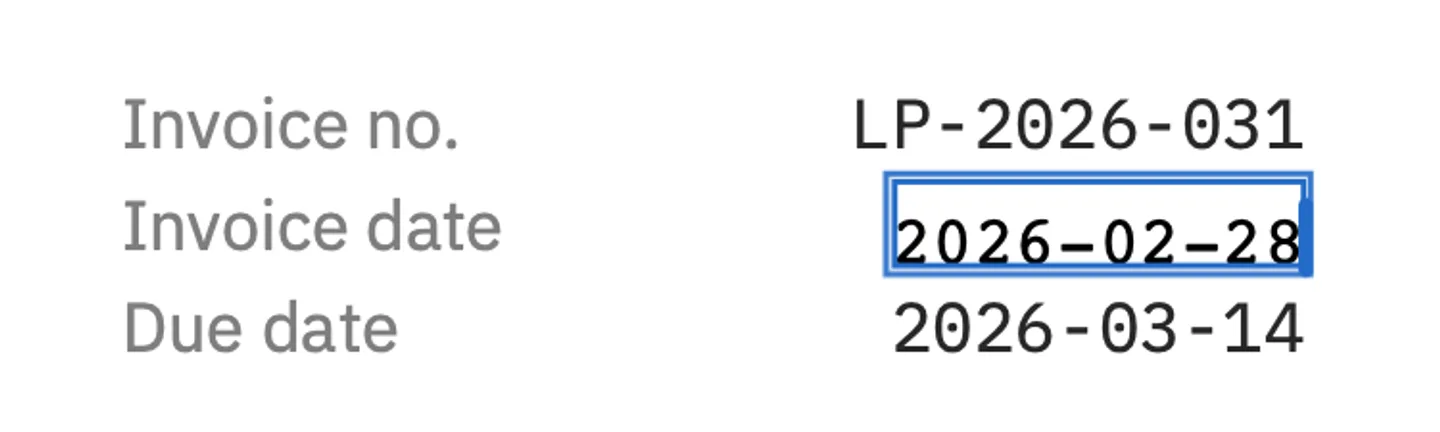
Find the date with Edit > Find > Find Line… (⌘F), press Return to open the editor over it, type the correct date, press Return to apply it and ⌘S to save. On the demo invoice, 2026-02-30 becomes 2026-02-28 in the invoice’s own monospaced figures. How to change a date in your own PDF walks through that fix step by step, with screenshots, and covers dates written in words.
Do the totals update when you change a figure?
No. A PDF stores the printed result, not the sums behind it. The demo invoice adds up like this: 1,850.00, 840.00, 380.00 and 270.00 make a subtotal of 3,340.00, VAT at 20 percent is 668.00, and the total due is 4,008.00. Suppose the shopfront signage was two pieces of artwork, not one. Five lines change, and the rate stays as it was:
| Line on the demo invoice | Before | After |
|---|---|---|
| Shopfront signage artwork: quantity | 1 | 2 |
| Shopfront signage artwork: amount | 380.00 | 760.00 |
| Subtotal | 3,340.00 | 3,720.00 |
| VAT 20% | 668.00 | 744.00 |
| Total due (GBP) | 4,008.00 | 4,464.00 |
Work the new figures out on paper or in a spreadsheet first, then edit each line, then read the page from the top.
On the demo, the columns stay straight through all five edits, for a reason worth knowing. The figures are set in IBM Plex Mono, where every character has the same width, and each new figure has as many characters as the old one, so each still ends at the right edge of its column. An edit keeps the start of the line where it was, so a figure that gains a digit, such as 980.00 becoming 1,960.00, grows to the right, past the edge of the column. How to change numbers in a PDF covers longer figures, currency signs and right-aligned columns in detail.
Where else does the invoice number appear?
Usually in more than one place, and each is a line of its own. On the demo invoice, LP-2026-031 sits in the header beside “Invoice no.” and again in the payment line, “Please quote LP-2026-031 with your payment.” Correct one and leave the other, and a customer who copies the payment line quotes the wrong number. Find (⌘F) finds the old number on every page, and ⌘G moves to the next match. The number can also sit outside the page, in the document’s properties and in the file name; the last section below covers those.
How do you correct the customer’s address?
Line by line, within the lines the invoice already has. The demo invoice bills three lines, each set in IBM Plex Sans:
Harbour Lane Bakery
Attn: Priya Raman
3 Harbour Lane, Port Elm PX2 4LS
If the bakery has moved, the third line is one edit: the new street and postcode replace the old ones on that line, which starts where it did. A new contact is an edit of the second line. These lines have nothing after them, so a longer address simply runs further to the right. What does not work is an address that needs a fourth line, because an edit never adds one: fit it to three lines, as you would on a label, or reissue the invoice from your invoicing app.
Should you send a corrected PDF or a credit note?
That depends on where you are and on whether the invoice has been recorded. In the European Union, invoicing follows, as a general rule (Article 219a(1) of the VAT Directive; paragraph 2 sets exceptions), “the rules applying in the Member State in which the supply of goods or services is deemed to be made”, and “Any document or message that amends and refers specifically and unambiguously to the initial invoice shall be treated as an invoice.” Other countries have their own rules, and we do not give accounting advice.
Two facts usually decide it: whether the invoice has been recorded, by you or by the customer, and whether the correction changes what is owed. Both are questions for your accountant and your local rules, not for a PDF editor. When the answer is a credit note, issue it from your accounting software, where the record lives. Is it legal to edit a PDF? gives the general picture of your own documents and other people’s.
What if the invoice is signed or an e-invoice?
Then do not edit the PDF; reissue it. A digitally signed invoice stops verifying once it is saved with any change, and PDF Textfix asks before your first edit and says so. An e-invoice is, in the words of the EU directive, an invoice “issued, transmitted and received in a structured electronic format which allows for its automatic and electronic processing”: the structured file is the invoice and the PDF is at most a picture of it, so correcting the PDF corrects nothing that counts.
How do you send the corrected copy?
Use File > Save As… (⇧⌘S) to keep the original beside the corrected file, and give the new file a name that says what it is. Tell the customer what changed in your email; a corrected invoice that arrives without a word looks like a mistake of its own. Before you send it, check what lies outside the page: the document’s properties can still hold the old details. The demo invoice’s title property reads Invoice LP-2026-031, and Save leaves properties, bookmarks and link addresses as they were. What saving does to your PDF lists everything Save writes and keeps.
More document kinds are on the use cases page, starting with contracts.
Questions about correcting invoices
Can I change an invoice I made in QuickBooks, Xero or another invoicing app?
Correct it in that app and export the PDF again. The app holds the record your books and reports use; a PDF changed outside it no longer matches that record.
Can I change the currency sign?
You can type one, but a sign the invoice’s font lacks is drawn by a fallback font and tinted orange while you edit. The euro sign is a known case on fonts with the Mac Roman encoding. Zoom in before you save.
Can I correct a scanned invoice?
No. A scan is a picture of text, and the Lines pane says “This page is a scanned image”.
How many line edits does an invoice correction use?
One for each line you change. Correcting the date is one line edit; the signage correction above changes five lines, so it is five. Free to try. Your first 5 line edits save clean. After that, saved files carry a watermark until you buy once.
