
Yes, you can fix a typo in a contract PDF, as long as the draft is yours and nobody has signed it yet: open it in PDF Textfix, correct the line and save. Everything you do not edit is copied as it was, unless the file was damaged; PDF Textfix tells you when it repaired one. After signing, the answer changes. Any change to the file breaks its digital signatures, and any change to the words is a change to the agreement, so a corrected signed contract is a new version that both parties sign again. PDF Textfix asks before the first edit of a signed file and says what saving will do.
Can you fix a typo in your own draft contract?
Yes, one line at a time. The demo service agreement made for PDF Textfix runs to three pages of clauses in IBM Plex Serif. To correct a line:
- Choose Edit > Find > Find Line… (⌘F) and type a few words of the line, or walk the lines with Tab.
- Press Return or double-click. The editor opens over the line in its own font.
- Type the correction and press Return. Tab applies it and moves to the next line, which is quick when a name is misspelled in several clauses.
- Press ⌘S and read the bar: “Saved and verified.”
In the demo, the parties’ definitions read (the Studio) and (the Client). Typing quotation marks around “Studio” shows something worth knowing: the contract embeds only the characters it used, and the curly quotation marks are not among them. PDF Textfix draws them with a fallback font, tints them orange while you edit, and names the font in the Issues pane. You decide before saving whether that is acceptable.
Why are some lines of the contract locked?
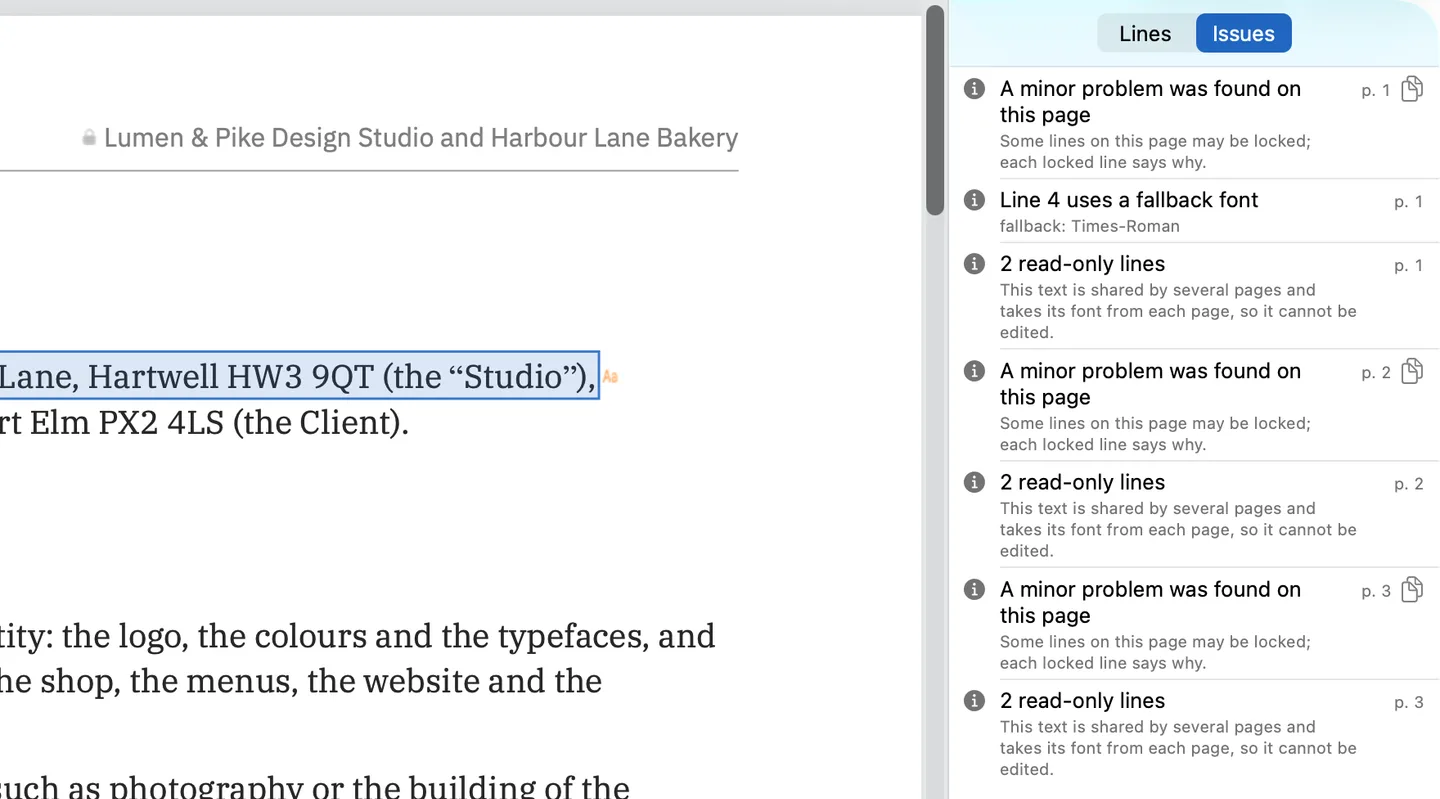
Every page of the demo contract draws its running header, “Service Agreement LP-SA-2026-07” and the parties’ names, from one shared piece of content. That content carries no font of its own and takes one from each page that draws it, so PDF Textfix locks its lines and gives the reason: “This text is shared by several pages and takes its font from each page, so it cannot be edited.” The Issues pane (⌥⌘I) lists them page by page, as the screenshot shows, while the clauses stay editable.
Other locks you may meet in contracts: text in a form field, such as a date someone typed into a field, and pages that are scans. When the header itself is wrong, correct it in the document the contract came from and export it again. A header shared by pages that carries fonts of its own is different: it can be edited, every page changes with it, and the bar says how many places changed.
What happens if you edit a contract after it was signed?
The signatures stop verifying. A PDF signature covers a digest of the bytes; the PDF standard says the range “should be the entire file, including the signature dictionary but excluding the signature value itself”, and “A signature shall be validated by recomputing the digest and comparing it with the one stored in the signature.” Save in PDF Textfix writes the whole file again, so no earlier digest matches it afterwards.
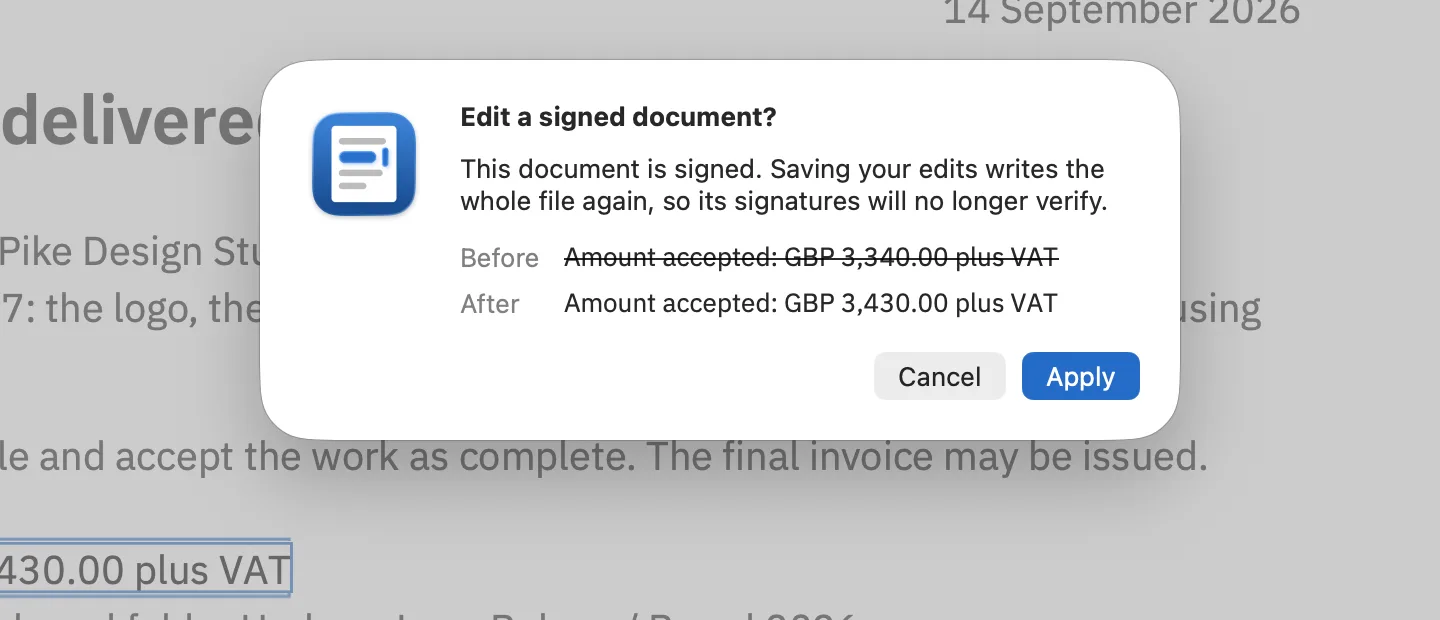
PDF Textfix says this twice. A banner above the pages of a signed file reads: “This file is signed: saving an edit rewrites it, so its signatures will no longer verify. You will be asked to confirm before the first edit.” When you apply the first edit, a sheet asks “Edit a signed document?” and shows the line before and after in the document’s font. Apply goes ahead; Cancel leaves the editor open with your text.
A certified document that allows no changes is stricter: its text stays locked until you choose Allow Editing… in the banner and confirm. How to edit a signed PDF covers both cases in detail.
Is a contract still valid after you change it?
Treat a changed contract as a new contract. The demo agreement says so itself in clause 10: “Any change to this agreement is made in writing and accepted by both parties.” Many real contracts carry a similar clause. So after signing, the honest route is to correct the text, send the new version with a note of what changed, and have both parties sign again. Never pass off an edited copy as the one that was signed. Is it legal to edit a PDF? goes further; it is general information, not legal advice for your contract.
The same goes for a contract the other party drafted. You can read it, comment on it and send back your proposed changes; the text of their document is theirs to change.
What will PDF Textfix not do to a contract?
It edits text that is already on the page, one line at a time. It does not:
- add a clause or a sentence that needs a new line;
- reflow a paragraph, so a longer word does not push text onto the next line;
- change a font or a size;
- fill in form fields, such as a signature date typed into a field.
When an edit would run into the words after it on the same line, PDF Textfix moves them along to make room and says so; Keep Following Text in Place puts them back. Apart from those words, it checks before applying an edit that every other character on the page stays where it was. When moving cannot make room, for example when the next text belongs to another line, it refuses the edit, says why and leaves the file as it was. A clause that needs rewriting needs the source document.
Questions about correcting contracts
Can I change the date on a contract that has been signed?
Not as the signed contract. A new date is a new version: agree it with the other party and sign again.
Will the other party see that the PDF was changed after signing?
Yes, if they check the signature: it no longer verifies once the file is saved with an edit.
Is the original contract kept when I save?
Save writes over the file you opened. Use File > Save As… (⇧⌘S) to write the corrected draft under a new name and keep the original untouched.
For a single wrong word in any document, How to fix a typo in a PDF is the shorter read. Every document kind is on the use cases page, and certified PDF and digital signature explain the terms.
