
In the standard’s words, the objects in a content stream “shall be interpreted and acted upon sequentially”, unlike the rest of the file, which a reader can jump around in. Each page has one or more, and producers usually compress them, so a PDF opened in a text editor looks like noise.
What does a content stream look like?
The demo invoice made for PDF Textfix’s screenshots has one page, object 4, which names its instructions in object 5. qpdf prints both; a stock Mac lacks it, and brew install qpdf adds it:
$ qpdf --show-object=4 "Demo Invoice.pdf"
<< /Contents 5 0 R /Parent 3 0 R /Resources 6 0 R /Type /Page >>
$ qpdf --show-object=5 "Demo Invoice.pdf"
Object is stream.  Dictionary:
<< /Filter /FlateDecode /Length 1300 >>
The file stores 1,300 compressed bytes; --filtered-stream-data opens them up to 3,446. The stream begins with the rules of the invoice’s table, then the studio’s name (shortened, line breaks added):
q Q q
0.75 w /Cs1 CS 0.3 SC 64 578 m 531 578 l S
0.4 w /Cs1 CS 0.8 SC 64 551 m 531 551 l S
…
/Cs2 cs 0.114 sc
BT 15 0 0 15 64 772 Tm /TT1 1 Tf [ (L) 6 (umen & Pik) 24 (e Design S) 4 (tudio) ] TJ ET
Read it as: save the graphics state; set a line width of 0.75 point and a dark gray; move to 64, 578 points from the bottom left, draw a line to 531, 578 and stroke it. Then a lighter rule, and later a near-black fill and the studio’s name at 15 points.
Which instructions can a content stream hold?
Annex A of the standard lists every operator. They fall into a few families:
| Family | Operators | What they do |
|---|---|---|
| Graphics state | q, Q, cm, w |
Save and restore the state, transform coordinates, set the line width |
| Color | CS, SC, cs, sc |
Choose the stroke and fill colors |
| Paths | m, l, re, S, f |
Build lines and rectangles, then stroke or fill them |
| Text | BT to ET |
A text object, with its own operators |
| Images and forms | Do |
Paint an image or a form by its name |
Nothing in the stream marks a paragraph, so viewers rebuild paragraphs by guessing from positions; how a PDF stores text explains why. PDF Textfix edits one line at a time and does not reflow paragraphs.
What does an edit change, and what does it leave?
When you change a line in PDF Textfix, the new stream differs from the old only in the instructions that draw that line. PDF Textfix checks this before applying the edit. If other parts of the stream would change, it refuses: “This edit would change other parts of the page, so it was not applied.” If a character it keeps would move, the refusal names that instead, as the text object entry shows. Save leaves the replaced stream out of the file, where an incremental update would keep it. Everything else is copied as it was, unless the file was damaged; PDF Textfix tells you when it repaired one.
Some streams are shared. Each page of the demo contract begins with q /Header Do Q: paint the form named Header, the running header. That form lists no fonts of its own:
$ qpdf --show-object=13 "Demo Contract.pdf"
Object is stream.  Dictionary:
<< /BBox [ 0 0 595 842 ] /Filter /FlateDecode /Length 215 /Subtype /Form /Type /XObject >>
Its text takes its font from each page that draws it, so PDF Textfix locks those lines and says why:
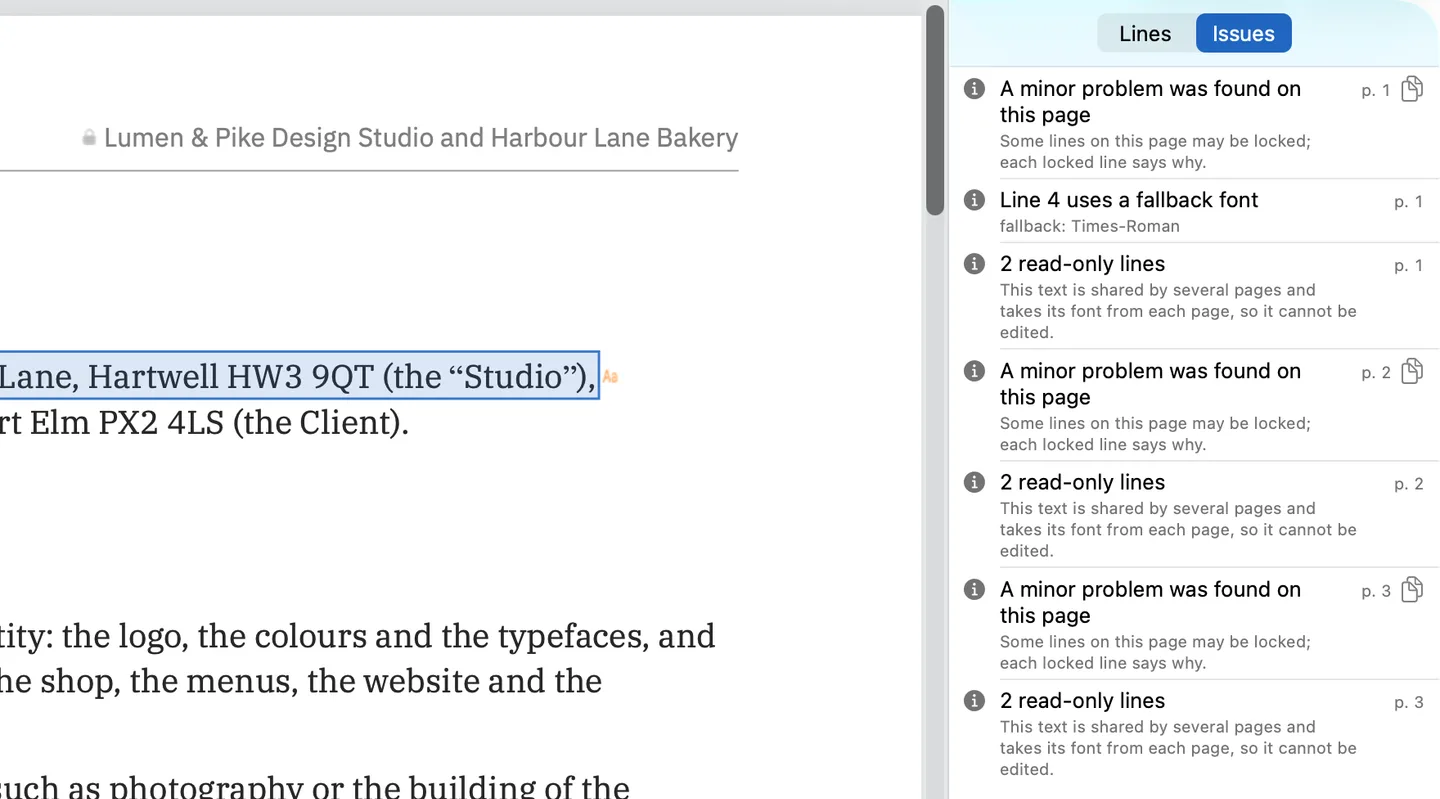
Shared text that carries its own fonts stays editable, and PDF Textfix says how many places an edit changes.
Where do you see content streams?
qpdf --show-pages lists each page’s streams, and qpdf --show-object=N --filtered-stream-data prints one decompressed; both work on any PDF. PDF Textfix shows what the stream draws: its Lines pane lists the lines, and its Issues pane names text drawn in several places.
Questions about content streams
Do content streams make a PDF large?
Rarely: the demo invoice’s 3,446 bytes of instructions are stored as 1,300. Images and full fonts weigh more, as the guide to large PDFs shows.
Can a page have more than one content stream?
Yes. A viewer reads them “as if all of the streams in the array were concatenated, in order”.
Is a form the same as a content stream?
A form is a content stream of its own, with a bounding box, that a page paints with Do, as the contract’s header shows.
Related terms
- Optional content groups: layers marked inside the stream.
- Tagged PDF: structure tied to parts of the stream.
- Type 3 font: glyphs drawn by streams of operators.